






 See Compatible Printers
 Read more about our ink!
Hewlett Packard
Compatible HP CM1415 (CE321A CE322A CE323A) Toner Cartridge 3 Color Set

Amazon Price:

- Page Yield:
- Colors:1,300 Each pages
- Availability:
- In Stock
- Shipping:
- Free Shipping
- Compatible Printers
- Color LaserJet CM1410fnw
- Color LaserJet CM1415fnw
- Color LaserJet CP1522n
- Color LaserJet CP1523n
- Color LaserJet CP1525nw
- Color LaserJet Pro CP1525nw
- LaserJet CM1410fnw
- LaserJet CM1415fnw
- LaserJet CP1525nw
- LaserJet Pro CP1525nw
- LaserJet Pro CM1410fnw
- LaserJet Pro Pro CP1525nwi>
- Color CM1415
- Color CM1415 MFP
- Color CM1415FN
- Color CM1415FNW
- Color CM1415FNW MFP
- Color CP1520
- Color CP1521N
- Color CP1522N
- Color CP1523N
- Color CP1525
- Color CP1525N
- Color CP1525NW
- Color CP1526NW
- Color CP1527NW
- Color CP1528NW
- Color PRO CM1410
- Color PRO CM1415
- Color PRO CM1415FN
- Color PRO CM1415FNW
- Color PRO CP1525
- Color PRO CP1525N
- Color PRO CP1525NW
- Specifications
- SKU:
- CLS-HP-CM1415-3Set-2
- Printer Brand:
- Hewlett Packard
- OEM Number:
- CE321A, CE323A, CE322A
- Ink Color:
- Cyan, Magenta, Yellow
- Page Yield:
- Colors:1,300 Each pages
- Printer Type:
- Laser Cartridge
- Condition:
- New Compatible
- Description
- Reviews

/> 

From the HP 128A Color LaserJet Series emerges a comprehensive lineup of printers designed to fulfill the diverse needs of professional color printing. Whether it's the CM1415, CP1520, or PRO CM1410 series, each model promises exceptional quality and performance. Notable models include the CM1415FNW, CP1525NW, and PRO CM1415FNW, renowned for their versatility and reliability. Compatible with these printers are the HP 128A toner cartridges, including the CE320A Black, CE321A Cyan, CE323A Magenta, and CE322A Yellow. These cartridges ensure vibrant colors and sharp text, delivering consistent results across various printing tasks. With the HP 128A cartridges, users can produce professional-quality documents, presentations, and marketing materials with ease. For multifunction printers like the CM1415 MFP and CM1415FNW MFP, as well as the PRO CM1415 series, these cartridges maintain efficiency across printing, scanning, copying, and faxing tasks. The PRO CP1525N and CP1525NW offer added convenience with their wireless connectivity options, making them suitable for modern office environments. In the realm of color laser printing, the HP 128A series stands out for its reliability and performance. With these printers and cartridges, users can achieve vibrant color reproduction and crisp, clear text, ensuring impactful and professional-looking documents. Whether it's business reports, brochures, or photographs, the HP 128A series delivers impressive results every time. Overall, the HP 128A Color LaserJet Series, coupled with the HP 128A toner cartridges, offers a comprehensive solution for businesses and individuals seeking high-quality color printing. With their advanced features, robust build, and consistent performance, these printers and cartridges are the ideal choice for all your printing needs.
Frequently Asked Questions
My greens have started printing blue. Will this set fix it?
Very likely, yes. When yellow fades, greens lose their yellow component and slide toward blue — the classic symptom of an exhausted CE322A. This set renews all three colors at once (CE321A cyan, CE322A yellow, CE323A magenta) for $61.62, so the balance comes back together instead of one fresh cartridge outshining two tired ones.
What is in the carton?
One cyan, one yellow and one magenta cartridge, each sealed in its own wrapping. No black cartridge is included — the set is purely the color side of the 128A family.
Should I run the calibration after fitting them?
It is worth doing. A calibration cycle from the CM1415's menu after a color change helps the machine re-balance its output, and a supplies status page printed afterwards confirms all three new levels at full.
What is the rated life of each cartridge?
1,300 pages apiece under standard test coverage. Photographs and full-color pages consume toner much faster than office documents with modest color, so heavy color users will see shorter runs.
Can I fit just the yellow and shelve the rest?
Yes — each color is an independent unit in its own slot. Replace the one that failed, keep the remaining two sealed, and fit them when their warnings arrive.
What if a cartridge prints badly out of the box?
It is protected by a 1-year warranty with 1-year free returns: a defective unit goes back at no cost to you inside that first year.
Two of the three colors may sit on my shelf for months. How should they be kept?
Sealed in their cartons, lying flat in a cool, dry place out of direct sunlight and away from radiators or other heat. Toner is a dry powder, so a sealed CE321A, CE322A or CE323A holds its full 1,300-page rating while it waits; heat and strong light are the only real enemies. Keep the cartons with their code labels facing outward so the color you need is the one you grab.
When I later reorder just one color, how do I avoid mixing up three nearly identical codes?
Read the code off the cartridge coming out of the machine, or off a supplies status page, rather than ordering from memory. The three codes differ by a single digit — CE321A is cyan, CE322A is yellow, CE323A is magenta — and the digit, not the color name you remember, is what guarantees the right unit arrives. The same codes are printed on this set's cartons, so the empty's label and the new box should match exactly.
How do I judge the renewed colors fairly on their first pages?
Print a color document you already know well — a chart or photograph you have printed before — and compare it against what that document used to look like. Give the machine the calibration cycle and a few ordinary pages first, since output settles as the new toner works through. A known document is a far better test than a random page, because your eye spots drift in familiar colors immediately.
What should I do with the three spent cartridges?
Drop each empty into the carton its replacement came out of, which keeps any toner residue contained and the codes visible. Keep the set of empties until the new cartridges have proved themselves on real work, then recycle all three through your usual cartridge recycling channel in one trip. Holding them briefly costs nothing and means a questionable new unit can be compared against the old one if support ever asks.
About This CM1415 Color Renewal Set
Color drift is the usual reason owners come looking for this set: the Color LaserJet CM1415 still prints happily, but its colors no longer agree with the screen. Replacing CE321A, CE322A and CE323A together at $61.62 restores the trio as a matched team, which matters when the three have aged side by side since the last change.
Deliveries are sent from IL, PA, GA and CA warehouses, with the fine print gathered on the shipping & returns page. Our support desk answers Monday–Friday, 9 AM–5 PM CST, and the black cartridge plus other platform supplies live in the HP aisle.
Compatibility covers the Color LaserJet CM1415fnw, Color LaserJet CP1522n, Color LaserJet CP1523n, Color LaserJet CP1525nw, Color LaserJet Pro CP1525nw, LaserJet CM1415fnw, Color LaserJet CP1520, Color LaserJet CM1415, Color LaserJet CM1415fn and Color LaserJet CP1528nw. One channel at a time is covered too: the 128A cyan cartridge (CE321A), 128A yellow cartridge (CE322A) and 128A magenta cartridge (CE323A) are all available individually.
Related Items


Hewlett Packard
Compatible HP CM1415 MFP (CE321A CE322A CE323A) Toner Cartridge 3 Color Set
/>



Hewlett Packard
Compatible HP CM1415 MFP (CE321A CE322A CE323A) Toner Cartridge 6 Color Set
/>


Hewlett Packard
Compatible HP CM1415 (CE320A CE321A CE322A CE323A) Toner Cartridge 4 Color Set
/>

Hewlett Packard
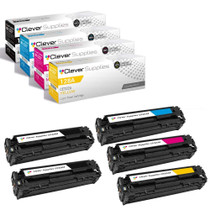
Compatible HP CM1415 MFP (CE320A CE321A CE322A CE323A) Toner Cartridge 5 Color Set
/>