




Color CP1520
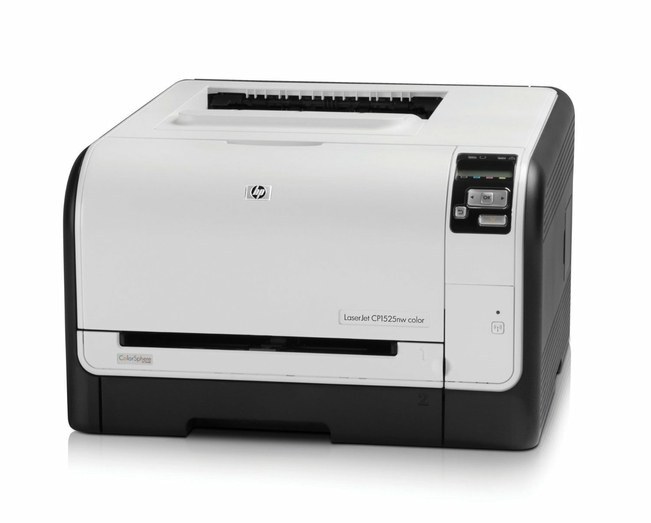
The Color CP1520 is the entry point of the 1520s: a compact, straightforward color laser printer for light office duty. It prints from the HP 128A (CE320A) black cartridge plus CE321A cyan, CE322A yellow and CE323A magenta, and every cartridge and set listed here is a compatible 128A product with a 1-year warranty and 1-year returns behind it.
As the base model of its line, the CP1520 tends to live where color printing is occasional rather than constant: a front desk that prints a few bright handouts, a home office that wants laser sharpness without a big machine, a classroom corner. Light duty is good news for supply costs, because a set of cartridges in a lightly used printer stretches across a long stretch of calendar time, and reorders become rare, planned events instead of emergencies.
Toner Cartridges for Color CP1520
- CE320A — Black — See product page for yield
- CE321A — Cyan — See product page for yield
- CE322A — Yellow — See product page for yield
- CE323A — Magenta — See product page for yield
- 128A four-color set (CE320A, CE321A, CE322A, CE323A)
- 128A three-color set (CE321A, CE322A, CE323A)
- 128A five-color set (2 x CE320A plus the three colors)
Singles and extra black packs:
- 128A (CE321A) Toner Cyan
- 128A (CE321A) Toner Cyan (listing 1)
- 128A (CE321A) Toner Cyan
- 128A (CE321A) Toner Cyan (listing 1)
- CP1520 (CE321A) Toner Cyan
- CP1520 (CE321A) Toner Cyan (listing 1)
- 128A (CE320A) Toner (listing 1)
- 128A (CE320A) Toner (listing 2)
- 128A (CE320A) Toner Black
- CP1520 (CE320A) Toner 2 Black
- CP1520 (CE320A) Toner Black
- CP1520 (CE320A) Toner Black (listing 1)
- CP1520 (CE320A) Toner 3 Black
- CP1520 (CE320A) Toner Black (listing 2)
- CM2320 (CE320A) Toner 2 Black
- CE320A Toner Black/ HP 128A Toner
Beyond the headline rows, the same cartridges appear in a stack of alternate listings. Sets and volume packs:
- 128A Premium Quality Toner 4 Color Set (CE320A/ CE321A/ CE323A/ CE322A)
- CP1520 Toner 4 Color Set
- CP1520 (CE321A CE322A CE323A) Toner 3 Color Set
- CP1520 (CE321A CE322A CE323A) Toner 3 Color Set (listing 1)
- 128A (CE320A CE321A CE322A CE323A) Toner 4 Color Set
- 128A (CE320A CE321A CE322A CE323A) Toner 4 Color Set (listing 1)
- 128A (CE320A CE321A CE322A CE323A) Toner 4 Color Set (listing 2)
- 128A (CE320A CE321A CE322A CE323A) Toner 4 Color Set (listing 3)
- 128A (CE320A CE321A CE322A CE323A) Toner 4 Color Set (listing 4)
- 128A (CE320A CE321A CE322A CE323A) Toner 4 Color Set (listing 5)
- 128A (CE320A CE321A CE322A CE323A) Toner 4 Color Set (listing 6)
- 128A (CE320A CE321A CE322A CE323A) Toner 4 Color Set (listing 7)
- 128A (CE320A CE321A CE322A CE323A) Toner 4 Color Set (listing 8)
- 128A (CE320A CE321A CE322A CE323A) Toner 4 Color Set (listing 9)
- 128A (CE320A CE321A CE322A CE323A) Toner 4 Color Set (listing 10)
- 128A (CE320A CE321A CE322A CE323A) Toner 4 Color Set (listing 11)
- 128A (CE320A CE321A CE322A CE323A) Toner 5 Color Set
- 128A (CE320A CE321A CE322A CE323A) Toner 4 Color Set (listing 12)
- 128A (CE320A CE321A CE322A CE323A) Toner 4 Color Set (listing 13)
- 128A (CE320A CE321A CE322A CE323A) Toner 4 Color Set (listing 14)
- 128A (CE320A CE321A CE322A CE323A) Toner 4 Color Set (listing 15)
- 128A (CE320A CE321A CE322A CE323A) Toner 4 Color Set (listing 16)
Which cartridge should you buy?
There is no high-yield branch in the 128A listings here — one standard tier does the whole job, which keeps the CP1520 decision down to singles versus sets. For a printer that sips toner, single cartridges bought as each color fades are usually the sensible pattern; a full four-color set only earns its keep when two or more slots run low around the same time. The three-color set covers cyan, yellow and magenta together when a color refresh is due but the black still has life. Whichever route you take, replace the empty cartridge only — the others stay in the machine and keep printing.
Chip, toner and everyday use
Seat a fresh cartridge and the printer reads its chip for level reporting; that handshake is why a compatible cartridge built for the 128A family registers without coaxing. Before installing, ease the cartridge side to side a few times to loosen the toner, then pull the seal straight out and slide the unit in until it sits square. Faint first pages after a swap usually just mean the toner is still settling. Remember that quoted yields assume about 5% coverage per page, so a month of full-color flyers will show on the levels sooner than a month of letters. Store the next cartridge sealed and upright, away from heat.
Frequently Asked Questions
What toner does the Color CP1520 use?
The CP1520 uses the HP 128A family: CE320A black, CE321A cyan, CE322A yellow and CE323A magenta. No other HP family fits, so the CE code on your old cartridge is the one fact to check before ordering.
Is there a high-yield cartridge for the CP1520?
The listings on this page are a single standard tier — there is no separate high-yield 128A line to step up to. If you print in bursts, a black multipack or a full set on the shelf is the practical way to lower the cost of staying stocked.
Can I change just the yellow cartridge?
Yes. The four slots are independent, so a faded yellow can be swapped on its own while black, cyan and magenta carry on. There is no need to buy or install a whole set for one empty color.
Why do I see the same cartridge listed several times?
The same 128A cartridges are listed generically and under individual model names across this store, so several listings can describe the identical cartridge. They are interchangeable — pick by the CE code and the pack size you want.
More printers that use the same cartridges
Every model in the wider 1520s and CM1415 family runs on these same four cartridges, so the supply shelf is shared across all of them:
- Color PRO CP1525NW
- Color PRO CP1525N
- Color PRO CP1525
- Color PRO CM1415FNW
- Color PRO CM1415FN
- Color PRO CM1415
- Color PRO CM1410
- Color CP1528NW
- Color CP1527NW
- Color CP1526NW
- Color CP1525NW
- Color CP1525N
- Color CP1525
- Color CP1523N
- Color CP1522N
- Color CP1521N
- Color CM1415FNW MFP
- Color CM1415FNW
- Color CM1415FN
- Color CM1415 MFP
- Color CM1415
SELECT YOUR PRINTER FAMILY TO SHOP Color CP1520 PRODUCTS
There are no products listed under this category.