




Color PRO CM1415FNW
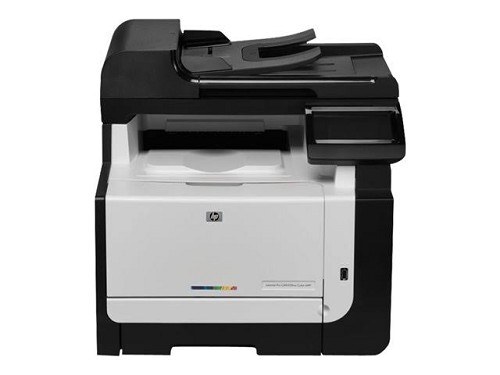
Every connection on one chassis: the Color PRO CM1415FNW is the fax, Ethernet and Wi-Fi variant of the Pro CM1415, and one cartridge family covers all of it — the HP 128A set, with CE320A black, CE321A cyan, CE322A yellow and CE323A magenta, each living in its own slot.
A printer reachable by cable, by wireless and by phone line ends up serving everyone a little differently: the desk beside it prints over Ethernet, the laptop across the room joins by Wi-Fi, and faxes arrive on their own schedule. Through all three doors, the toner math never changes — four cartridges, four independent levels, one familiar set to reorder.
Toner Cartridges for Color PRO CM1415FNW
The Pro CM1415fnw shelf adds 4 Color Set.
Under Pro CP1525: 4 Color Set.
Pro CP1525N — the same cartridges are also listed as 4 Color Set.
CM1415 MFP listings: CE321A CE322A CE323A 3 Color Set, CE321A CE322A CE323A 6 Color Set, CE323A Magenta, CE323A Magenta, CE322A Yellow, CE322A Yellow, CE320A CE321A CE322A CE323A 5 Color Set, CE320A CE321A CE322A CE323A 5 Color Set, CE320A CE321A CE322A CE323A 5 Color Set, CE320A CE321A CE322A CE323A 8 Color Set, CE320A Black.
Sold under the CM1415FNW MFP name: Magenta (CE323A); Magenta (CE323A); Yellow (CE322A); 2 Black (CE320A); 2 Black (CE320A); 2 Black (CE320A); 5 Color Set (CE320A CE321A CE322A CE323A).
CP1525N buyers will also find Cyan, Cyan.
The PRO CM1410 shelf adds CE321A CE322A CE323A 3 Color Set · CE321A CE322A CE323A 6 Color Set · CE321A Cyan · CE323A Magenta · CE322A Yellow · CE320A 2 Black · CE320A CE321A CE322A CE323A 5 Color Set · CE320A Black.
Under PRO CM1415: Cyan (CE321A) / Magenta (CE323A) / Black (CE320A) / 2 Black (CE320A) / 5 Black (CE320A).
PRO CM1415FN — the same cartridges are also listed as Yellow, Cyan.
CP1522N listings: CE320A CE321A CE322A CE323A 5 Color Set.
Sold under the CP1528NW name: 3 Black (CE320A).
PRO CM1415FNW buyers will also find Black.
The CM2320 shelf adds CE320A 2 Black.
Under CM1415: 4 Color Set / 3 Color Set (CE321A CE322A CE323A) / 4 Color Set (CE320A CE321A CE322A CE323A).
CM1415FN — the same cartridges are also listed as Black, 4 Color Set.
CM1415FNW listings: 4 Color Set, CE321A CE322A CE323A 3 Color Set, CE321A Cyan.
Sold under the CP1521n name: 4 Color Set.
CP1522n buyers will also find 4 Color Set.
The CP1523n shelf adds 4 Color Set.
Under CP1526nw: 4 Color Set.
CP1527nw — the same cartridges are also listed as 4 Color Set.
CP1528nw listings: 4 Color Set.
Sold under the CP1525 name: 4 Color Set; Cyan (CE321A); Magenta (CE323A); Yellow (CE322A).
CP1525n buyers will also find 4 Color Set.
Shoppers comparing shelves for the Color PRO CM1415FNW will find extra pack sizes listed under the sibling CP1525nw page, since both machines draw from the same 128A pool: 4 Color Set · CE321A CE322A CE323A 3 Color Set · CE321A CE322A CE323A 6 Color Set · CE321A Cyan · CE323A Magenta · CE322A Yellow · CE323A Magenta · CE320A 2 Black · CE320A 3 Black · CE320A 5 Black · CE320A CE321A CE322A CE323A 5 Color Set · CE321A CE322A CE323A 8 Color Set · CE320A Black · CE320A Black.
Under CM1415fnw mfp: 4 Color Set.
CM1415 mfp — the same cartridges are also listed as 4 Color Set.
CP1520 listings: 4 Color Set, CE321A CE322A CE323A 3 Color Set, CE321A CE322A CE323A 3 Color Set, CE321A Cyan, CE321A Cyan, CE320A 2 Black, CE320A Black, CE320A Black, CE320A 3 Black, CE320A Black.
Sold under the Pro CM1410 name: 4 Color Set.
Pro CM1415 buyers will also find 4 Color Set.
The Pro CM1415fn shelf adds 4 Color Set.
Which cartridge should you buy?
Because this configuration invites the widest mix of work, watch which cartridge the supplies screen flags most often and stock to that pattern. Black usually leads — documents and faxes both drink from it — so a spare black is the baseline. Colors follow actual use: swap singles as they fade, and reach for the four-color set when several run low together. There is no extended-yield option in this family, which makes the singles-versus-set rhythm the whole buying decision.
Chip, toner and everyday use
Chip-equipped cartridges report their own levels, and the printer confirms each new one as it is seated — push until the click, close the access door, and allow the recognition cycle to finish. When a cartridge starts to print light, removing it and rocking it gently can redistribute toner for a handful more pages. Unopened spares store best flat and sealed; opened early, they simply age faster. Any page-yield figure attached to these cartridges assumes standard light coverage, so dense color pages will always land lower.
Frequently Asked Questions
What toner does the Color PRO CM1415FNW take?
The 128A family: CE320A black, CE321A cyan, CE322A yellow and CE323A magenta.
Is the wireless model's toner different from the wired one?
No. Every CM1415 configuration, wired or wireless, fax or not, uses the same four cartridges — the suffix changes the connections, not the toner.
Do I need to change all four cartridges together?
No. Replace each one as it empties; the set option exists for convenience when several run low at once.
What if the printer does not recognize a new cartridge?
Reseat it firmly until it clicks and restart the printer. A properly seated, chip-equipped cartridge is normally recognized right away.
More printers that use the same cartridges
These siblings share the very same cartridges — stock bought for one machine fits the rest:
- Color CM1415
- Color CM1415 MFP
- Color CM1415FN
- Color CM1415FNW
- Color CM1415FNW MFP
- Color CP1520
- Color CP1521N
- Color CP1522N
- Color CP1523N
- Color CP1525
- Color CP1525N
- Color CP1525NW
- Color CP1526NW
- Color CP1527NW
- Color CP1528NW
- Color PRO CM1410
- Color PRO CM1415
- Color PRO CM1415FN
- Color PRO CP1525
- Color PRO CP1525N
- Color PRO CP1525NW
SELECT YOUR PRINTER FAMILY TO SHOP Color PRO CM1415FNW PRODUCTS
There are no products listed under this category.