






 See Compatible Printers
 Read more about our ink!
Hewlett Packard
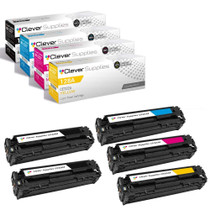
Compatible HP CM1415 (CE320A CE321A CE322A CE323A) Toner Cartridge 4 Color Set
- Page Yield:
- Black:2,000 Each, Colors:1,300 Each pages
- Availability:
- In Stock
- Shipping:
- Free Shipping

Amazon Price:

- Page Yield:
- Black:2,000 Each, Colors:1,300 Each pages
- Availability:
- In Stock
- Shipping:
- Free Shipping
- Compatible Printers
- Color LaserJet CM1410fnw
- Color LaserJet CM1415fnw
- Color LaserJet CP1522n
- Color LaserJet CP1523n
- Color LaserJet CP1525nw
- Color LaserJet Pro CP1525nw
- LaserJet CM1410fnw
- LaserJet CM1415fnw
- LaserJet CP1525nw
- LaserJet Pro CP1525nw
- LaserJet Pro CM1410fnw
- LaserJet Pro Pro CP1525nwi>
- Color CM1415
- Color CM1415 MFP
- Color CM1415FN
- Color CM1415FNW
- Color CM1415FNW MFP
- Color CP1520
- Color CP1521N
- Color CP1522N
- Color CP1523N
- Color CP1525
- Color CP1525N
- Color CP1525NW
- Color CP1526NW
- Color CP1527NW
- Color CP1528NW
- Color PRO CM1410
- Color PRO CM1415
- Color PRO CM1415FN
- Color PRO CM1415FNW
- Color PRO CP1525
- Color PRO CP1525N
- Color PRO CP1525NW
- Specifications
- SKU:
- CLS-HPCM1415-1
- Printer Brand:
- Hewlett Packard
- OEM Number:
- CE320A, CE321A, CE323A, CE322A
- Ink Color:
- Black, Cyan, Magenta, Yellow
- Page Yield:
- Black:2,000 Each, Colors:1,300 Each pages
- Printer Type:
- Laser Cartridge
- Condition:
- New Compatible
- Description
- Reviews

/> 

From the HP 128A Color LaserJet Series emerges a comprehensive lineup of printers designed to fulfill the diverse needs of professional color printing. Whether it's the CM1415, CP1520, or PRO CM1410 series, each model promises exceptional quality and performance. Notable models include the CM1415FNW, CP1525NW, and PRO CM1415FNW, renowned for their versatility and reliability. Compatible with these printers are the HP 128A toner cartridges, including the CE320A Black, CE321A Cyan, CE323A Magenta, and CE322A Yellow. These cartridges ensure vibrant colors and sharp text, delivering consistent results across various printing tasks. With the HP 128A cartridges, users can produce professional-quality documents, presentations, and marketing materials with ease. For multifunction printers like the CM1415 MFP and CM1415FNW MFP, as well as the PRO CM1415 series, these cartridges maintain efficiency across printing, scanning, copying, and faxing tasks. The PRO CP1525N and CP1525NW offer added convenience with their wireless connectivity options, making them suitable for modern office environments. In the realm of color laser printing, the HP 128A series stands out for its reliability and performance. With these printers and cartridges, users can achieve vibrant color reproduction and crisp, clear text, ensuring impactful and professional-looking documents. Whether it's business reports, brochures, or photographs, the HP 128A series delivers impressive results every time. Overall, the HP 128A Color LaserJet Series, coupled with the HP 128A toner cartridges, offers a comprehensive solution for businesses and individuals seeking high-quality color printing. With their advanced features, robust build, and consistent performance, these printers and cartridges are the ideal choice for all your printing needs.
Frequently Asked Questions
What does this set provide for the CM1415?
A complete change of HP 128A supplies: CE320A black, CE321A cyan, CE322A yellow and CE323A magenta, each sealed in its own box. The set is $76.20 and feeds the CM1415 multifunction family.
Our CM1415 is the office's only color machine. What does that mean for this set?
It means one set carries four jobs at once — printing, copying, scanning-to-print and fax output all lean on these same four cartridges. When the only color machine in the building is also the copier, its colors age faster than a printer-only tally suggests, and a complete set on hand is the difference between a swap and a standstill.
What yields do the four cartridges carry?
The CE320A black is rated at 2,000 pages; the colors — CE321A, CE322A, CE323A — at 1,300 pages each. On a multifunction, remember that copies spend those ratings exactly as prints do.
The machine still runs the starter cartridges it shipped with. Is this the right next step?
Yes. Starters are partial fills meant to get the machine running; this set is the first full-capacity round, at the complete ratings above. Owners usually notice the difference simply in how long the second round lasts compared with the first.
Later on, can I replace a single color without buying a whole set again?
Of course — the slots are independent, and this set itself can be drawn down one cartridge at a time. Many owners install the black and the weakest color from the set first, holding the rest sealed until their slots ask.
What backing does the set come with?
Every cartridge carries a 1-year warranty with 1-year free returns. A failure inside its first year goes back at no cost to you.
If I install this set as a group, how should I work through the four slots?
One slot at a time, matching each cartridge to its color position as you go: CE320A to black, CE321A to cyan, CE322A to yellow, CE323A to magenta. Open only the box for the slot you are changing, pull its sealing strip in one motion, and seat the unit until it clicks before opening the next. Working singly keeps the remaining new cartridges sealed until their moment and makes it obvious which unit went where if a first page ever needs explaining.
The set may wait weeks before every cartridge is needed. How do the uninstalled ones stay fresh?
Sealed in their boxes, stored flat indoors, out of sunlight and away from heat. A compatible cartridge asks for nothing more exotic than a cupboard shelf; what it dislikes is being opened early, stood on end for months, or baked in a sunny spot. Kept that way, the last cartridge out of this set performs like the first, at the same full ratings — 2,000 pages for the black and 1,300 for each color.
What is the smartest first page to print once fresh cartridges are in?
A page that uses all four colors at honest strength — a familiar document with your letterhead, a photo, or a chart you print often. You know how that page is supposed to look, so each slot gets judged against memory at once: black text solid, colors where they belong. A page like that turns the whole set's arrival into one verdict instead of four separate guesses spread over the following week.
Once this set is installed, which single cartridge is worth keeping as the household spare?
The one your work leans on hardest — for most CM1415 owners, the CE320A black, because documents, copies and fax output all spend it while the colors wait for color jobs. If your machine's life is brochures and photos, the color you see fading first in the gauges is the better spare. Either way, the empty you pull out names its own replacement: the code on its label is the single to order.
About This 128A Four-Color Set for the CM1415
The plain CM1415 — the base model of the family that also includes the Color LaserJet CM1415 — is typically the one color device a small team depends on for everything. This set keeps that dependence comfortable: all four 128A codes, CE320A through CE323A, together at full rating for $76.20, ready to go in as a group or one at a time as the machine asks.
Orders leave from warehouses in IL, PA, GA and CA; transit and returns specifics are collected on the shipping & returns page. Support hours are Monday–Friday, 9 AM–5 PM CST, and the rest of the family's range is under the store's HP heading.
Owners run this cartridge in the Color LaserJet CM1415fnw, Color LaserJet CP1522n, Color LaserJet CP1523n, Color LaserJet CP1525nw, Color LaserJet Pro CP1525nw, LaserJet CM1415fnw, Color LaserJet CP1520, Color LaserJet CM1415, Color LaserJet CM1415fn and Color LaserJet CP1528nw. Every cartridge in it is also listed singly — the 128A black cartridge (CE320A), 128A cyan cartridge (CE321A), 128A yellow cartridge (CE322A) and 128A magenta cartridge (CE323A) — when only one position needs changing.
Related Items

Hewlett Packard
Compatible HP CM1415 MFP (CE320A CE321A CE322A CE323A) Toner Cartridge 5 Color Set
/>



Hewlett Packard
Compatible HP CM1415 MFP (CE320A CE321A CE322A CE323A) Toner Cartridge 8 Color Set
/>


Hewlett Packard
Compatible HP Color LaserJet CP1528NW (CE320A CE321A CE322A CE323A) Toner Cartridge 4 Color Set
/>