







 See Compatible Printers
 Read more about our ink!
Hewlett Packard
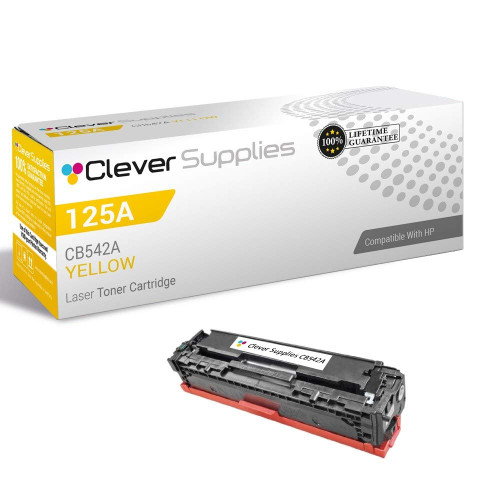
Compatible HP CM1312mfp (CB542A) Toner Cartridge Yellow

Amazon Price:

- Page Yield:
- Color: 1400
- Availability:
- In Stock
- Shipping:
- Calculated at Checkout
- Compatible Printers
- Color LaserJet CM1312 MFP
- Color LaserJet CM1312nfi
- Color LaserJet CP1215
- Color LaserJet CP1515n
- Color LaserJet CP1518ni
- LaserJet CM1312 MFP
- LaserJet CM1312nfi
- LaserJet CP1215
- LaserJet CP1515n
- LaserJet CP1518nii>
- Color LaserJet 1600
- Color LaserJet 2600
- Color LaserJet 2600DN
- Color LaserJet 2600N
- Color LaserJet 2605
- Color LaserJet 2605DN
- Color LaserJet 2605DTN
- Color LaserJet CM1015
- Color LaserJet CM1015MFP
- Color LaserJet CM1017
- Color LaserJet CM1017MFP
- Color LaserJet CM1300
- Color LaserJet CM1312
- Color LaserJet CP1210
- Color LaserJet CP1215N
- Color LaserJet CP1217
- Color LaserJet CP1312
- Color LaserJet CP1312MFP
- Color LaserJet CP1510
- Color LaserJet CP1512
- Color LaserJet CP1512MFP
- Color LaserJet CP1515
- Color LaserJet CP1515NI
- Color LaserJet CP1518
- HP 124A
- HP 125A
- Specifications
- SKU:
- CS-HP-CM1312mfp-Y-1
- Printer Brand:
- Hewlett Packard
- OEM Number:
- CB542A
- Ink Color:
- Yellow
- Page Yield:
- Color: 1400
- Printer Type:
- Laser Cartridge
- Condition:
- New Compatible
- Description
- Reviews



Explore the dynamic world of color printing with the HP 125A Color LaserJet series, encompassing a variety of models such as the CM1312, CM1312 MFP, CM1312NFI, CM1300, CP1210, CP1215, CP1215N, CP1217, CP1510, CP1515, CP1515N, CP1515NI, CP1518, CP1518NI, CP1312, CP1312MFP, CP1512, and CP1512MFP. These printers are crafted to deliver exceptional color accuracy and vibrancy, catering to both professional and personal printing needs. With compatibility with the CB540A Black, CB541A Cyan, CB543A Magenta, and CB542A Yellow HP 125A toner cartridges, you can achieve stunning results with every print. Elevate your printing experience with the HP 125A toner cartridge, engineered to produce crisp, clear prints with vivid colors and precise details. Immerse yourself in the world of color with the HP 125A Color LaserJet CM1312 series. Whether you require the multifunctionality of the CM1312 MFP, the network connectivity of the CM1312NFI, or the compact design of the CM1300, these printers offer versatility and performance. The CP1210 and CP1215 series provide compact solutions for personal or small office use, while the CP1510 series delivers high-quality prints with enhanced features like network connectivity and duplex printing. Unleash your creativity with the HP 125A toner cartridge series, designed to deliver rich, true-to-life colors that make your prints stand out. From vibrant blues and greens to deep reds and yellows, these cartridges ensure stunning results for both graphics and text. Meanwhile, the HP 125A toner cartridge offers superior performance, producing sharp, smudge-free prints that resist fading over time. Whether you're printing brochures, photographs, or presentations, you can rely on HP's trusted quality to deliver exceptional results. Enhance your printing capabilities with the HP 125A Color LaserJet series and accompanying cartridges. With a diverse range of models to choose from and advanced printing technologies at your disposal, you can bring your ideas to life with confidence. Invest in the power of HP printing solutions and experience the difference for yourself.
Cross-reference: HP CB542A, the 125A yellow toner cartridge (1,400 pages), is the same cartridge Canon sells as Canon Cartridge 116 (black 1980B001AA, cyan 1979B001AA, yellow 1977B001AA, magenta 1978B001AA) for the Canon imageCLASS MF8050Cn and MF8080Cw and the Color imageCLASS LBP5050 printers. Canon rates Cartridge 116 black at 2,200 pages and each color at 1,500 pages (ISO/IEC standard).
Frequently Asked Questions
Which code is the yellow cartridge for a CM1312mfp?
Yellow is CB542A in the 125A family. The Color LaserJet CM1312 MFP labels its stations by code, so read CB542A off the yellow unit you remove and order against exactly that.
Copies from the glass look blue-heavy while prints look fine — why?
Both jobs share the same yellow cartridge, but copies expose a weak color sooner because the scanner's lighting makes missing yellow obvious in greens and warm tones. If greens in a copied chart have gone blue while the same chart printed from a file looks closer to right, the yellow supply is nearly spent on both — copies just showed it first.
How many pages does one yellow cartridge cover here?
Roughly 1,400 pages per cartridge at standard coverage. Color copying spends yellow across almost every shade it reproduces, so a machine doing daily color copies will move through that figure faster than a print-only desk.
Can I fit it without upsetting the machine's stored settings?
Yes. The yellow station swaps by hand with the power state and settings untouched — address book entries, fax settings and copy defaults all stay exactly as they were. The only thing that changes is the yellow supply level.
What is a good first check after fitting?
Copy a page with green and warm colors in it from the glass, then print the same page from a computer. Both should show balanced greens and natural warmth by the second or third sheet. If one route still looks cold, the cartridge may need reseating — take it out and set it back in firmly.
What warranty backs this yellow cartridge?
Clever Supplies covers it with a 1-year warranty and 1-year free returns — twelve months of protection.
How can I spot the yellow running low before a copy run goes wrong?
Watch the greens on ordinary copies. On a CM1312mfp the first honest signal is copied charts and logos drifting blue while everything still prints without a warning. Making one color copy of a page you know well — a logo sheet or a standard chart — each week gives you a reference: when its greens cool noticeably, the CB542A is nearly spent and ordering time has arrived.
Does color copying really use yellow faster than printing does?
It can. The roughly 1,400-page rating is set at standard coverage, but a scanner reproduces whatever sits on the glass — photographs, highlighted pages, colored originals — and yellow is spent inside nearly every shade it rebuilds. A machine whose day is mostly color copying will move through a CB542A faster than the same machine printing text documents, even at the same page count. Copy volume, not page volume, is the number to watch.
Where should a spare yellow cartridge wait on a shared machine?
Sealed in its box, in the same room as the machine, with "CB542A yellow" written on the box end where anyone can see it. On a shared CM1312mfp, the person who discovers the fading greens is rarely the person who ordered the last cartridge, so a labeled spare in an obvious spot is what keeps the fix quick. Keep it flat, dry and out of direct sunlight.
What do I do with the spent cartridge after the swap?
Box it in the new cartridge's packaging and route it to a toner recycling collection instead of general waste. Doing it immediately matters on a multifunction machine: the empty is out, the copy queue is moving again, and a loose spent cartridge left on top of the unit invites both toner dust and confusion about whether it is the old one or a spare.
About This CM1312mfp Yellow Cartridge (CB542A)
At $32.18, this is the single yellow cartridge for the CM1312mfp. Yellow empties quietly on a copy-heavy machine — nothing stops, the colors just drift — and this listing lets you correct that one station without buying anything the machine does not yet need.
We dispatch orders from the IL, PA, GA and CA warehouses, and the shipping & returns page explains delivery timing and how to start a return. Support hours are Monday through Friday, 9 AM–5 PM CST, and the wider HP range is there for the machine's other stations.
Related Items

Hewlett Packard
CS Compatible Replacement for HP CB542A Toner Cartridge Yellow/ HP 125A Toner
/>

Hewlett Packard
Compatible HP CP1215 (CB540A) Toner Cartridge Black
Hewlett Packard
Compatible HP CM1312nfi (CB540A) Toner Cartridge Black

Hewlett Packard
Compatible HP CP1217 (CB540A) Toner Cartridge Black