




Color LaserJet CM1015MFP
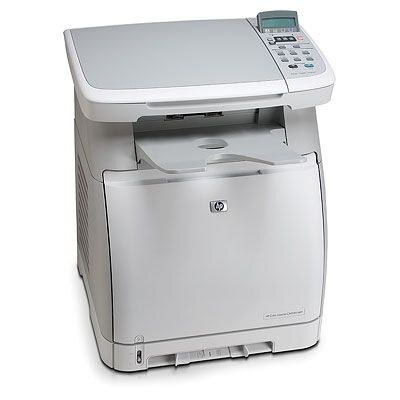
One machine instead of three: the Color LaserJet CM1015MFP packed color printing, scanning and copying into a compact mid-2000s chassis made for crowded desks. Everything it prints runs on HP's 124A cartridge family — Q6000A black, Q6001A cyan, Q6002A yellow and Q6003A magenta — and each color lifts out independently when its turn comes. One small shelf of four codes keeps the whole multifunction working.
The CM1015MFP's bargain was desk space: a home office or a small team gave up a separate printer, scanner and copier and fed one machine instead. That shapes its toner habits. Copying pulls from the same four slots as printing, so a week of copying handouts shows up in the levels just like a week of print jobs, and the owner who watches one set of levels is really watching three machines' worth of work. A spare black within reach matters more here than raw speed ever did.
Toner Cartridges for Color LaserJet CM1015MFP
| Cartridge | Color | Page Yield |
|---|---|---|
| Q6000A | Black | See product page |
| Q6001A | Cyan | See product page |
| Q6002A | Yellow | See product page |
| Q6003A | Magenta | See product page |
Ways to buy the same family on this page:
- Q6000AD — the black cartridge in a two-pack, for desks that copy and print mostly in black
- CM1015MFP 4-color set — all four cartridges in one box, listed under this model's own name
- 124A 4-color set — the complete Q6000A–Q6003A range in a single carton
- 124A 4-color set, alternate listing — the same four codes in a second listing
- Tri-color pack — cyan, yellow and magenta together, without black
One caution: this shelf also stocks the 125A family — CB540A black with CB541A cyan, CB542A yellow and CB543A magenta, sold as a set and as a tri-color pack for the CM1312 and CP1215 machines. Those cartridges do not fit the CM1015MFP; the two families sit side by side in many catalogs and are easy to confuse, so check for the Q-codes above before ordering.
Which cartridge should you buy?
Most CM1015MFP owners should buy the single cartridge that ran out. The four channels empty at their own pace, and there is no high-yield tier in this family to trade up to. Two exceptions are worth knowing. If your desk copies and prints documents all day, black disappears first by a wide margin, and the Q6000AD two-pack keeps a spare black ready without paying for colors you do not need yet. And when two or three channels are low together — common after the machine's first long stretch — a 4-color set resets the whole row at once and ends the one-at-a-time warnings. Otherwise, one code, one cartridge, matched to the slot that faded.
Chip, toner and everyday use
The chip on each 124A cartridge tells the CM1015MFP which code was installed and how much toner remains, so give the panel a few seconds to settle after a change. If a compatible cartridge is ever questioned, reseating it firmly usually completes the handshake. Keep the printer's next black in the drawer beneath or beside it, still sealed; unopened cartridges wait patiently for months, while an opened spare gathers dust. When output fades before the warning, pull the cartridge and rock it gently — settled toner spreads again and the last pages come out even.
Frequently Asked Questions
What toner does the Color LaserJet CM1015MFP use?
HP 124A cartridges: Q6000A black, Q6001A cyan, Q6002A yellow and Q6003A magenta. Match the number printed on the cartridge you remove and the replacement will seat the same way.
Will HP 125A cartridges fit the CM1015MFP?
No. The 125A family (CB540A–CB543A) belongs to machines like the CM1312 and the CP1215 series. The cartridges look similar on a shelf, but they are a different range and will not work in the CM1015MFP, which takes 124A only.
Is it safe to run compatible toner in the CM1015MFP long term?
Yes — the machine is built to run compatible 124A cartridges as well as genuine HP. Buy from a reputable source so the cartridge matches the 124A specification exactly and seats properly, and the printer treats it like any other cartridge.
Do I have to replace all four cartridges when one runs out?
No. Each color is an independent cartridge. Replace only the one the panel reports as empty and leave the others until their turn; changing them early wastes the toner still inside.
More printers that use the same cartridges
The CM1015MFP shares its shelf with two related HP families. Machines on the 124A family: Color LaserJet 1600, Color LaserJet 2600, Color LaserJet 2600DN, Color LaserJet 2600N, Color LaserJet 2605, Color LaserJet 2605DN, Color LaserJet 2605DTN, Color LaserJet CM1015, Color LaserJet CM1017, Color LaserJet CM1017MFP. Machines on the 125A family: Color LaserJet CM1300, Color LaserJet CM1312, Color LaserJet CM1312 MFP, Color LaserJet CM1312NFI, Color LaserJet CP1210, Color LaserJet CP1215, Color LaserJet CP1215N, Color LaserJet CP1217, Color LaserJet CP1312, Color LaserJet CP1312MFP, Color LaserJet CP1510, Color LaserJet CP1512, Color LaserJet CP1512MFP, Color LaserJet CP1515, Color LaserJet CP1515N, Color LaserJet CP1515NI, Color LaserJet CP1518, Color LaserJet CP1518NI. Cartridge index pages: HP 124A and HP 125A.