




Color LaserJet CM1015
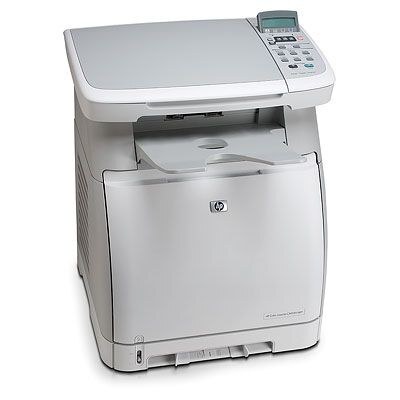
A mid-2000s color laser that earned its keep the hard way — by printing year after year. The CM1015 brought color LaserJet output to small offices long before it was common, and plenty are still on desks today. Its toner is the HP 124A family: Q6000A black plus Q6001A cyan, Q6002A yellow and Q6003A magenta, with a two-black option listed as Q6000AD. This shelf also stocks the later HP 125A generation — CB540A black with CB541A, CB542A and CB543A colors — which belongs to the CM1312 and CP1215 machines listed below, not to the CM1015 itself.
The CM1015 arrived when a color laser was still a deliberate purchase for a small office, and its staying power is simple: the cartridge family behind it never became hard to find. Owners who kept these machines running learned to buy by code rather than by model name, because the same 124A shelf feeds a long list of HP color printers from the same years — the full list is at the bottom of this page.
Toner Cartridges for Color LaserJet CM1015
| Cartridge | Color | Page Yield |
|---|---|---|
| Q6001A / Q6002A / Q6003A / 124A — Tri Color | Three colors | See product page |
| CB541A / CB543A / CB542A / 125A — Tri Color | Three colors | See product page |
| Q6000AD / 124A | Black | See product page |
| CS Compatible Replacement for HP CM1015 Toner Cartridge Color Laserjet 4 Color Set (CM1015) — 4 Color Set | — | See product page |
| CS Compatible Replacement for HP CM1300 Toner Cartridge Color Laserjet 4 Color Set (CM1300) — 4 Color Set | — | See product page |
| Q6000A / Q6001A / Q6002A / Q6003A / 124A — 4 Color Set | — | See product page |
| Q6000A / 124A | Black | See product page |
| Q6001A / 124A | Cyan | See product page |
| Q6002A / 124A | Yellow | See product page |
| Q6003A / 124A | Magenta | See product page |
| CB540A / CB541A / CB542A / CB543A / 125A — 4 Color Set | — | See product page |
| CB540A / CB541A / CB542A / CB543A (CP1215n) — 4 Color Set | — | See product page |
| Q6000A / Q6001A / Q6002A / Q6003A / 124A — 4 Color Set | — | See product page |
| Q6000A / Q6001A / Q6002A / Q6003A / 124A — 4 Color Set | — | See product page |
Which cartridge should you buy?
Start with singles. The CM1015 empties its black cartridge well ahead of the colors under normal office paperwork, so the Q6000A single — or the Q6000AD two-pack when the machine prints all day — covers most orders. Colors go one at a time: a faded sky or a weak red tells you exactly which of Q6001A, Q6002A or Q6003A to replace. Full four-color sets earn their place after a long idle spell or when three cartridges report low together. One caution: the 125A cartridges further down this page look similar but belong to a different HP family — if the cartridge you pulled out says 124A, order 124A.
Chip, toner and everyday use
A compatible 124A cartridge carries the chip the CM1015 expects to read, and most recognition problems trace back to fit rather than electronics: pull the seal out fully, slide the cartridge in level, and press until it clicks. If output comes out light from a cartridge that has been installed a while, remove it and rock it gently from side to side to redistribute the toner, then reseat it. Spares keep best sealed in their packaging, upright, in a cool dry spot away from windows.
Frequently Asked Questions
Does the Color LaserJet CM1015 take a high-yield cartridge?
The 124A family has no separate high-yield tier — capacity steps up through the Q6000AD two-pack of the standard black instead. The color cartridges are single-capacity, so the economy move is replacing each color only when it is actually empty.
Are 124A and 125A cartridges interchangeable in the CM1015?
No. The CM1015 uses the 124A set — Q6000A, Q6001A, Q6002A and Q6003A. The 125A cartridges stocked on this page (CB540A and its colors) fit the later CM1312 and CP1215 family; they will not work in the CM1015, so check the code on your old cartridge before ordering.
How should I store a spare 124A cartridge?
Leave it sealed in its bag and box, stored upright in a cool, dry place out of sunlight. A spare kept that way is ready the moment the installed cartridge runs out — open it only when the printer asks for it.
My CM1015 prints one color weakly — is the cartridge finished?
Usually that color is low or its toner has settled. Remove the cartridge for that color, rock it side to side a few times and reseat it; if the weakness returns within a few pages, the cartridge is genuinely empty and should be replaced on its own.
More printers that use the same cartridges
These HP color models all run on the same 124A cartridge family:
Color LaserJet 1600, Color LaserJet 2600, Color LaserJet 2600DN, Color LaserJet 2600N, Color LaserJet 2605, Color LaserJet 2605DN, Color LaserJet 2605DTN, Color LaserJet CM1015MFP, Color LaserJet CM1017, Color LaserJet CM1017MFP, Color LaserJet CM1300, Color LaserJet CM1312, Color LaserJet CM1312 MFP, Color LaserJet CM1312NFI, Color LaserJet CP1210, Color LaserJet CP1215, Color LaserJet CP1215N, Color LaserJet CP1217, Color LaserJet CP1312, Color LaserJet CP1312MFP, Color LaserJet CP1510, Color LaserJet CP1512, Color LaserJet CP1512MFP, Color LaserJet CP1515, Color LaserJet CP1515N, Color LaserJet CP1515NI, Color LaserJet CP1518, Color LaserJet CP1518NI, HP 124A, HP 125A.