




MFC-L3720CDW
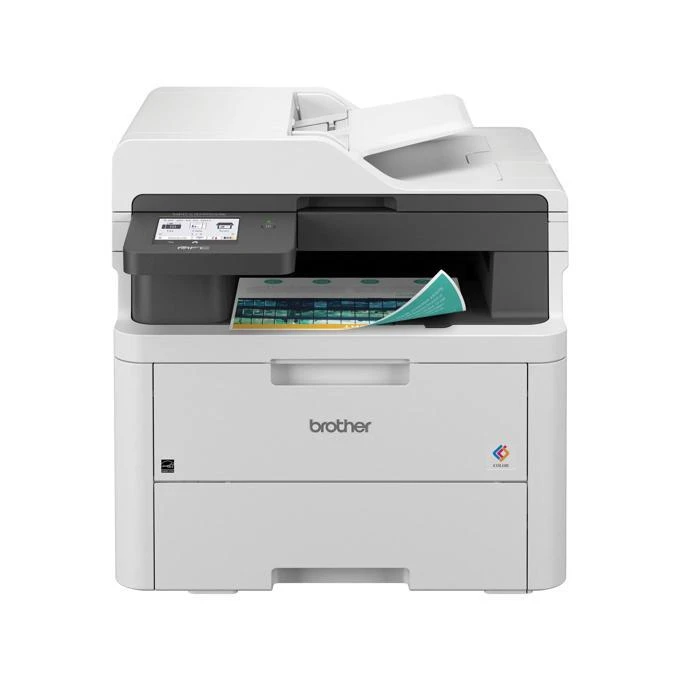
One cartridge at a time — that is the working principle of the Brother MFC-L3720CDW and its TN229 (TN-229) toner system. This color laser printer never asks you to retire four cartridges when only one is empty: the standard tier splits into TN229BK black at approx. 1,500 pages and the single-color cartridges TN229C, TN229M and TN229Y at approx. 1,200 pages each. The TN229XL (TN-229XL) high-yield tier keeps the same split — TN229XLBK black at approx. 3,000 pages, TN229XLC, TN229XLM and TN229XLY at approx. 2,300 — and so does TN229XXL (TN-229XXL), where TN229XXLBK runs to approx. 4,500 pages and TN229XXLC, TN229XXLM and TN229XXLY to approx. 4,000. All four slots ride on one DR229CL (DR-229CL) drum unit, rated approx. 20,000 pages.
At a front desk or an admin workstation, printing arrives in bursts — a stack of forms, a run of appointment letters, a color handout for the waiting room. Work like that punishes any printer that ties its colors together, because one heavy week on letterhead can strand three healthy cartridges behind an empty fourth. Here the empty slot is the only errand. The MFC-L3720CDW also rewards a modest stocking habit: one spare of the color your documents lean on most, kept beside the machine, turns a mid-morning empty into a two-minute swap.
Toner Cartridges for MFC-L3720CDW
Compatible cartridges first, in tier order:
| Cartridge | Color | Page Yield |
|---|---|---|
| TN229BK | Black | Approx. 1,500 pages |
| TN229C | Cyan | Approx. 1,200 pages |
| TN229M | Magenta | Approx. 1,200 pages |
| TN229Y | Yellow | Approx. 1,200 pages |
| TN229BK 2 Pack | Black | Approx. 1,500 pages per cartridge |
| TN229 4 Color Set | Black, cyan, magenta, yellow | Approx. 1,500 pages black |
| TN229 5 Color Set | Black, cyan, magenta, yellow | Approx. 1,500 pages black |
| TN229XLBK | Black | Approx. 3,000 pages |
| TN229XLC | Cyan | Approx. 2,300 pages |
| TN229XLM | Magenta | Approx. 2,300 pages |
| TN229XLY | Yellow | Approx. 2,300 pages |
| TN229XLBK 2 Pack | Black | Approx. 3,000 pages per cartridge |
| TN229XL 4 Color Set | Black, cyan, magenta, yellow | Approx. 3,000 pages black |
| TN229XL 5 Color Set | Black, cyan, magenta, yellow | Approx. 3,000 pages black |
| TN229XXLBK | Black | Approx. 4,500 pages |
| TN229XXLC | Cyan | Approx. 4,000 pages |
| TN229XXLM | Magenta | Approx. 4,000 pages |
| TN229XXLY | Yellow | Approx. 4,000 pages |
| TN229XXLBK 2 Pack | Black | Approx. 4,500 pages per cartridge |
| TN229XXL 4 Color Set | Black, cyan, magenta, yellow | Approx. 4,500 pages black |
| TN229XXL 5 Color Set | Black, cyan, magenta, yellow | Approx. 4,500 pages black |
Genuine Brother cartridges, for those who prefer original stock:
- Genuine TN229BK — black, approx. 1,500 pages
- Genuine TN229C — cyan, approx. 1,200 pages
- Genuine TN229M — magenta, approx. 1,200 pages
- Genuine TN229Y — yellow, approx. 1,200 pages
- Genuine TN229 4 Color Set — black, cyan, magenta, yellow, see product page
- Genuine TN229XLBK — black, approx. 3,000 pages
- Genuine TN229XLC — cyan, approx. 2,300 pages
- Genuine TN229XLM — magenta, approx. 2,300 pages
- Genuine TN229XLY — yellow, approx. 2,300 pages
- Genuine TN229XLBK 2 Pack — black, approx. 3,000 pages per cartridge
- Genuine TN229XL 4 Color Set — black, cyan, magenta, yellow, approx. 3,000 pages black
- Genuine TN229XLC/M/Y 3 Color Set — cyan, magenta, yellow, approx. 2,300 pages each
- Genuine TN229XXLBK — black, approx. 4,500 pages
- Genuine TN229XXLC — cyan, approx. 4,000 pages
- Genuine TN229XXLM — magenta, approx. 4,000 pages
- Genuine TN229XXLY — yellow, approx. 4,000 pages
- Genuine TN229XXL 4 Color Set — black, cyan, magenta, yellow, approx. 4,500 pages black
Drum unit: the DR229CL (DR-229CL) genuine Brother drum unit, rated for approx. 20,000 pages, is sold separately from the toner cartridges above.
Which cartridge should you buy?
Buy singles for the slots that surprise you and sets for the slots that don't. If your color use is lopsided — most offices find one or two colors doing the real work — single cartridges in the TN229XL tier keep those slots economical without over-committing the quiet colors. When a full refresh is due, the four-color set in your chosen tier is the tidy way to reset every counter at once, and the five-color set adds a spare black for text-heavy desks. Standard TN229 remains the right answer for genuinely light use, where a 1,200-page color cartridge may sit in the machine for a year. Judge by the last two cartridges you replaced, not by the brochure.
Chip, toner and everyday use
Swap one color without disturbing the rest: power stays on, the front cover opens, and each cartridge-and-drum assembly slides out by its own handle. The chip on the new cartridge registers its level as soon as it seats, so the printer's low-toner warnings stay honest per slot. If a freshly installed color prints pale for the first page or two, that is toner settling — print a couple of test sheets before judging it. Keep the drum's green corona wire tab sliding clean occasionally per the manual's guidance if streaks appear, and remember yields are rated at roughly 5% coverage, so dense handouts shorten real-world life.
Frequently Asked Questions
What happens when only one color runs out on the MFC-L3720CDW?
Only that color stops you. Replace the single cartridge — say TN229M for magenta — and the other three keep printing. Every color is available as a single in the standard, XL and XXL tiers on this page.
Does this printer use a separate drum unit?
Yes, the DR229CL, rated at roughly 20,000 pages — it outlasts many toner cartridges. The toner cartridges click into the drum assembly, so a toner swap reuses the drum until prints show drum wear: repeating spots, lines or background haze.
Which tier suits a front desk with bursty printing?
TN229XL is the usual sweet spot: double the standard yield in the colors you burn through, without the upfront cost of XXL across all four slots. Keep standard singles as emergency spares if the budget is tight.
More printers that use the same cartridges
The TN229 system is shared across Brother's color laser range. The single-function and DCP models on it are DCP-L3560CDW, HL-L3220CDW, HL-L3280CDW, HL-L3295CDW, HL-L3300CDW, HL-L8245CDW, while the fellow MFC models are MFC-L3765CDW, MFC-L3780CDW, MFC-L8395CDW.