







 See Compatible Printers
 Read more about our ink!
Brother
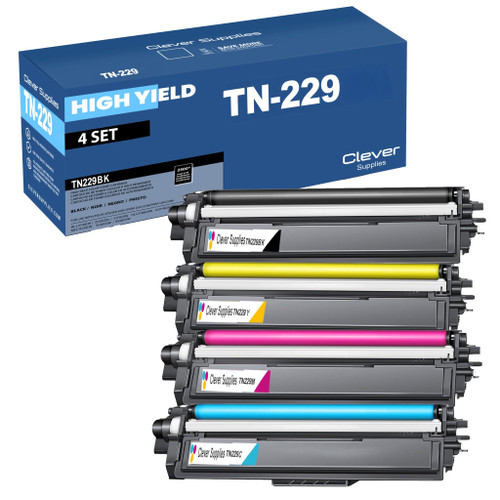
Compatible Brother TN229 (TN229BK, TN229C, TN229Y, TN229M) Toner Cartridge 4 Color Set

Amazon Price:

- Page Yield:
- Black: 1500, Color: 1200
- Availability:
- In Stock
- Shipping:
- Free Shipping
- Compatible Printers
- Specifications
- SKU:
- CS-Brother-TN229-4Set
- Printer Brand:
- Brother
- OEM Number:
- TN229BK, TN229C, TN229Y, TN229M
- Ink Color:
- Black,Cyan,Magenta,Yellow
- Page Yield:
- Black: 1500, Color: 1200
- Printer Type:
- Laser Cartridge
- Condition:
- New Compatible
- Description
- Reviews

/> 

Power through your printing tasks with the Brother TN229, including the high-yield TN229BK Black, TN229C Cyan, TN229M Magenta, and TN229Y Yellow toner cartridges. These cartridges are designed to produce sharp text and vibrant colors, making them ideal for both everyday documents and high-impact graphics. Built for high efficiency, the Brother TN229 toner cartridge and Brother TN229 toner cartridge deliver outstanding performance and long-lasting results. With higher page yields, youll spend less time replacing cartridges and more time printing without interruption. Compatible with a wide range of Brother printers, these cartridges work seamlessly with models like MFC-L3720CDW, MFC-L3780CDW, HL-L3220CDW, HL-L3280CDW, HL-L3300CDW, and HL-L3295CDW. Each print is clean, consistent, and professionally finished to meet the needs of home offices or busy workplaces. Optimized for extended use in devices such as the HL-L8245CDW, MFC-L8395CDW, and MFC-L3765CDW, the TN229BK Black, TN229C Cyan, TN229M Magenta, and TN229Y Yellow cartridges ensure your prints look sharp and stay vividpage after page. Trust these high-yield solutions to deliver the quality and reliability Brother is known for.
Frequently Asked Questions
How does the set price break down per cartridge?
The four standard cartridges bought individually would total $144.20; this set is $88.73, a saving of $55.47. That works out to $22.18 per cartridge — less than the price of many single standard blacks on this platform. For the three TN229 tiers priced side by side — standard, XL and the four-model XXL — see our Best Brother TN229, TN229XL & TN229XXL Toner Cartridges guide.
Who buys the full set instead of topping up single colors?
Usually owners whose first set of cartridges is ending together, or anyone setting up a printer for a new role — a front desk, a classroom, a small team — who wants every color fresh at once and a predictable printing budget for the months ahead.
Which machines does this four-pack fit?
It is built for Brother's TN229 platform, including DCP-L3560CDW, HL-L3220CDW, HL-L3280CDW, HL-L3295CDW, HL-L3300CDW, HL-L8245CDW, MFC-L3720CDW, MFC-L3765CDW, MFC-L3780CDW and MFC-L8395CDW. The set's black, cyan, magenta and yellow use the same slots as the XL and XXL cartridges, so it also suits machines that have been running larger tiers.
Can I install the colors one at a time as the old ones run out?
Yes. Each cartridge is sealed separately, so you can change the black today and hold the colors until each one actually empties. Nothing in the set expires on a schedule — sealed toner keeps well in a drawer at room temperature.
What page capacity does the whole set represent?
Up to 1,500 pages from the black plus up to 1,200 pages from each of the three colors, all rated at standard 5% coverage. For a typical small office that is months of mixed printing before the next cartridge decision comes around.
If one cartridge in the set misbehaves, what happens?
We stand behind each one individually: a one-year warranty covers every cartridge in the box, and returns are free for a year, as laid out on our returns page. One faulty color never means sending the whole set back.
What should I check when the four-color set first arrives?
Count the boxes and read every code before breaking a single seal. The set should hold one TN229BK black and one each of the TN229C cyan, TN229M magenta and TN229Y yellow — four cartridges, four distinct final letters. A delivery checked at the door means a missing or wrong color is a quick message to us, while the same discovery a month later, mid-swap, is a printer standing idle.
Is there a required order for installing the four cartridges?
No sequence is imposed on you. Each cartridge answers only to its own slot, so the black can go in today, the cyan next week, and the magenta whenever its predecessor actually empties. Nothing is gained by changing a cartridge early to match the others, and nothing is lost by spreading the installs out. The set is a purchasing unit, not an installation ritual — treat each slot on its own schedule.
How can I capture a baseline while all four cartridges are fresh?
Print one page you know well — a document with a logo, a chart and a photograph — write the date on it, and file it. With every slot at full strength, that page is the most honest reference the printer will ever give you. Months later, when a color starts to look questionable, reprinting the same file and comparing it against the filed original shows exactly which cartridge is drifting, instead of leaving you guessing among four.
After this set, which cartridge will probably need attention first?
In most offices, the black. Text and documents dominate everyday volume, and the black's 1,500 pages are spent on nearly every sheet, while the three 1,200-page colors divide only the color work between them. Cyan usually leads the colors on chart-heavy workloads. None of this is a fault — it is the platform's normal rhythm, and it means your next order after a full set is most likely a single black top-up rather than another set.
About This TN229 Four-Cartridge Set
The standard-yield TN229 set — black, cyan, magenta and yellow — at $88.73, saving $55.47 against the $144.20 cost of the four singles and bringing the effective price down to $22.18 a cartridge. Start with a single standard cartridge like the TN229 black if only one color is done, or take the whole platform fresh in one order; either way it ships from our IL, PA, GA or CA warehouses.
Printer showing "Replace Toner" or "No Toner" after a cartridge change? Our TN229 troubleshooting guide walks through the reseat, contact-cleaning and counter-reset steps for this family.
Related Items


Brother
Compatible Brother TN229 (TN229BK, TN229C, TN229Y, TN229M) Toner Cartridge 5 Color Set
#N/A Frequently Asked Questions When does changing all four cartridges at once make more sense than one at a time? When several colors are fading together — the usual story with a printer that has...


Brother
Brother TN229BK TN229C TN229M TN229Y Black Cyan Magenta Yellow Genuine OEM Toner Cartridge 4 Color Set - Black: 1,500 pages, Color: 1,400 pages each
/>


Brother
Compatible Brother TN229 (TN229M) Toner Cartridge Magenta
/>


Brother
Compatible Brother TN229 (TN229C) Toner Cartridge Cyan
/>