






 See Compatible Printers
 Read more about our ink!
Brother
Compatible Brother TN229 (TN229C) Toner Cartridge Cyan
- Page Yield:
- Color: 1200
- Availability:
- In Stock
- Shipping:
- Calculated at Checkout

Amazon Price:

- Page Yield:
- Color: 1200
- Availability:
- In Stock
- Shipping:
- Calculated at Checkout
- Compatible Printers
- Specifications
- SKU:
- CS-Brother-TN229-C
- Printer Brand:
- Brother
- OEM Number:
- TN229C
- Ink Color:
- Cyan
- Page Yield:
- Color: 1200
- Printer Type:
- Laser Cartridge
- Condition:
- New Compatible
- Description
- Reviews

/> 

Power through your printing tasks with the Brother TN229, including the high-yield TN229BK Black, TN229C Cyan, TN229M Magenta, and TN229Y Yellow toner cartridges. These cartridges are designed to produce sharp text and vibrant colors, making them ideal for both everyday documents and high-impact graphics. Built for high efficiency, the Brother TN229 toner cartridge and Brother TN229 toner cartridge deliver outstanding performance and long-lasting results. With higher page yields, youll spend less time replacing cartridges and more time printing without interruption. Compatible with a wide range of Brother printers, these cartridges work seamlessly with models like MFC-L3720CDW, MFC-L3780CDW, HL-L3220CDW, HL-L3280CDW, HL-L3300CDW, and HL-L3295CDW. Each print is clean, consistent, and professionally finished to meet the needs of home offices or busy workplaces. Optimized for extended use in devices such as the HL-L8245CDW, MFC-L8395CDW, and MFC-L3765CDW, the TN229BK Black, TN229C Cyan, TN229M Magenta, and TN229Y Yellow cartridges ensure your prints look sharp and stay vividpage after page. Trust these high-yield solutions to deliver the quality and reliability Brother is known for.
Frequently Asked Questions
Why does the cyan always seem to run out first?
Most office color work leans blue: charts, links, logos, headers and graphs all draw heavily on cyan. On this platform each standard color cartridge is rated for up to 1,200 pages, so the color doing the most work — usually cyan — simply gets there first.
Can I change only the cyan and leave the rest alone?
Yes. Each color on the TN229 platform is a separate cartridge, so a low cyan never forces you to touch black, magenta or yellow. Pop the old one out, slide this one in, and the printer carries on with the cartridges that still have life in them.
Why is the color rating 1,200 pages when the black is 1,500?
Brother rates the standard TN229 colors at up to 1,200 pages each and the standard black at up to 1,500. Ratings follow the standard 5% coverage test, and in real mixed printing the colors also share work with each other, so treat the figure as a planning guide rather than a promise. For the three TN229 tiers priced side by side — standard, XL and the four-model XXL — see our Best Brother TN229, TN229XL & TN229XXL Toner Cartridges before you pick a tier by habit.
Will this cyan fit my printer?
It fits Brother printers built around the TN229 series, including DCP-L3560CDW, HL-L3220CDW, HL-L3280CDW, HL-L3295CDW, HL-L3300CDW, HL-L8245CDW, MFC-L3720CDW, MFC-L3765CDW, MFC-L3780CDW and MFC-L8395CDW. Standard, XL and XXL cartridges all use the same slot, so this standard cyan also works in a machine currently running larger tiers of the other colors.
How should I keep a spare cyan on hand?
Leave it sealed in its bag, stored flat at room temperature away from direct sunlight. Laser toner is a dry powder, so a spare keeps well for a long time — just shake it gently side to side before installing to redistribute the powder evenly.
What if the cyan arrives damaged or prints badly?
Then it comes back to us: this cartridge carries a one-year warranty and a one-year free return window, explained on our returns page. Reach our team on weekdays between 9 AM and 5 PM CST and we will arrange a replacement or refund.
What should I verify before breaking the seal on a new TN229C?
The code, read right off the box: TN229C, with the closing C marking the cyan slot. The four cartridges in this family share one shell design, so a magenta or yellow in cyan packaging looks identical until the letter is read. Two seconds at the shelf saves the one error no amount of careful fitting can fix — and an unopened wrong cartridge is the simplest return there is.
How can I catch cyan fading early on documents I print every week?
Keep a dated reference print. When this TN229C goes in, print one page carrying your usual chart or letterhead, date it, and pin it near the printer. Each week, hold a fresh copy of the same file against it: blues and greens losing their depth show up in the side-by-side comparison while individual prints still look plausible on their own. You will order the next cyan days earlier than guesswork allows.
Do two-sided color documents spend this cyan faster than expected?
They spend it exactly as rated — but the rating is in sides, not sheets. A duplexed report with charts on both faces draws cyan for every side that carries color, so the stack of paper grows at half the rate the cartridge counter falls. Judge the TN229C against the printer's page total rather than the ream count and its 1,200 pages will make sense.
When is the right moment to order the next cyan?
When your sealed spare goes into the printer. Cyan is typically the first color this platform calls for, and its warnings tend to arrive in the middle of the work that needs it. Treating the spare's installation as the reorder trigger keeps one TN229C always in reserve: the working cartridge, the shelf cartridge, and none of the mid-job scrambles that a just-in-time order invites.
About This TN229 Cyan Toner Cartridge
A standard-yield cyan for the TN229 platform, rated up to 1,200 pages at about 3.02 cents per page and priced at $36.19. It is the right buy when cyan is the color holding your printer back and the rest of the set still has life — and if your color volume keeps growing, the same slot also accepts the longer-life XL and XXL colors in the Brother range.
Printer showing "Replace Toner" or "No Toner" after a cartridge change? Our TN229 troubleshooting guide walks through the reseat, contact-cleaning and counter-reset steps for this family.
Related Items

Brother
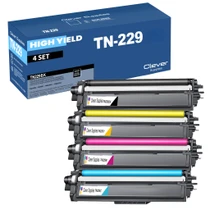
Compatible Brother TN229 (TN229BK, TN229C, TN229Y, TN229M) Toner Cartridge 4 Color Set
/>



Brother
Compatible Brother TN229 (TN229BK, TN229C, TN229Y, TN229M) Toner Cartridge 5 Color Set
#N/A Frequently Asked Questions When does changing all four cartridges at once make more sense than one at a time? When several colors are fading together — the usual story with a printer that has...


Brother
Compatible Brother TN229 (TN229M) Toner Cartridge Magenta
/>


Brother
Compatible Brother TN229 (TN229BK) Toner Cartridge Black
/>