







 See Compatible Printers
 Read more about our ink!
Brother
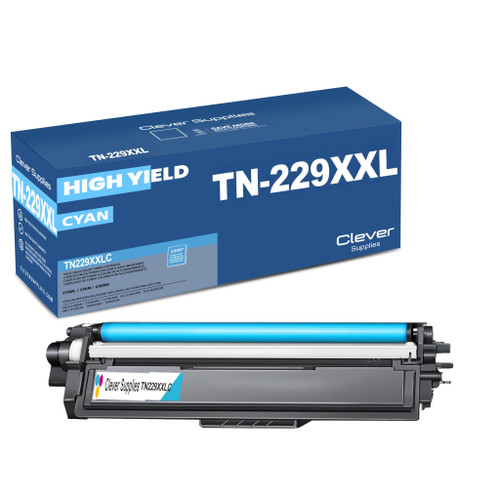
Compatible Brother TN229XXL (TN229XXLC) Toner Cartridge Cyan
- Page Yield:
- Color: 4000
- Availability:
- In Stock
- Shipping:
- Calculated at Checkout

Amazon Price:

- Page Yield:
- Color: 4000
- Availability:
- In Stock
- Shipping:
- Calculated at Checkout
- Compatible Printers
- Specifications
- SKU:
- CS-Brother-TN229XXL-C
- Printer Brand:
- Brother
- OEM Number:
- TN229XXLC
- Ink Color:
- Cyan
- Page Yield:
- Color: 4000
- Printer Type:
- Laser Cartridge
- Condition:
- New Compatible
- Description
- Reviews

/> 

Upgrade your printing capabilities with the Brother TN229XXL, featuring ultra high-yield performance from the TN229XXLBK Black, TN229XXLC Cyan, TN229XXLM Magenta, and TN229XXLY Yellow toner cartridges. These cartridges are engineered to produce vivid colors and crisp black text, ideal for both everyday use and professional-grade documents. Crafted for long-lasting performance, the Brother TN229XXL toner cartridge and Brother TN229XXL toner cartridge are perfect for high-volume printing environments. Enjoy more pages per cartridge while maintaining the reliable quality Brother is known for. Compatible with a variety of Brother printer models, these cartridges work flawlessly with the MFC-L3720CDW, MFC-L3780CDW, HL-L3220CDW, HL-L3280CDW, HL-L3300CDW, and HL-L3295CDW, delivering consistently excellent results with every page. Optimized for demanding workflows, these ultra high-yield cartridges are also a perfect fit for the HL-L8245CDW, MFC-L8395CDW, and MFC-L3765CDW. Count on the TN229XXLBK Black, TN229XXLC Cyan, TN229XXLM Magenta, and TN229XXLY Yellow to reduce cartridge changes and deliver professional results that last.
Frequently Asked Questions
What does an XXL cyan do for color-heavy printing?
It takes cyan — usually the first color to empty — off your mind for a long stretch. This TN229XXL cyan is rated up to 4,000 pages at $38.32, which works out to about 0.96 cents per page: under a cent for the color that carries your blues, greens and charts.
How does 4,000 pages compare with the smaller cyans?
The standard cyan is rated at 1,200 pages and the XL at 2,300, so the XXL holds well over three standard cartridges' worth of cyan in a single unit. If your printer lives on presentations, flyers or teaching materials, that gap is the difference between monthly and quarterly color changes. For the three TN229 tiers priced side by side — standard, XL and the four-model XXL — see our Best Brother TN229, TN229XL & TN229XXL Toner Cartridges before you pick a tier by habit.
Which printers accept this cartridge?
Brother's TN229 platform, including MFC-L3720CDW, MFC-L3780CDW, HL-L3220CDW, HL-L3280CDW, HL-L3300CDW, HL-L3295CDW, HL-L8245CDW, MFC-L8395CDW and MFC-L3765CDW. The XXL cyan uses the family's standard slot, so it fits alongside any tier of black, magenta and yellow your printer is already running.
Can an XXL cyan run beside standard cartridges in the other slots?
Yes. Each slot is independent, so an XXL cyan next to a standard black and regular magenta and yellow works perfectly. It is a sensible pattern: put the biggest cartridge in the color you consume fastest and keep the rest right-sized.
Will a bigger cyan change my print quality?
The output is the same as any fresh cyan on this platform — clean blues and greens from a full cartridge. What changes is how long that quality lasts before fading sets in: the fade simply arrives thousands of pages later.
What cover does this cartridge carry?
A one-year warranty and a year of free returns, as described on our shipping and returns page. Should the cartridge arrive damaged or print poorly, weekday support (9 AM–5 PM CST) will arrange the fix.
My color pages are mostly full-page charts and photos — will I really see 4,000 pages from this cyan?
Expect fewer, and that is normal rather than a short cartridge. The 4,000-page rating for the TN229XXLC assumes standard document coverage, the light mix of text and small graphics most ratings are built on. A full-page chart or photo lays down far more cyan per sheet, so a graphics-heavy desk lands below the rating while a text-with-logos desk lands close to it. Either way, the XXL holds well over three standard cyans' worth of toner, so the swap interval stretches dramatically even at heavy coverage.
Can I keep a spare TN229XXLC on the shelf, or should I order only when the printer warns me?
A sealed spare is a sensible pattern for this slot, because cyan is usually the first color to empty and rarely picks a convenient moment. Laser toner is a dry powder, so a cartridge kept sealed, flat and away from direct sunlight and heat does not dry out while it waits. Holding one spare turns a low-cyan warning into a two-minute swap, and you simply reorder when the spare goes in.
How do I make sure I reorder the cyan and not one of the other XXL colors?
Read the last letter of the code on the cartridge or its box before you order. TN229XXLC ends in C for cyan; the same tier ends in M for magenta and Y for yellow, while the black is the TN229XXLBK. All four share the TN229XXL prefix, so the final letter is the part that decides whether you receive the color your printer is actually asking for.
Do copies on the MFC models draw on this cyan the same way computer print jobs do?
Yes — a copy is a printed page as far as the cartridge is concerned. On an all-in-one such as the MFC-L3720CDW or MFC-L8395CDW, every color copy lays down cyan exactly as a printed document does. A desk that copies charts, flyers or teaching materials in color can therefore empty this cyan noticeably faster than its computer print volume alone would suggest.
About This TN229XXL Cyan Toner Cartridge
The largest cyan the TN229 platform offers: up to 4,000 pages at about 0.96 cents per page, priced at $38.32, for printers whose color work drains cyan long before anything else. It installs like any cartridge in the family and is stocked with the wider Brother toner collection for these machines.
Printer showing "Replace Toner" or "No Toner" after a cartridge change? Our TN229 troubleshooting guide walks through the reseat, contact-cleaning and counter-reset steps for this family.
Related Items


Brother
Compatible Brother TN229XXL (TN229XXLBK, TN229XXLC, TN229XXLY, TN229XXLM) Toner Cartridge 4 Color Set
/>



Brother
Compatible Brother TN229XXL (TN229XXLBK, TN229XXLC, TN229XXLY, TN229XXLM) Toner Cartridge 5 Color Set
#N/A Frequently Asked Questions Roughly how long does a full XXL set last a small office? It depends on volume, but the capacity gives you a yardstick: 4,500 pages from the black and 4,000 from each...


Brother
Compatible Brother TN229XXL (TN229XXLY) Toner Cartridge Yellow
/>
Brother
Compatible Brother TN229XXL (TN229XXLM) Toner Cartridge Magenta
/>