




Optra S1250
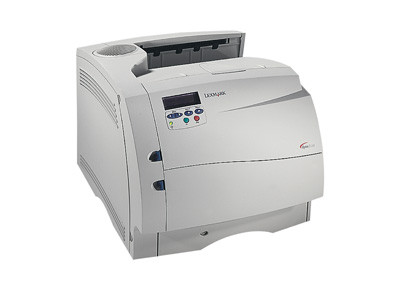
The Lexmark Optra S1250 belongs to a generation of office hardware that was simply never designed to quit. This 12-page-per-minute-class monochrome laser printer spent the 1990s on desks and in back offices, and a surprising number of them are still working today. Keeping one in service comes down to a single supply: the 1382925 high-yield black toner cartridge, rated at roughly 17,600 pages. Older Lexmark supply lists show the same printer's cartridge under an earlier Optra S designation, 1382625, and both numbers are covered by the compatible cartridges stocked on this page.
Most S1250s still in use survive for one reason: the work they do has not changed. Correspondence, invoices, labels and plain text reports look exactly as sharp off this machine as they did decades ago, so replacing it would buy features nobody needs. The running-cost math favors keeping it, too. A single high-yield cartridge covers a very long stretch of everyday printing, and the compatible versions listed here bring the per-page cost down to a level that makes a new printer hard to justify. If your S1250 is still turning out clean pages, the sensible move is to feed it well rather than send it to recycling.
Toner Cartridges for Optra S1250
Which cartridge should you buy?
Start with the yield, because on this printer the choice is refreshingly simple. Lexmark also made a standard-yield cartridge, the 1382920, but the high-yield 1382925 is the one stocked here: at around 17,600 pages it stretches a single purchase across months or even years of typical S1250 duty, and its cost per page undercuts the standard cartridge by a wide margin. From there, decide by how the printer is used. A lone S1250 in a quiet corner does fine with a single cartridge and a spare on the shelf. An office that leans on it daily should take the 2-pack or 4-pack, which lowers the per-cartridge price and removes the scramble when a long print run lands the same week the toner runs dry.
Chip, toner and everyday use
Cartridges from this era predate the pairing rituals of modern printers: the replacement slides in, the machine recognizes it, and printing resumes. Yield figures are estimates quoted at 5% page coverage under ISO/IEC 19752, so a page of dense contracts will use more toner than a short memo. When output first starts to fade, take the cartridge out and rock it gently from side to side; redistributing the toner inside often restores even print for a good while longer. Keep your spare cartridge sealed, stored flat and away from heat, and an S1250 asks for almost nothing else in return for its service.
Frequently Asked Questions
Which toner cartridge does the Optra S1250 take?
It takes the high-yield black cartridge sold here as the 1382925. If an old supply list or a storeroom label gives the number 1382625 instead, that is the earlier Optra S designation for the same cartridge family, and the compatible version on this page covers it.
How many pages will one cartridge print in the S1250?
The high-yield cartridge is rated at approximately 17,600 pages at 5% coverage, the standard business-letter density used for ISO/IEC 19752 testing. Real-world results vary with what you print: graphics-heavy pages finish a cartridge sooner, while plain correspondence often runs past the rating.
Are the cartridges on this page original Lexmark products?
No. They are premium compatible cartridges built for the Optra S1250, not original Lexmark stock. They install the same way and print to the same standard, and every compatible cartridge here is backed by a 1-year warranty and 1-year returns.
Can I keep printing when the toner light first comes on?
Usually, yes. The first low-toner warning is an estimate, not a hard stop, and gently rocking the cartridge side to side redistributes the remaining toner for many more pages. Order your replacement when the warning appears, though, so the spare is on hand when fading actually begins.
More printers that use the same cartridges
The Optra S family shares its black cartridge across the whole line, so the same supplies fit these models as well:
Optra 4059, Optra S1255, Optra S1620, Optra S1625, Optra S1650, Optra S1855, Optra S2420, Optra S2450, Optra S2455