




LaserJet M4345X
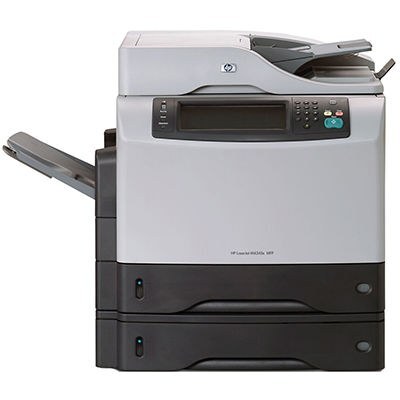
HP's LaserJet M4345X is the expanded configuration of the M4345 line — a mid-2000s monochrome multifunction built with extra capability for busier offices. It prints, copies and scans, and all of that output comes from one black cartridge, the 45A (Q5945A). Sites that run the machine hard can step up to the maximum-yield 45X (Q5945X), which stretches the supply further between changes.
The X configuration was aimed at offices where the multifunction rarely rests: a corridor or department machine that fields print jobs, copy requests and scans from a whole team. In that setting a cartridge change is a small interruption multiplied by everyone waiting, so supply planning matters more than on a personal printer. The M4345X keeps that planning to one line on the order form, since a single cartridge type covers every configuration in the family.
Toner Cartridges for LaserJet M4345X
The shelf below lists every version of the cartridge this page sells, from the standard fill to the maximum-yield option.
| Cartridge | Version | Color | Page Yield |
|---|---|---|---|
| Q5945A | Standard black cartridge | Black | See product page |
| Q5945X | Maximum-yield black cartridge | Black | See product page |
| Q5945A | Premium-quality black cartridge | Black | See product page |
| Q5945A | MICR black cartridge for check printing | Black | See product page |
| Compatible black cartridge | Listed under this model’s name | Black | See product page |
Which cartridge should you buy?
Let monthly volume decide. A department M4345X that prints every day will chew through the standard Q5945A on a regular rhythm; the maximum-yield Q5945X lengthens that rhythm and is the better habit for a busy shared machine. If the printer's workload is modest — a satellite office, a backup machine — the standard fill is the economical pattern, and the premium-quality version of the same cartridge suits buyers who want the higher build tier. The MICR listing is a specialist tool for check printing and nothing else. The cartridge listed under this model's name is the identical fitting sold another way, so no choice here can strand you with the wrong cartridge.
Chip, toner and everyday use
The printer reads each cartridge's chip to verify it and to estimate the toner remaining. Seat a new cartridge until it sits squarely in the bay; a cartridge that reports as unrecognized usually just needs reseating. Toward the end of a cartridge, output often fades on one side first — lifting the cartridge out and rocking it gently side to side redistributes the toner inside and evens the pages back up for a time. Keep one spare within reach of a shared machine like this, stored sealed in a cool, dry spot, so a faded morning report never turns into a wait for a delivery.
Frequently Asked Questions
Which toner cartridge does the LaserJet M4345X take?
The standard cartridge is the HP Q5945A, and this page also stocks its premium-quality and MICR versions. The maximum-yield Q5945X fits the same bay and simply carries more toner.
Why is my LaserJet M4345X printing faded or streaky pages?
That usually means the cartridge is running low or its toner has settled unevenly. Remove the Q5945A and rock it gently side to side, then test again; if the fading persists, the cartridge is finished and should be replaced.
Does the maximum-yield Q5945X really fit the M4345X?
Yes — it is the same cartridge design with a larger toner fill, made for this family. It installs exactly like the standard Q5945A and the printer reads its chip the same way.
The printer does not recognize a new cartridge. What should I check?
Open the cartridge door, pull the unit out and slide it back in firmly until it seats. Recognition problems on this machine are most often contact problems; a cartridge that still refuses to register after reseating should be exchanged.
More printers that use the same cartridges
Every other member of the family runs on the same cartridge pair, listed here in reverse order: LaserJet M4345XSMFP, LaserJet M4345XS, LaserJet M4345XMMFP, LaserJet M4345XMFP, LaserJet M4345XM, LaserJet M4345MFP, LaserJet M4345, LaserJet 4345XSMFP, LaserJet 4345XS, LaserJet 4345XMMFP, LaserJet 4345XMFP, LaserJet 4345XM, LaserJet 4345X, LaserJet 4345MFP, LaserJet 4345, HP Q5945A.