




LaserJet M4345MFP
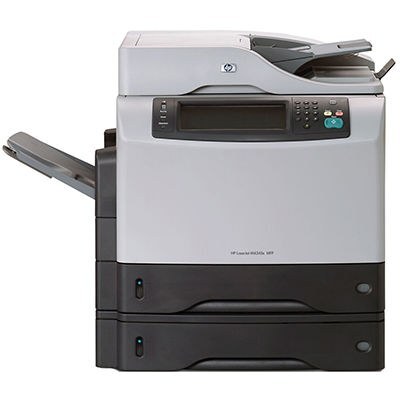
HP's M4345MFP is the multifunction listing of the M4345 — the mid-2000s refresh of the well-liked 4345 all-in-one — and small offices kept choosing it for dependable print, copy and scan duty. Toner is the Q5945A (HP 45A). Operators who burn through a standard fill too fast can move up to the Q5945X (HP 45X), a maximum-yield compatible cartridge sized for heavier monthly volume. The code on the spent cartridge is the reference for every reorder.
The MFP suffix is the machine's whole proposition: a single box on the office floor that prints the documents, copies the forms and scans the paperwork back into the system. For a small office that consolidation is worth more than raw speed, and it makes the M4345MFP the kind of printer everyone in the building knows by name — and notices immediately on the rare day it stands still.
Toner Cartridges for M4345MFP
| Cartridge | Color | Page Yield |
|---|---|---|
| Q5945A Toner Cartridge Black MICR | Black (MICR) | See product page |
| Q5945X Toner Cartridge Black Maximum Yield | Black | See product page |
| LaserJet M4345MFP Toner Cartridge Black | Black | See product page |
| Q5945A Premium Quality Toner Cartridge Black | Black | See product page |
| Q5945A Toner Cartridge Black | Black | See product page |
Which cartridge should you buy?
Two fills, one fit. The standard Q5945A is right for the office that prints steadily but not relentlessly, and its Premium build is there for buyers who favor a higher-grade compatible. When the machine's print-and-copy load is heavy, the maximum-yield Q5945X stretches the interval between changes and brings the cost per page down. The MICR listing is the check-printing specialist of the shelf, and the model-named cartridge is a compatible built and labeled for the M4345MFP itself. All carry a 1-year warranty and 1-year returns.
Chip, toner and everyday use
Install the new cartridge until it seats with a click and let the MFP read its chip before running a job; a cartridge the machine questions usually just needs reseating. If pages come out blank right after a change, the sealing strip is still in — remove the cartridge and pull it clear. Keep the next cartridge sealed in a cool, dry place; toner tolerates storage well as long as heat and sunlight stay away. A gentle end-to-end rock before fitting levels settled toner for even first pages.
Frequently Asked Questions
Can I scan documents with the LaserJet M4345MFP?
Yes — it is a multifunction printer with a built-in scanner, alongside its print and copy functions. Use the flatbed for single pages and delicate originals.
Which toner cartridge does the LaserJet M4345MFP use?
The Q5945A. Confirm the code on the cartridge you remove matches before ordering, and consider the maximum-yield Q5945X if changes come too often.
My office copies as much as it prints — which fill should we buy?
Copying consumes toner exactly like printing, so a print-and-copy office belongs on the maximum-yield Q5945X; it is built for heavier monthly volume.
What does the model-named cartridge on this page mean?
It is a compatible cartridge built for this family and labeled with the M4345MFP's own name — the same 45A fit, listed by model instead of by cartridge code.
More printers that use the same cartridges
These relatives all take the same cartridges:
LaserJet M4345XSMFP, LaserJet M4345XS, LaserJet M4345XMMFP, LaserJet M4345XMFP, LaserJet M4345XM, LaserJet M4345X, LaserJet M4345, LaserJet 4345XSMFP, LaserJet 4345XS, LaserJet 4345XMMFP, LaserJet 4345XMFP, LaserJet 4345XM, LaserJet 4345X, LaserJet 4345MFP, LaserJet 4345, HP Q5945A