




LaserJet 4345XMFP
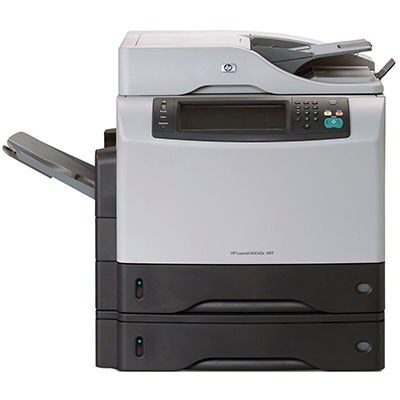
HP's 4345XMFP is the multifunction listing of the expanded 4345XM — the 2004 all-in-one with extra capability for busy offices. It uses the Q5945A (HP 45A) cartridge, and fleet managers feeding one can step up to the Q5945X (HP 45X), the maximum-yield compatible build that keeps the busiest multifunction supplied longer per change. Both codes are stocked below, alongside a premium build and a MICR version of the standard cartridge.
Departments that outgrew basic MFPs landed on machines like this one: print, scan and copy in a single chassis that a whole floor could lean on. A departmental machine changes the toner calculation — an empty cartridge is no longer one person's problem but a queue of colleagues' — which is why the maximum-yield option matters more here than it would on a personal printer.
Toner Cartridges for LaserJet 4345XMFP
| Cartridge | Color | Page Yield |
|---|---|---|
| Q5945A (45A) | Black | See product page |
| Q5945X (45X) | Black | See product page |
| Q5945A Premium | Black | See product page |
| Q5945A MICR | Black | See product page |
Which cartridge should you buy?
The standard Q5945A is the baseline and the right answer for a moderately used machine. The Q5945X maximum-yield build is the departmental choice: it keeps a busy multifunction supplied longer per change, which means fewer interruptions landing in the middle of someone else's deadline. The premium build of the standard cartridge suits offices that standardize on that line, and the MICR version exists for check printing. Whichever you choose, hold a spare in the department — shared machines should never wait on a delivery.
Chip, toner and everyday use
Only printing consumes toner on an MFP: scanning and copying-to-file draw nothing from the cartridge, while every printed or copied page does. That is worth remembering when a cartridge seems to fade early in a copy-heavy week. The swap itself is a one-cartridge job — pull the old unit, seat the new one, and let the machine calibrate before sending the next job. Keep the spare where the whole department knows to look, and log the change if your floor tracks supplies, so the next reorder is never a surprise.
Frequently Asked Questions
Which toner cartridge does the LaserJet 4345XMFP use?
The Q5945A, with the maximum-yield Q5945X as the longer-running alternative in the same slot. Confirm the code printed on your current cartridge matches before ordering a replacement.
Can I scan documents with the 4345XMFP?
Yes — it is a multifunction machine with a built-in scanner, so you can scan to a computer, email or a USB drive. Use the scanner glass for single pages and delicate originals.
Can the 4345XMFP make copies without a computer?
Yes. It works as a standalone copier: place the original on the scanner and press copy on the control panel. No computer connection is needed for basic copying.
45A or 45X — which suits a busy department?
The 45X. Its maximum-yield build exists precisely for machines whose empty cartridge becomes everyone's problem; the standard 45A remains the economical pick when the machine's workload is moderate.
More printers that use the same cartridges
The 45A and 45X cartridges also serve the rest of the 4345 family: HP Q5945A, LaserJet 4345, LaserJet 4345MFP, LaserJet 4345X, LaserJet 4345XM, LaserJet 4345XMMFP, LaserJet 4345XS, LaserJet 4345XSMFP, LaserJet M4345, LaserJet M4345MFP, LaserJet M4345X, LaserJet M4345XM, LaserJet M4345XMFP, LaserJet M4345XMMFP, LaserJet M4345XS, LaserJet M4345XSMFP.