




LaserJet 4345XS
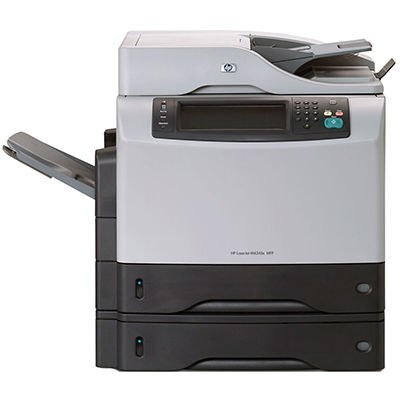
HP packaged the LaserJet 4345XS as the solutions-oriented configuration of its 2004 LaserJet 4345 multifunction — an A4 all-in-one aimed at offices with specific workflow requirements rather than plain walk-up printing. Whatever the workflow layered on top, the engine underneath runs on one cartridge: the 45A (Q5945A). Sites that burn through the standard fill can spec the 45X (Q5945X), a maximum-yield compatible cartridge that keeps the 45A fit while holding a deeper toner supply.
Solutions configurations tend to be bought deliberately — a department standardized on this build for a particular document process — which makes running out of toner more disruptive than on an ordinary shared printer. The process stops, not just the printing. That is the practical argument for keeping the cartridge situation simple on a 4345XS: one code to reorder, one spare on the shelf, and a high-yield option when the workflow's volume justifies it.
Toner Cartridges for LaserJet 4345XS
- Q5945A standard cartridge — Black; page yield: See product page
- Q5945A Premium Quality cartridge — Black; page yield: See product page
- LaserJet 4345XS cartridge (model-named listing) — Black; page yield: See product page
- Q5945A MICR cartridge — Black; page yield: See product page
- Q5945X maximum-yield cartridge — Black; page yield: See product page
Which cartridge should you buy?
For a 4345XS doing steady everyday work, the standard Q5945A remains the baseline, with the Premium Quality listing offering the same code in a premium build for offices that prefer it. The decision point is changeover frequency: if staff are opening the machine more often than the workflow tolerates, the Q5945X maximum-yield cartridge answers it without changing anything else about how the printer runs. The Q5945A MICR listing is a specialty cartridge for check printing and should not be bought as a general refill. Compatible cartridges on this page carry a 1-year warranty and 1-year returns.
Chip, toner and everyday use
Yield figures are estimates worked out at 5 percent page coverage, and a workflow-heavy machine — forms, scanned copies, multi-page sets — can move through toner faster than that estimate suggests. Treat the printer's low-toner message as the reorder trigger and schedule the swap for a quiet window rather than mid-process. Rock a new cartridge gently from side to side before installing it so the toner inside sits level, and store the spare sealed in a cool, dry place; toner keeps best away from heat and humidity.
Frequently Asked Questions
What toner does the LaserJet 4345XS take?
The Q5945A, HP's 45A black cartridge. The Q5945X is the maximum-yield version of the same cartridge family and fits this model as well.
How is the Q5945X different from the standard cartridge?
Same fit, deeper fill. The Q5945X is the maximum-yield option, so it prints longer before running out; nothing about installation or the machine's settings changes.
Should a solutions site keep a spare on hand?
Yes — a workflow built around this machine should not wait on a delivery. Keep one sealed Q5945A or Q5945X beside the printer and reorder when the spare goes in.
Is there a premium version of the standard cartridge?
Yes. Alongside the standard listing, this page carries a Premium Quality Q5945A build. Both are the same cartridge code; the choice is about the build, not compatibility.
These related models take the same cartridges: LaserJet M4345XSMFP, LaserJet M4345XS, LaserJet M4345XMMFP, LaserJet M4345XMFP, LaserJet M4345XM, LaserJet M4345X, LaserJet M4345MFP, LaserJet M4345, LaserJet 4345XSMFP, LaserJet 4345XMMFP, LaserJet 4345XMFP, LaserJet 4345XM, LaserJet 4345X, LaserJet 4345MFP, LaserJet 4345, HP Q5945A.