




LaserJet M1005 MFP
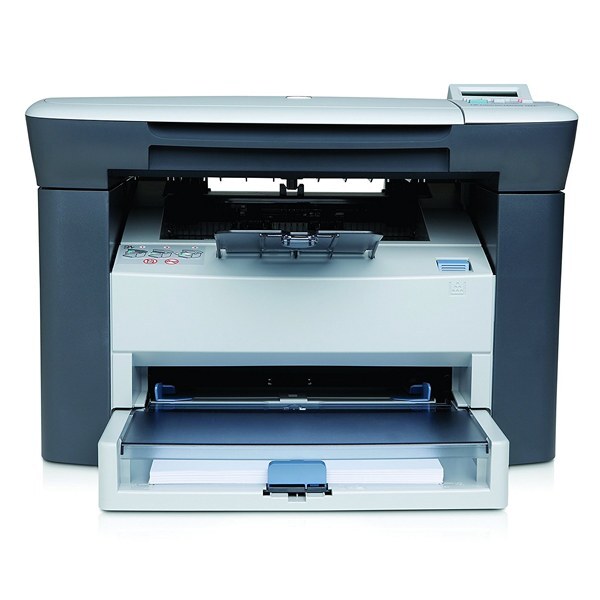
Under its full multifunction name, the LaserJet M1005 MFP is the 2006 budget all-in-one that small offices and home businesses ran for years — printing, scanning and copying from one compact machine. Toner follows the family recipe: the Q2612A as the standard cartridge, the Q2612X when a deeper high-yield fill makes sense, and the Q2612AJ jumbo build for the hardest-working desks. Owners shopping by the short family codes will know the standard cartridge as the 12A and the high-yield as the 12X.
A machine bought as an office's only device lives a particular life: morning invoices, midday copies of signed paperwork, scans headed for email, all through one small box. The M1005 MFP was spec'd for exactly that mixed diet, and its owners value it for never demanding attention — the cartridge shelf below is built the same way, with enough depth that toner is a stocked item, not a recurring errand.
Toner Cartridges for LaserJet M1005 MFP
- Q2612X High Yield — black — high yield, page yield: See product page
- Q2612X High Yield 2 Pack — black — high yield, page yield: See product page
- Q2612X High Yield 3 Pack — black — high yield, page yield: See product page
- Q2612X High Yield 5 Pack — black — high yield, page yield: See product page
- Q2612X High Yield 10 Pack — black — high yield, page yield: See product page
- 12X 4 Black (Q2612A / Q2612X) — black — high yield, page yield: See product page
- Q2612A — black, page yield: See product page
- Q2612A — alternate listing — black, page yield: See product page
- Q2612A — duplicate listing — black, page yield: See product page
- Q2612A 2 Pack — black, page yield: See product page
- Q2612A 3 Pack — black, page yield: See product page
- Q2612A 5 Pack — black, page yield: See product page
- Q2612A Premium Quality 5 Pack — black, page yield: See product page
- Q2612A 6 Pack — black, page yield: See product page
- Q2612A 10 Pack — black, page yield: See product page
- Q2612A MICR — black — micr, page yield: See product page
- Q2612AJ Jumbo Yield — black — jumbo yield, page yield: See product page
- Q2612AJ Jumbo Yield 4 Pack — black — jumbo yield, page yield: See product page
- LaserJet M1005MFP cartridge — black, page yield: See product page
Which cartridge should you buy?
Copy-heavy desks should start at the high-yield Q2612X: copies draw on the same fill as prints, so mixed-use machines empty standard cartridges sooner than their owners expect. The jumbo Q2612AJ is the longest-legged option for an all-in-one that never rests. Genuinely light users can economize with the standard Q2612A single. The multi-pack ladder — 2, 3, 5, 6 and 10 counts, plus a premium-quality 5-pack — suits offices that keep a supply shelf, and the MICR build covers check printing. Compatible cartridges carry a 1-year warranty and 1-year returns.
Chip, toner and everyday use
Because this machine scans and copies as well as prints, judge toner problems by the printout, not the copy: if prints are clean but copies are pale, wipe the scanner glass before touching the cartridge. When a swap is due, rock the new cartridge gently to level the toner, remove the seal in one straight pull, and let the machine recognize it before sending the next job. Yield ratings assume about 5% page coverage; dense forms and shaded paperwork spend a fill noticeably faster. Store the spare sealed and flat, away from the heat the machine itself gives off.
Frequently Asked Questions
Is the M1005 MFP's cartridge different from the M1005's?
No — the full-name MFP listing and the M1005 are the same machine family and share the Q2612A cartridge shelf exactly, including the high-yield and jumbo builds.
Why does my M1005 MFP run out of toner faster than expected?
Copies count. Every copied page spends toner just like a printed one, so an all-in-one doing daily copy work empties a standard cartridge quickly — stepping up to the Q2612X or the jumbo Q2612AJ usually ends the surprise.
What does the jumbo Q2612AJ give me over the high-yield Q2612X?
More toner in the same fit. The Q2612AJ is the deepest fill stocked for this family, aimed at desks that print and copy all day and want the fewest possible changeovers.
The printer does not recognize a new cartridge — what first?
Power the machine down, reseat the cartridge firmly until it clicks, and restart. Compact all-in-ones occasionally miss a contact on the first fit; a reseat cures most recognition complaints without replacing anything.
More printers that use the same cartridges
Every model in this long list shares the same 12A cartridge family:
Laserjet 1022NW, Laserjet 1022N, Laserjet 1022, Laserjet 1020, Laserjet 1018, Laserjet 1015, Laserjet 1012, Laserjet 1010, LaserJet M1319F MFP, LaserJet M1319F, LaserJet M1319, LaserJet M1005MFP, LaserJet M1005, LaserJet 3055, LaserJet 3052MFP, LaserJet 3052, LaserJet 3050Z, LaserJet 3050MFP, LaserJet 3050, LaserJet 3030MFP, LaserJet 3030, LaserJet 3020MFP, LaserJet 3020, LaserJet 3015MFP, LaserJet 3015, LaserJet 1030, LaserJet 1022NXI, LaserJet 1018S, LaserJet 1010W, LaserJet 1010, HP Q2612A