




Laserjet 1018
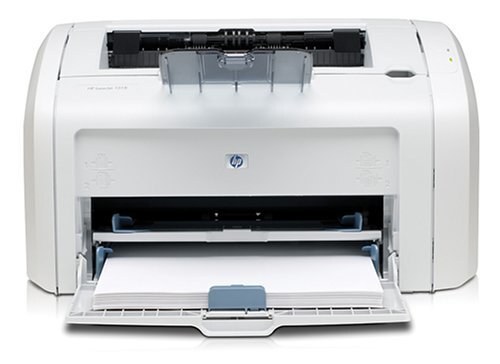
When HP refreshed its personal laser line in 2005, the Laserjet 1018 became the new entry point — smaller, quieter and quicker than the models it replaced, and students and home offices snapped it up by the millions. Its cartridge is HP's 12A (Q2612A); the high-yield 12X (Q2612X) trims the cost of each page for regular printing, and the busiest 1018 owners can go further still with the jumbo-yield Q2612AJ, which extends the time between changes beyond even the 12X.
An entry-point printer lives or dies by how little thought it demands, and the 1018 understood the assignment: one black cartridge, no color hardware, nothing to configure beyond plugging it in. That is also why so many are still running — a machine with one consumable has very little to go wrong. The shelf below is arranged for the two kinds of 1018 owner: the student who replaces a cartridge once a year, and the household whose printer quietly became the family print shop.
Toner Cartridges for Laserjet 1018
- Q2612A / 12A · 6 Pack — Black — See product page
- Q2612A / 12A · MICR — Black (MICR) — See product page
- Q2612AJ · 4 Pack · Jumbo Yield — Black — See product page
- Q2612AJ · Jumbo Yield — Black — See product page
- Q2612A / 12A · 10 Pack — Black — See product page
- Q2612A / 12A · 2 Pack — Black — See product page
- Q2612A / 12A · 3 Pack — Black — See product page
- Q2612A / 12A · 5 Pack — Black — See product page
- Q2612A / 12A · 5 Pack · Premium — Black — See product page
- HP Laserjet 1018 Black — Black — See product page
- Q2612A / 12A — Black — See product page
- Q2612X / 12X · High Yield — Black — See product page
- Q2612X / 12X · 10 Pack · High Yield — Black — See product page
- Q2612X / 12X · 2 Pack · High Yield — Black — See product page
- Q2612X / 12X · 3 Pack · High Yield — Black — See product page
- Q2612X / 12X · 5 Pack · High Yield — Black — See product page
- 12X / Q2612A / Q2612X · 4 Black — Black — See product page
- 12A / Q2612A — Black — See product page
Which cartridge should you buy?
The standard 12A is the honest default for the 1018's typical workload — coursework, letters, the occasional form — and it keeps the cost of keeping the printer ready as low as possible. Move to the 12X when printing becomes a weekly rhythm rather than an occasional event: the cartridge costs more up front, then pays it back in a lower cost per page and far fewer changes. The jumbo Q2612AJ is for the outliers, the 1018 units printing for a whole household or a small club or society, where even high-yield changes come too often. Whichever tier you choose, buying a two-pack keeps a spare in the drawer for the night-before deadline. Every compatible cartridge here carries a 1-year warranty and 1-year returns.
Chip, toner and everyday use
Light vertical bands on the page are the classic 1018 cartridge symptom, and they usually live inside the cartridge rather than the printer: take the unit out, rock it gently to redistribute the toner, and reseat it. Bands that survive that step are the cartridge asking to be replaced. New cartridges go in with the sealing tape pulled and a firm final push. A practical note on yields: the numbers behind standard and high-yield ratings assume light test coverage, so a semester of dense lecture slides will always run a cartridge down faster than the same count of plain letters.
Frequently Asked Questions
What is the difference between the Q2612A and Q2612X cartridges for the Laserjet 1018?
For the Laserjet 1018, the two are the same cartridge family in two capacities: standard (HP 12A) and high-yield (HP 12X). Either one installs the same way; the choice is purely about how much you print.
How do I fix light vertical bands on prints from my Laserjet 1018?
Start with the cartridge, not the printer. Reseat the 12A after a gentle redistribution of its toner; if the bands persist across several pages afterward, the cartridge is spent and a fresh Q2612A is the fix.
Will the Laserjet 1018 work with a newer computer?
Generally, yes. Check HP's support site for a driver for your system first, and fall back to the universal print driver if a model-specific one is not offered — as long as the 1018 connects, the software side is solvable.
Is the jumbo cartridge overkill for a student?
For most students, yes — a standard or high-yield cartridge already outlasts a semester. The jumbo Q2612AJ earns its keep when one 1018 serves a whole household or prints in serious volume.
More printers that use the same cartridges
The 1018's cartridges are the family standard, shared with:
- HP Q2612A
- LaserJet 1010
- LaserJet 1010W
- LaserJet 1018S
- LaserJet 1022NXI
- LaserJet 1030
- LaserJet 3015
- LaserJet 3015MFP
- LaserJet 3020
- LaserJet 3020MFP
- LaserJet 3030
- LaserJet 3030MFP
- LaserJet 3050
- LaserJet 3050MFP
- LaserJet 3050Z
- LaserJet 3052
- LaserJet 3052MFP
- LaserJet 3055
- LaserJet M1005
- LaserJet M1005 MFP
- LaserJet M1005MFP
- LaserJet M1319
- LaserJet M1319F
- LaserJet M1319F MFP
- Laserjet 1010
- Laserjet 1012
- Laserjet 1015
- Laserjet 1020
- Laserjet 1022
- Laserjet 1022N
- Laserjet 1022NW