




LaserJet 3020
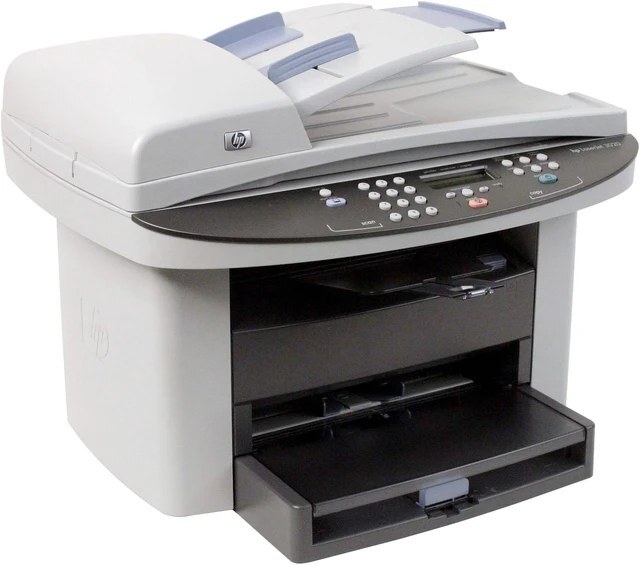
The LaserJet 3020 carried HP's early-2000s multifunction push onto the small-office desk: printing, flatbed scanning and copying in one monochrome machine — the daily trio most offices actually used. Its cartridge family starts with the standard Q2612A, rises to the high-yield Q2612X, and tops out at the jumbo Q2612AJ, which outlasts even the high-yield. The short names on the boxes read 12A, 12X and 12AJ.
The 3020 earned its place by being the machine within arm's reach: the one that printed the invoice, copied the form and scanned the signed page without a walk down the hall. Machines in that role accumulate pages quietly — a copy here, a scan-to-print there — and their cartridges empty on a rhythm set by the whole office rather than by any single user.
Toner Cartridges for LaserJet 3020
- Q2612A — 6 Pack — black toner; the rated yield for each listing is on its product page
- Q2612A MICR (HP 12A) — black toner; the rated yield for each listing is on its product page
- Q2612AJ — Jumbo Yield 4 Pack — black toner; the rated yield for each listing is on its product page
- Q2612AJ (HP 12AJ) — Jumbo Yield — black toner; the rated yield for each listing is on its product page
- Q2612A — 10 Pack — black toner; the rated yield for each listing is on its product page
- Q2612A — 2 Pack — black toner; the rated yield for each listing is on its product page
- Q2612A — 3 Pack — black toner; the rated yield for each listing is on its product page
- Q2612A — 5 Pack — black toner; the rated yield for each listing is on its product page
- Q2612A Premium — 5 Pack — black toner; the rated yield for each listing is on its product page
- Black cartridge listed under this model — black toner; the rated yield for each listing is on its product page
- Q2612A (HP 12A) — black toner; the rated yield for each listing is on its product page
- Q2612X (HP 12X) — black toner; the rated yield for each listing is on its product page
- Q2612X — 10 Pack — black toner; the rated yield for each listing is on its product page
- Q2612X — 2 Pack — black toner; the rated yield for each listing is on its product page
- Q2612X — 3 Pack — black toner; the rated yield for each listing is on its product page
- Q2612X — 5 Pack — black toner; the rated yield for each listing is on its product page
- HP 12X family — 4 Black (Q2612A / Q2612X) — black toner; the rated yield for each listing is on its product page
- HP 12A — Black (Q2612A) — black toner; the rated yield for each listing is on its product page
- HP 12A — Black (Q2612A), alternate listing — black toner; the rated yield for each listing is on its product page
Which cartridge should you buy?
Cost control on a 3020 starts with the cartridge tier. The standard fill is the cheapest way onto the shelf and fits a machine with genuinely light use. The high-yield lowers the cost of every page and is the default for most offices. The jumbo pushes the per-page cost down furthest and suits a machine that copies as much as it prints. Beyond the tier, two habits stretch any of them: use draft or toner-save mode for internal documents, and reserve full quality for pages that leave the building. Compatible cartridges across all three tiers keep the arithmetic friendly.
Chip, toner and everyday use
A fresh cartridge announces itself through its chip, so the 3020 knows a new supply is fitted as soon as the door closes. Keep print quality honest by watching the output rather than the calendar: even fading across a page is the classic sign that toner is running low and settling unevenly. A gentle horizontal rock of the cartridge redistributes what is left and usually restores clean pages for the remainder of its life. Store the next cartridge sealed and flat, and the swap becomes a non-event.
Frequently Asked Questions
How can I lower toner costs on the LaserJet 3020?
Choose compatible cartridges for everyday work and turn on draft or toner-save mode for internal pages; together they cut the cost of routine output significantly. Save full-quality settings for documents that go to clients, and the cartridge budget stretches much further.
Does the 3020 need a separate drum unit?
No separate drum is sold for this machine. The cartridge is a single unit that you replace whole, which is why the supply list for the 3020 contains cartridges only — when output quality fades for good, one swap renews everything at once.
How long does an unopened spare cartridge keep?
A long time, if it is stored properly: sealed in its bag, flat, and away from heat and sunlight. Under those conditions a spare stays ready on the shelf, so there is no penalty for buying the next cartridge — or a multi-pack — well ahead of needing it.
More printers that use the same cartridges
Alphabetically, the models that run on this same cartridge family are: HP Q2612A, LaserJet 1010, Laserjet 1010, LaserJet 1010W, Laserjet 1012, Laserjet 1015, Laserjet 1018, LaserJet 1018S, Laserjet 1020, Laserjet 1022, Laserjet 1022N, Laserjet 1022NW, LaserJet 1022NXI, LaserJet 1030, LaserJet 3015, LaserJet 3015MFP, LaserJet 3020MFP, LaserJet 3030, LaserJet 3030MFP, LaserJet 3050, LaserJet 3050MFP, LaserJet 3050Z, LaserJet 3052, LaserJet 3052MFP, LaserJet 3055, LaserJet M1005, LaserJet M1005 MFP, LaserJet M1005MFP, LaserJet M1319, LaserJet M1319F and LaserJet M1319F MFP.