




LaserJet 3015
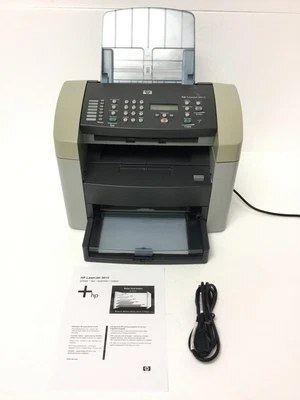
Introduced around 2003, the HP LaserJet 3015 was among the first affordable monochrome multifunction printers — printing, scanning and copying in one compact box, at a price small offices could finally accept. It runs on a single black cartridge, the Q2612A, with two longer-lived versions of the same cartridge above it: the high-yield Q2612X and the jumbo-yield Q2612AJ. The family is better known by HP's short names — 12A, 12X and 12AJ.
One cartridge feeding three jobs is the 3015's defining trait. Every copy and every printed page draws from the same toner supply, so a busy all-in-one works its cartridge harder than a print-only machine with the same page count of documents. That is worth remembering when the toner light arrives sooner than expected: on an MFP, the cartridge has been serving the copier too.
Toner Cartridges for LaserJet 3015
| Cartridge | Color | Page Yield |
|---|---|---|
| Q2612A — 6 Pack | Black | See product page |
| Q2612A MICR (HP 12A) | Black | See product page |
| Q2612AJ — Jumbo Yield 4 Pack | Black | See product page |
| Q2612AJ (HP 12AJ) — Jumbo Yield | Black | See product page |
| Q2612A — 10 Pack | Black | See product page |
| Q2612A — 2 Pack | Black | See product page |
| Q2612A — 3 Pack | Black | See product page |
| Q2612A — 5 Pack | Black | See product page |
| Q2612A Premium — 5 Pack | Black | See product page |
| Black cartridge listed under this model | Black | See product page |
| Q2612A (HP 12A) | Black | See product page |
| Q2612X (HP 12X) | Black | See product page |
| Q2612X — 10 Pack | Black | See product page |
| Q2612X — 2 Pack | Black | See product page |
| Q2612X — 3 Pack | Black | See product page |
| Q2612X — 5 Pack | Black | See product page |
| HP 12X family — 4 Black (Q2612A / Q2612X) | Black | See product page |
| HP 12A — Black (Q2612A) | Black | See product page |
| HP 12A — Black (Q2612A), alternate listing | Black | See product page |
Which cartridge should you buy?
Match the fill to how the machine spends its day. A 3015 that mostly prints a few pages and idles between jobs is perfectly happy on the standard cartridge. If it copies and prints steadily through the week, the high-yield version lowers the cost of every page and halves the changeovers. The jumbo is for the hardest-worked units — the front-desk machine that never really stops — where the longest possible interval is worth more than the lowest purchase price. Because one cartridge covers printing and copying alike, keeping a spare is doubly sensible: an empty cartridge stops both jobs at once.
Chip, toner and everyday use
The cartridge chip lets the 3015 recognize a fresh supply as soon as it is installed, and compatible cartridges may prompt a message about a non-original supply that you can simply accept. Rated yields are estimates built on standard test pages with light coverage, so dense documents and heavy copying use toner faster than the rating suggests. When pages begin to fade, rock the cartridge gently from side to side to level what remains — on an MFP that small rescue buys time for prints and copies alike while the spare is fitted.
Frequently Asked Questions
Which toner cartridge does the LaserJet 3015 take?
It takes the standard cartridge linked at the top of this page, with high-yield and jumbo versions of the same cartridge above it. All three are the same physical fit; they differ only in how much toner they carry.
Why do faint repeated images appear on pages from my 3015?
That ghosting pattern usually points to a cartridge near the end of its life rather than to the printer itself. Swap in a spare cartridge and print the same page: if the repeats vanish, the old cartridge was responsible and the machine is fine.
Does copying use the same toner as printing?
Yes. The 3015 has a single toner supply for everything it puts on paper, so copies draw from the same cartridge as prints. Scanning, by contrast, uses no toner at all — it only reads the page.
More printers that use the same cartridges
This is one of HP's longest-running cartridge families. The full list of models that share it: HP Q2612A, LaserJet 1010, LaserJet 1010W, LaserJet 1018S, LaserJet 1022NXI, LaserJet 1030, LaserJet 3015MFP, LaserJet 3020, LaserJet 3020MFP, LaserJet 3030, LaserJet 3030MFP, LaserJet 3050, LaserJet 3050MFP, LaserJet 3050Z, LaserJet 3052, LaserJet 3052MFP, LaserJet 3055, LaserJet M1005, LaserJet M1005 MFP, LaserJet M1005MFP, LaserJet M1319, LaserJet M1319F, LaserJet M1319F MFP, Laserjet 1010, Laserjet 1012, Laserjet 1015, Laserjet 1018, Laserjet 1020, Laserjet 1022, Laserjet 1022N and Laserjet 1022NW.