




COLOR LASERJET 5500N
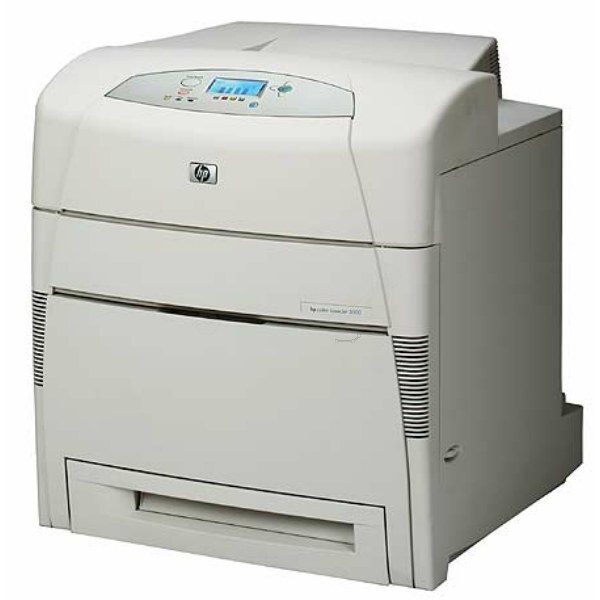
The HP Color LaserJet 5500N shared its wide-format color output across the office network — for early-2000s departments needing A3 color, it was the practical shared solution. It runs HP 645A toner: black C9730A alongside cyan C9731A, yellow C9732A and magenta C9733A. The family's singles, multi-packs and sets are all listed below.
The N configuration put the 5500's A3 engine on the network without the duplexer of its DN sibling: one machine, many desks, all of them able to send a poster or an oversized spreadsheet to the same output tray. Shared machines develop shared habits — and a shared appetite for black toner in particular.
Toner Cartridges for COLOR LASERJET 5500N
| Cartridge | Color | Page Yield |
|---|---|---|
| 645A 4 Color Set (C9730A, C9731A, C9732A, C9733A) | Black, cyan, yellow and magenta | See product page |
| C9730A | Black | See product page |
| C9731A | Cyan | See product page |
| C9732A | Yellow | See product page |
| C9733A | Magenta | See product page |
| 4 Color Set (C9730A, C9731A, C9732A, C9733A) | Black, cyan, yellow and magenta | See product page |
| C9730A — 3 Black pack | Black | See product page |
| C9730A | Black | See product page |
| C9732A | Yellow | See product page |
| 645A 3 Color Set (C9731A, C9732A, C9733A) | Cyan, yellow and magenta | See product page |
| 642A (C9733A) | Magenta | See product page |
The same shelf also carries listings labeled for the sibling models in this family — the cartridges are the same, and each listing below is the one it names:
- HP 5500 (C9730A) Toner 3 Black
- HP 5500 (C9730A) Toner Black
- HP 5500 (C9731A) Toner Cyan
- HP 5500dtn (C9730A) Toner 2 Black
- HP 5500dtn (C9730A) Toner 3 Black
- HP 5500dtn (C9730A) Toner Black
- HP 5500dtn (C9731A) Toner Cyan
- HP 5500dtn (C9733A) Toner Magenta
- HP 5500dtn (C9732A) Toner Yellow
- HP 5550 (C9730A) Toner 2 Black
- HP 5550 (C9730A) Toner Black
- HP 5550 (C9731A) Toner Cyan
- HP 5550 (C9733A) Toner Magenta
- HP 5550 (C9732A) Toner Yellow
- HP 5550dn (C9730A) Toner 2 Black
- HP 5550dn (C9730A) Toner 3 Black
- HP 5550dn (C9730A) Toner Black
- HP 5550dn (C9731A) Toner Cyan
- HP 5550dn (C9733A) Toner Magenta
- HP 5550dn (C9732A) Toner Yellow
- HP 5550dtn (C9730A) Toner 2 Black
- HP 5550dtn (C9730A) Toner 3 Black
- HP 5550dtn (C9730A) Toner Black
- HP 5550dtn (C9731A) Toner Cyan
- HP 5550dtn (C9733A) Toner Magenta
- HP 5550dtn (C9732A) Toner Yellow
- HP 5550n (C9730A) Toner Black
- HP 5550n (C9733A) Toner Magenta
- HP 5500hdn (C9731A) Toner Cyan
- HP 5550hdn (C9731A) Toner Cyan
- HP 5550hdn (C9733A) Toner Magenta
- HP 5550hdn (C9732A) Toner Yellow
Which cartridge should you buy?
Think of this printer's toner in two streams. Stream one is black: everyday office documents, sent by everyone, empty the C9730A long before any color — the 2-black and 3-black listings exist so the shared machine never waits on a single cartridge order. Stream two is color: project work arrives in bursts, and a burst usually burns one color hardest, so keep the C9731A, C9732A and C9733A singles as the targeted replacements. The 4 Color Set is the reset button for the whole family when quality across all colors starts to slide, and the 3 Color Set refreshes just the color trio. Owning the reserve yourself beats discovering an empty color the morning a presentation is due.
Chip, toner and everyday use
Because a networked printer serves people who are not in the room, leave it ready: after a cartridge change, confirm the panel shows the new cartridge recognized and the supply level updated. Seat the cartridge firmly so its chip makes contact the first time. A spare that has been shelved for a while prints more evenly after a gentle shake redistributes the toner. Store reserves sealed, flat and away from windows; heat and light are the two enemies of a cartridge waiting its turn.
Frequently Asked Questions
What toner fits the Color LaserJet 5500N?
HP 645A — C9730A black, C9731A cyan, C9732A yellow, C9733A magenta. The same family covers every 5500 and 5550 model.
The printer says a color is empty but I only print documents — why?
Shared machines print everyone's work, including color jobs from other desks. The empty color's single is all you need to replace.
Singles or the 4 Color Set for a shared printer?
Singles for the color-by-color reality of shared use; the set when the whole family is aging together and you want one maintenance moment instead of four.
Is there a set without black?
Yes — the 3 Color Set bundles cyan, yellow and magenta for shops whose black supply runs on the multi-black listings instead.
More printers that use the same cartridges
Nothing changes when you move between these models — the toner family is identical across the list: COLOR LASERJET 5550, COLOR LASERJET 5550DN, COLOR LASERJET 5550DTN, COLOR LASERJET 5550HDN, COLOR LASERJET 5550N, HP 645A, COLOR LASERJET 5500, COLOR LASERJET 5500DN, COLOR LASERJET 5500DTN, COLOR LASERJET 5500HDN.