







 See Compatible Printers
 Read more about our ink!
Hewlett Packard
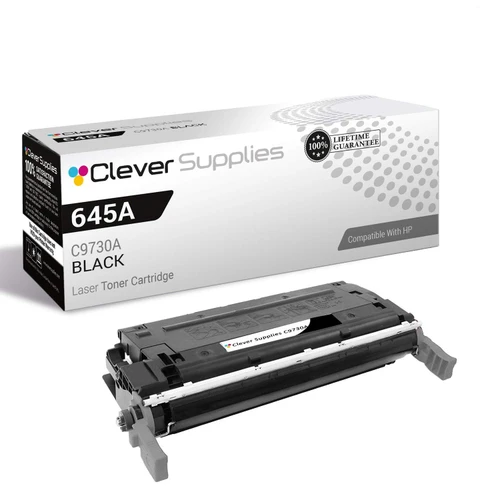
Compatible HP 5500n (C9730A) Toner Cartridge Black
- Page Yield:
- Black: 13000
- Availability:
- In Stock
- Shipping:
- Free Shipping

Amazon Price:

- Page Yield:
- Black: 13000
- Availability:
- In Stock
- Shipping:
- Free Shipping
- Compatible Printers
- Color LaserJet 5500
- Color LaserJet 5500dn
- Color LaserJet 5500dtn
- Color LaserJet 5500hdn
- Color LaserJet 5500n
- Color LaserJet 5550
- Color LaserJet 5550dn
- Color LaserJet 5550dtn
- Color LaserJet 5550hdn
- Color LaserJet 5550n
- LaserJet 5500
- LaserJet 5500dn
- LaserJet 5500dtn
- LaserJet 5500hdn
- LaserJet 5500n
- LaserJet 5550
- LaserJet 5550dn
- LaserJet 5550dtn
- LaserJet 5550hdn
- LaserJet 5550ni>
- i>
- HP 645A
- Specifications
- SKU:
- CLS-HP-5500n-BK
- Printer Brand:
- Hewlett Packard
- OEM Number:
- C9730A
- Ink Color:
- Black
- Page Yield:
- Black: 13000
- Printer Type:
- Laser Cartridge
- Condition:
- New Compatible
- Description
- Reviews



Explore the robust and reliable printing capabilities of the HP 645A Color LaserJet Series, offering a comprehensive range of printers to meet diverse printing requirements. The Color LaserJet 5500DN, 5500DTN, 5500HDN, and 5500N models provide high-quality color printing, while the 5550DN, 5550DTN, 5550HDN, and 5550N offer enhanced performance and versatility. Experience vibrant color printing with the C9730A Black, C9731A Cyan, C9733A Magenta, and C9732A Yellow toner cartridges, compatible with the HP 645A toner cartridge and toner cartridge options. These cartridges ensure consistent and reliable print quality for a variety of printing tasks, from documents to marketing materials. Invest in a printing solution that meets your business needs with the HP 645A Color LaserJet Series, known for its exceptional performance and professional-grade results. Whether it's the Color LaserJet 5500 series or 5550 series models, these printers deliver superior print quality and reliability for all your printing needs.
Frequently Asked Questions
Which black fits the networked 5500n in our office?
The 5500n takes the C9730A black, part of the HP 645A family. This is a single cartridge at $166.60, matched by the code on the label of the cartridge already in the machine.
Why did the black seem to run out without anyone noticing?
A networked printer has many owners and no owner. Everyone sends jobs, nobody watches the supply gauge, and black — used by nearly every page from every desk — quietly works its way to empty until pale text gives it away.
How long should one cartridge last a shared printer?
The rating is 13,000 pages at standard coverage. On a shared machine the calendar life depends on how many people print and how much of it is plain text, but the page count itself is the dependable measure.
Can the printer tell us how much black is left before it fails?
Yes. The supply status page, printed from the control panel or viewed through the printer's network page, reports the black level alongside the colors. Checking it weekly lets a shared office reorder before the fade reaches someone's deadline.
Is it worth naming one person to handle the swap?
It helps. A single cartridge change takes minutes, and having one person who knows where the spare sits and how the old unit comes out keeps a shared printer from sitting idle while colleagues assume someone else is fixing it.
What support backs this cartridge after purchase?
Call or message us Monday–Friday, 9 AM–5 PM CST and we will help identify whether the cartridge is at fault. It is covered by a 1-year warranty and 1-year free returns; the shipping & returns page explains the process.
A department-wide mailing is scheduled for next week. How should the black be handled?
Check the supply status page a few days ahead rather than on the morning itself. If the black is reading low, fit the new C9730A before the mailing run starts. A mailing printed half on a fading cartridge and half on a fresh one shows the join, and a change forced mid-run holds up every desk waiting on the same printer.
Why does a shared printer justify keeping a spare nobody has asked for?
Because nobody in particular watches it. On a personal printer the owner notices the fade early; on a networked 5500n the warning belongs to everyone and no one. A sealed C9730A kept beside the machine means whoever first finds the pale text can fix it in minutes, instead of starting a search for whoever handles ordering.
What is worth noting each time the cartridge is changed?
The printer's page counter, read at the moment of the swap. Two changes give the office its real pages-per-cartridge figure on this shared machine — a number that mixes every user's habits and is worth far more for planning than the rated figure alone. Note the date as well, and the office learns its calendar pace too.
What should happen to the empty cartridge after the change?
Keep it for the first few days while the new cartridge handles the usual mix of jobs from different desks. A shared printer puts varied work through a cartridge quickly, so a few days is a fair trial. Once output has stayed clean across that mix, the empty can be disposed of with a clear record of the change behind it.
About This Black Cartridge for the Color LaserJet 5500n
A Color LaserJet 5500n serving a whole office burns through black faster than any single user expects, because every desk contributes. This C9730A single, rated at 13,000 pages, is the straightforward replacement that keeps the shared queue moving.
Your order ships from the closest of our IL, PA, GA and CA warehouses. Other HP cartridges for the same machine are stocked here for the day the colors run low.
Related Items


Hewlett Packard
Compatible HP 5500 (C9730A) Toner Cartridge Black



Hewlett Packard
Compatible HP 5500n (C9730A) Toner Cartridge 3 Black


Hewlett Packard
Compatible HP 5500 (C9730A) Toner Cartridge 3 Black


Hewlett Packard
Compatible HP 5550dn (C9730A) Toner Cartridge 3 Black