




COLOR LASERJET 5500
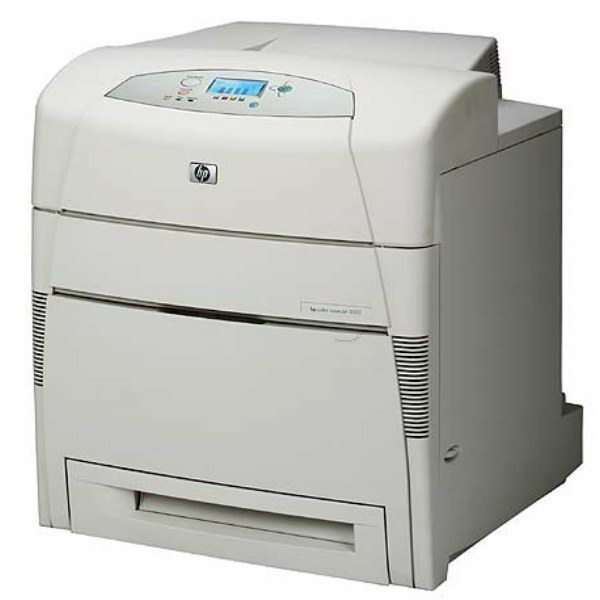
The HP Color LaserJet 5500 was the departmental wide-format color printer of the early 2000s, built to put A3 pages — engineering drawings, posters and oversized reports — on paper in full color. It runs on the HP 645A toner family: black C9730A, cyan C9731A, yellow C9732A and magenta C9733A, four separate cartridges that each handle one color. Everything stocked on this page is built for that family.
Machines like this one earned their keep in reprographics corners and department print rooms, where a drawing or a poster simply does not fit on a letter page. The 5500 is the base configuration of the line: no frills beyond the wide-format color engine itself, which is exactly why so many are still running. Keeping one fed is a simple routine — four cartridges, changed one at a time as each color runs down.
Toner Cartridges for COLOR LASERJET 5500
| Cartridge | Color | Page Yield |
|---|---|---|
| 645A 4 Color Set (C9730A, C9731A, C9732A, C9733A) | Black, cyan, yellow and magenta | See product page |
| C9730A | Black | See product page |
| C9731A | Cyan | See product page |
| C9732A | Yellow | See product page |
| C9733A | Magenta | See product page |
| 4 Color Set (C9730A, C9731A, C9732A, C9733A) | Black, cyan, yellow and magenta | See product page |
| C9730A — 3 Black pack | Black | See product page |
| C9730A | Black | See product page |
| C9731A | Cyan | See product page |
| 645A 3 Color Set (C9731A, C9732A, C9733A) | Cyan, yellow and magenta | See product page |
| 642A (C9733A) | Magenta | See product page |
The same shelf also carries listings labeled for the sibling models in this family — the cartridges are the same, and each listing below is the one it names:
- HP 5500dtn (C9730A) Toner 2 Black
- HP 5500dtn (C9730A) Toner 3 Black
- HP 5500dtn (C9730A) Toner Black
- HP 5500dtn (C9731A) Toner Cyan
- HP 5500dtn (C9733A) Toner Magenta
- HP 5500dtn (C9732A) Toner Yellow
- HP 5500n (C9730A) Toner 3 Black
- HP 5500n (C9730A) Toner Black
- HP 5500n (C9732A) Toner Yellow
- HP 5550 (C9730A) Toner 2 Black
- HP 5550 (C9730A) Toner Black
- HP 5550 (C9731A) Toner Cyan
- HP 5550 (C9733A) Toner Magenta
- HP 5550 (C9732A) Toner Yellow
- HP 5550dn (C9730A) Toner 2 Black
- HP 5550dn (C9730A) Toner 3 Black
- HP 5550dn (C9730A) Toner Black
- HP 5550dn (C9731A) Toner Cyan
- HP 5550dn (C9733A) Toner Magenta
- HP 5550dn (C9732A) Toner Yellow
- HP 5550dtn (C9730A) Toner 2 Black
- HP 5550dtn (C9730A) Toner 3 Black
- HP 5550dtn (C9730A) Toner Black
- HP 5550dtn (C9731A) Toner Cyan
- HP 5550dtn (C9733A) Toner Magenta
- HP 5550dtn (C9732A) Toner Yellow
- HP 5550n (C9730A) Toner Black
- HP 5550n (C9733A) Toner Magenta
- HP 5500hdn (C9731A) Toner Cyan
- HP 5550hdn (C9731A) Toner Cyan
- HP 5550hdn (C9733A) Toner Magenta
- HP 5550hdn (C9732A) Toner Yellow
Which cartridge should you buy?
Start with how the printer actually works day to day. Most wide-format volume on a machine like this is black line work — drawings, plans and text-heavy reports — so the black C9730A is the cartridge you will change most often; the multi-black listings on this page exist for exactly that pattern and cut the cost of keeping black in reserve. Color work is different: a poster run can drain one color while the others sit nearly full, which is where the individual cyan C9731A, yellow C9732A and magenta C9733A singles earn their place — replace only what is empty. When all four run low together, the 4 Color Set replaces the whole family in one order and one install session. The 3 Color Set covers the color trio on its own for shops whose black supply is already covered by multi-packs.
Chip, toner and everyday use
These cartridges carry a chip the printer reads on install, so seat each one firmly until it clicks and let the machine finish its recognition cycle before judging it. If a new cartridge draws a question from the control panel, confirm the code on the box matches the 645A family and reseat it once before assuming a fault. A gentle side-to-side shake before installing redistributes toner that settled in shipping and helps the first pages come out even. Spares keep best in their sealed bags, flat, away from heat and direct light — a shelf near the printer beats a storeroom across the building when an A3 job is waiting.
Frequently Asked Questions
What toner cartridges does the Color LaserJet 5500 use?
It uses the HP 645A family: C9730A in black, C9731A in cyan, C9732A in yellow and C9733A in magenta. Match those exact codes when you order — the same four cartridges serve the whole 5500 and 5550 range listed below.
Can the 5500 keep printing in black when a color cartridge is empty?
The machine needs all four cartridges installed to print, even for black-only work, according to the notes kept with this model. Choosing grayscale for everyday documents stretches the color cartridges so the black is not held up by an empty color.
Should I buy the 4 Color Set or individual cartridges?
If one color has run out, a single is the economical answer. If the set is aging together — common on a machine that prints posters in runs — the 4 Color Set swaps all four at once and resets the whole family.
Are there multi-packs of the black cartridge?
Yes. This page stocks 2-black and 3-black listings of the C9730A alongside the single, aimed at the drawing-and-report work that consumes black far faster than the colors.
More printers that use the same cartridges
The same cartridges also fit the related models in this family: COLOR LASERJET 5500DN, COLOR LASERJET 5500DTN, COLOR LASERJET 5500HDN, COLOR LASERJET 5500N, COLOR LASERJET 5550, COLOR LASERJET 5550DN, COLOR LASERJET 5550DTN, COLOR LASERJET 5550HDN, COLOR LASERJET 5550N, HP 645A.