




Color LaserJet 3700
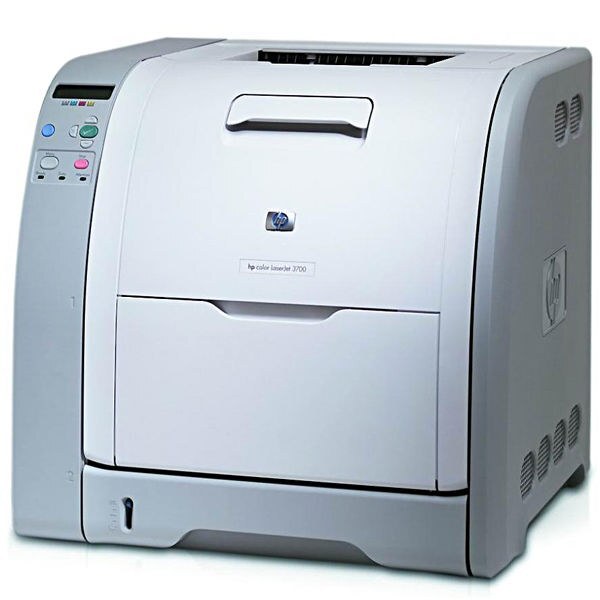
In the mid-2000s the HP Color LaserJet 3700 was the office color printer that felt grown up: fast for its era and built to be relied on. It runs four cartridges — the Q2670A black, sold as the 308A, and the 311A color series made up of Q2681A cyan, Q2682A yellow and Q2683A magenta. There is no extended-yield member in this family; every cartridge is the standard build, which keeps ordering simple. This page stocks the compatible versions of all four, each one listed in the table below.
The 3700 made its name on work that used to leave the building: marketing materials, client reports and anything with charts in it. A mid-size office could keep that printing in-house, on its own schedule, without a trip to the copy shop or the wait that went with it. Owners remember the model for speed and for simply keeping going, year after year, on the same four cartridges.
Toner Cartridges for Color LaserJet 3700
| Cartridge | Color | Page Yield |
|---|---|---|
| 308A / 311A / Q2670A / Q2681A / Q2682A / Q2683A set | 4 Color Set | See product page |
| 3700 4 Color Set | 4 Color Set | See product page |
| Q2670A / 308A | Black | See product page |
| Q2681A / 311A | Cyan | See product page |
| Q2682A / 311A | Yellow | See product page |
| Q2683A / 311A | Magenta | See product page |
A listing for the sister 3550's cyan cartridge is also stocked on this page:
Which cartridge should you buy?
With no high-yield option in this family, the buying decision is about timing rather than cartridge choice. Replace each color as it fades — the cartridges work independently, and there is no saving in changing a healthy one early. Ahead of a heavy run, such as a brochure batch or a reporting season, a four-color set on the shelf is cheap insurance against a mid-job stop. The rest of the time, singles as needed keep spend tied to actual use. Compatible cartridges here carry a 1-year warranty and 1-year returns, matching the way this printer is actually kept: serviced by the cartridge, not replaced.
Chip, toner and everyday use
Work a new cartridge in gently: pull the seal out in one steady motion, rock the cartridge side to side a few times so the toner sits level, and slide it home until it clicks — the 3700 reads its chip without menus or resets. Rated yields assume roughly 5% coverage, and marketing pages with solid backgrounds use several times that, so a color can run out sooner than the rating implies. Keep cartridges in their bags until the day they are fitted, and store them flat rather than on end.
Frequently Asked Questions
What toner cartridges does the Color LaserJet 3700 use?
Four standard cartridges: Q2670A black (the 308A), plus Q2681A cyan, Q2682A yellow and Q2683A magenta from the 311A series. Match the code on the cartridge you are replacing — that code is the whole compatibility test for this machine.
Is there a high-yield cartridge for the 3700?
No. Unlike some HP families, this one was never given an extended-yield member; black and colors alike are standard builds. The way to stretch the interval between orders is to keep a spare set ready, not to hunt for a bigger cartridge that does not exist for this printer.
Can the 3700 handle our marketing printing in-house?
That is the work it was known for — brochures, one-pagers and reports with color charts. Keep the color cartridges reasonably fresh, since solid backgrounds draw toner quickly, and proof a single copy before a long run so a fading cartridge never ruins a batch.
A color ran out in the middle of a print run. Do I change all four?
No — change the empty one and carry on. Because each cartridge is independent, swapping the others early only wastes the toner left in them. If the same color keeps finishing mid-run, keep its spare beside the printer rather than in a storeroom.
More printers that use the same cartridges
The 3700 shares its black cartridge — and in part its colors — with a wide HP family. Sister models first:
The other 3700 models: COLOR LASERJET 3700N
The earlier 3500 and 3550 lines: Color LaserJet 3500, Color LaserJet 3550, Color LaserJet 3550N
Cartridge pages for this family: HP 308A-309A, HP 308A-311A
And: COLOR LASERJET 3700DN, COLOR LASERJET 3700DTN, Color 3500, Color 3500N, Color 3500dn, Color 3500dtn, Color 3550, Color 3550N, Color 3700, Color 3700DN, Color 3700DTN, Color 3700N, Color 3750, Color 3750DN, Color 3750DTN, Color 3750N, Color LaserJet 3500N, Color LaserJet 3500dn, Color LaserJet 3500dtn, Color LaserJet 3750, Color LaserJet 3750DN, Color LaserJet 3750DTN, Color LaserJet 3750N