




Color 3700DN
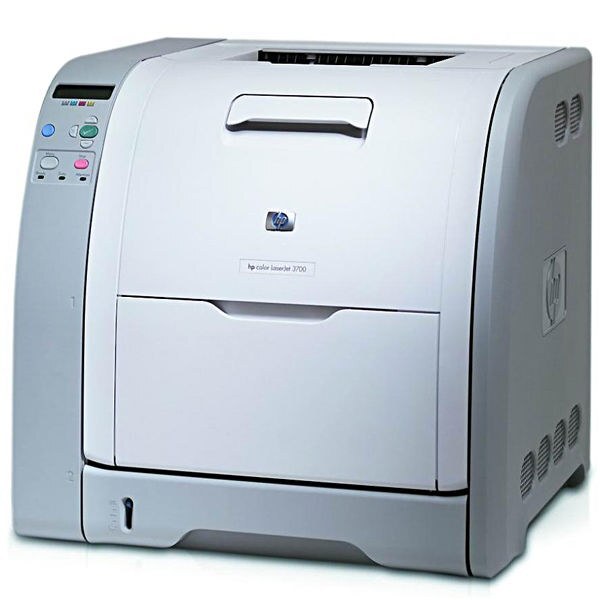
Duplex printing and Ethernet made the HP Color 3700DN the office-ready pick of its generation — two-sided color documents and shared access covered what most workgroups needed. It feeds on the Q2670A black cartridge (HP 308A), which this page lists under the title Compatible HP 309A (Q2670A) Toner Cartridge Black, plus its own 311A colors: Q2681A cyan, Q2682A yellow and Q2683A magenta. The black is stocked here; the colors need the care described below.
A duplexing network machine changes office habits quietly: reports arrive two-sided by default, paper use drops, and the printer becomes shared infrastructure rather than someone's desk accessory. The 3700DN's owners tended to be exactly the offices that printed client-facing color every day, so its toner routine had to be boringly reliable.
Toner Cartridges for Color 3700DN
- Compatible HP 309A (Q2670A) Toner Cartridge Black — the black cartridge for this model.
- Compatible HP 3550 (Q2671A Q2672A Q2673A) Toner Cartridge 3 Color Set — the three color cartridges in one box.
About the color listing on this page: the stocked color box is the Compatible HP 3550 (Q2671A Q2672A Q2673A) Toner Cartridge 3 Color Set, the 309A set for the 3550 family, carried here as an also-stocked item. The 3700DN does not use those cartridges — its colors are the 311A Q2681A, Q2682A and Q2683A, which this page does not stock. Buy color by the code on the cartridge you remove.
Which cartridge should you buy?
Two-sided printing stretches every cartridge further, so the 3700DN's black — the Q2670A — lasts longer here than in its single-sided siblings, but it is still the cartridge to keep ahead of: a workgroup machine out of black is a workgroup standing still. For color, hold the line on codes. This model's colors are the 311A cartridges Q2681A, Q2682A and Q2683A; the 309A set stocked on this page belongs to the 3550 line and will not serve. When you do buy color for this printer, replace only the empty slot — the three colors deplete independently. Compatible cartridges carry a 1-year warranty and 1-year returns.
Chip, toner and everyday use
Duplexing doubles the paper path, not the toner logic: each cartridge still reports its own level through its chip, and the machine warns early enough to order calmly. Fit cartridges with the machine idle, seal fully removed, and let it calibrate before judging the first color page — fresh cartridges in this generation occasionally need a page or two to settle. If two-sided pages show offset marks, that is a paper-path cleaning matter, not a toner one. Store spares sealed, upright and out of sunlight.
Frequently Asked Questions
Does duplexing change which toner the 3700DN uses?
No — the DN features are about paper handling and networking. It uses the same Q2670A black and the same 311A colors (Q2681A, Q2682A, Q2683A) as the rest of the 3700 family.
Can I use the 3 color set listed on this page in my 3700DN?
That set is the 309A color box for the 3550 models. Your machine's color cartridges are the 311A line, so use the set only if you also run a 3550 — for the 3700DN, order by the Q268 codes.
How do I know which color is actually empty?
The control panel names the cartridge whose chip reports empty. Trust the named slot: the other colors may have plenty left, and there is no need to change them together.
More printers that use the same cartridges
The models below sit in the same cartridge family — useful if you run more than one of them or are comparing a sibling machine:
- COLOR LASERJET 3700DN
- COLOR LASERJET 3700DTN
- COLOR LASERJET 3700N
- Color 3500
- Color 3500N
- Color 3500dn
- Color 3500dtn
- Color 3550
- Color 3550N
- Color 3700
- Color 3700DTN
- Color 3700N
- Color 3750
- Color 3750DN
- Color 3750DTN
- Color 3750N
- Color LaserJet 3500
- Color LaserJet 3500N
- Color LaserJet 3500dn
- Color LaserJet 3500dtn
- Color LaserJet 3550
- Color LaserJet 3550N
- Color LaserJet 3700
- Color LaserJet 3750
- Color LaserJet 3750DN
- Color LaserJet 3750DTN
- Color LaserJet 3750N
- HP 308A-309A
- HP 308A-311A