




ImageClass MF8350CDN
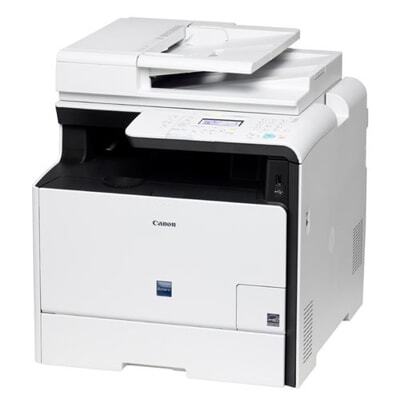
Canon USA's favorite detail on the imageCLASS MF8350Cdn is also its most practical one: the cartridges load from the front, so toner swaps happen without pulling the machine out of its alcove or opening side panels. Around that convenience sits a complete small-office MFP — 21 pages per minute in color and mono, with automatic duplexing across print, copy and fax. It prints with the Canon 118 color set, four cartridges rated individually: black at 3,400 pages, and cyan, magenta and yellow at 2,900 pages each.
Front access sounds like a small thing until a cartridge empties mid-morning in a tight office. On machines that need side or rear clearance, a two-minute swap becomes furniture moving; here the drawer is reached from the front and work resumes. That ease shapes the supply pattern too — because changing a cartridge is painless, there is little reason to over-order. The MF8350Cdn rewards a light shelf: one spare black, one spare of the color your office actually prints, and singles as needed.
Toner Cartridges for ImageClass MF8350CDN
| Cartridge | Color | Page Yield |
|---|---|---|
| Canon 118 Toner Cartridge | Black | 3,400 pages |
| Canon 118 Toner Cartridge | Cyan | 2,900 pages |
| Canon 118 Toner Cartridge | Magenta | 2,900 pages |
| Canon 118 Toner Cartridge | Yellow | 2,900 pages |
| Canon 118 Toner Cartridge — Black 2 Pack | Black | See product page |
| Canon 118 Toner Cartridge — Black 3 Pack | Black | See product page |
| Canon 118 Toner Cartridge — Black 5 Pack | Black | See product page |
| Canon 118 Toner Cartridge — 3 Color Set | 3 Color Set | See product page |
| Canon 118 Toner Cartridge — 4 Color Set | 4 Color Set | See product page |
| Canon 118 Toner Cartridge — 5 Color Set | 5 Color Set | See product page |
| Canon 118 Toner Cartridge — 6 Color Set | 6 Color Set | See product page |
| Canon 118 Toner Cartridge — 8 Color Set | 8 Color Set | See product page |
| Canon 118 Toner Cartridge — 4 Color Set (Alternate Listing) | 4 Color Set | See product page |
Which cartridge should you buy?
Replace colors one at a time, as they empty — the four Canon 118 cartridges are independent, and the color ratings (2,900 pages each) mean they rarely finish together. Black is the cartridge to hold in depth: at 3,400 pages against the colors' 2,900, and carrying every mono page the office prints, it is offered here in 2, 3 and 5-packs for buyers who would rather stock once. Sets have their moments — the 3-color set refreshes cyan, magenta and yellow when black is already covered, the 4-color set resets the whole machine, and the larger 5, 6 and 8-piece sets suit offices standardizing several of these printers — but for a single MF8350Cdn, singles plus a black multipack cover nearly every situation.
Chip, toner and everyday use
Yield ratings for the 118 set are quoted at 5% coverage, so a black cartridge printing mostly email and documents can meet its 3,400-page figure while one feeding a color-heavy brochure run will not. Each cartridge carries its own chip and is read individually; if a fresh cartridge is not recognized, pull it out and reseat it firmly in its color slot — the front-loading design makes that a ten-second check. Rock a new cartridge gently side to side before installing to distribute the toner, keep spares sealed until their turn, and remember the slots are color-keyed: a cartridge will only seat where its color belongs.
Frequently Asked Questions
What toner does the imageCLASS MF8350Cdn use?
The Canon 118 set: black rated at 3,400 pages, and cyan, magenta and yellow rated at 2,900 pages each. The four cartridges are separate items and are replaced individually.
Do I need to move the printer to change a cartridge?
No. Front-access cartridges are this model's signature convenience — the cartridges load from the front of the machine, so a swap needs no side clearance and no pulling the unit out of its place.
What happens when only one color runs out?
Replace just that color and keep printing. The remaining cartridges continue on their own schedules; there is no requirement to change the set together, and doing so early only discards usable toner.
Does the MF8350Cdn duplex automatically?
Yes — automatic duplexing covers print, copy and fax on this model, so two-sided work needs no manual re-feeding. Duplexing changes paper handling, not cartridge choice; the same Canon 118 set serves either way.
More printers that use the same cartridges
The Canon 118 set is shared with these related models — note the MF8350 in the list runs on the same supplies: ImageClass MF8350, ImageClass MF8380, ImageClass MF8380CDW, ImageClass MF8580, ImageClass MF8580CDW, LBP7200C, LBP7200CN, ImageClass LBP7200, ImageClass LBP7200CDN, ImageClass LBP7660, ImageClass LBP7660CDN, ImageClass MF8330, ImageClass MF8330CDN.