




ImageClass MF5880DN
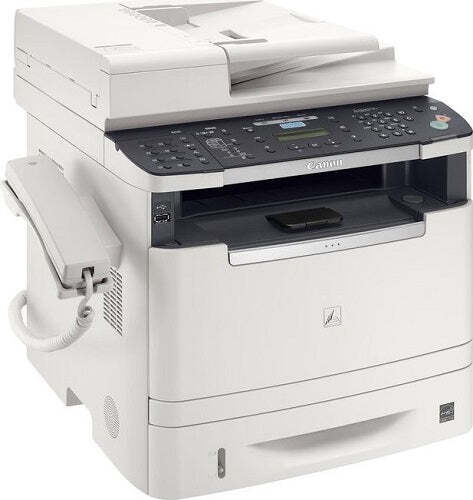
Top of its series, the imageCLASS MF5880dn adds SEND scan-to-email, network-folder and file-server destinations, plus extra memory, over the MF5850dn — all on the same 30-page-per-minute platform with automatic duplexing and Ethernet. Scanned paper may leave the building electronically, but everything that prints still comes through Canon's CRG-119 cartridge, rated at about 2,100 pages, or the high-yield CRG-119II, also catalogued as CRG119II. Listings shorten the standard cartridge to CRG119.
The SEND features tell you how this machine earns its place: paper arrives, gets scanned once, and fans out to inboxes and shared folders. What remains stubbornly physical is the output side — signed copies, filed printouts, the document handed across a desk. A team that scans heavily still prints deliberately, and the cartridge has to keep pace with a printer that several people treat as the office's paper exit.
Toner Cartridges for ImageClass MF5880DN
High yield — CRG-119II
| Cartridge | Color | Page Yield |
|---|---|---|
| Canon CRG-119II Toner Cartridges High Yield Black 2 Pack | Black | See product page |
| Canon CRG-119II Toner Cartridge High Yield Black | Black | See product page |
| Canon CRG-119II Toner Cartridge High Yield MICR Black | Black | See product page |
| Canon CRG-119II Premium Quality Toner Cartridges High Yield Black 5 Pack | Black | See product page |
| Canon CRG-119II Toner Cartridges High Yield Black 5 Pack | Black | See product page |
Standard yield — CRG-119
| Cartridge | Color | Page Yield |
|---|---|---|
| Canon CRG-119 Toner Cartridges Black 3 Pack | Black | 2,100 pages per cartridge |
| Canon CRG-119 Toner Cartridge Black | Black | 2,100 pages |
| Canon CRG-119 Toner Cartridge MICR Black | Black | See product page |
CRG119 listings
| Cartridge | Color | Page Yield |
|---|---|---|
| Canon CRG119 Toner Cartridges Black | Black | See product page |
| Canon CRG119 Toner Cartridges Black 2 Pack | Black | See product page |
| Canon CRG119 Toner Cartridges Black 3 Pack | Black | See product page |
| Canon CRG119 Toner Cartridges Black 5 Pack | Black | See product page |
| Canon CRG119 Toner Cartridges Black 10 Pack | Black | See product page |
Listed for this model by name
| Cartridge | Color | Page Yield |
|---|---|---|
| Canon ImageClass MF5880DN Toner Cartridge Black | Black | See product page |
The high-yield cartridge is also stocked under listings named for the other models in this family — the cartridge inside is the same: LBP251dw, LBP253dw, LBP6300DN, LBP6650DN, LBP6670DN, MF414dw, MF416dw, MF419dw, MF5850DN, MF5950DW, MF5960DN, MF6160dw, MF6180DW.
Which cartridge should you buy?
Choose by output volume, not scan volume. The standard CRG-119 covers a 5880dn whose printing stays light even while its scanner works hard. Where the machine also anchors the team's printing, the high-yield CRG-119II is the steadier choice — fewer swaps, lower cost per page, and less chance of an empty cartridge greeting a deadline. The 2, 3, 5 and 10 pack listings exist for offices that would rather hold stock than reorder monthly, and MICR versions of both yields are on the page for check runs.
Chip, toner and everyday use
Fit a new cartridge by opening the front cover, sliding the old unit out and its replacement in until it seats, after a gentle side-to-side rock to level the toner. A networked machine like this one can sit across the room from the person who notices it fading, so agree on a simple rule: whoever sees the low-toner notice orders or flags it the same day. Yield figures assume about 5% coverage; scanned-then-printed documents with heavy graphics finish cartridges faster. Compatible cartridges carry a 1-year warranty and 1-year returns.
Frequently Asked Questions
What toner does the imageCLASS MF5880dn take?
The Canon CRG-119 standard cartridge, rated at about 2,100 pages, or the high-yield CRG-119II. Both are listed above as singles and in multi-packs, including a listing named for this model.
Does the MF5880dn use the same cartridge as the MF5850dn?
Yes — the two models share a platform and a cartridge family. CRG-119 and CRG-119II stock is interchangeable between them, which simplifies ordering for offices running both.
Do the SEND scan features affect toner use?
Scanning itself uses no toner; only pages that come back out as prints or copies draw on the cartridge. A scan-heavy office can still be a light toner user if most documents stay electronic.
Is there a separate drum to replace on this model?
No separate drum is listed for the MF5880dn. The cartridges on this page are the complete supply — one swap is the entire maintenance event.
More printers that use the same cartridges
Offices mix and match within this family freely, because every model below takes the same two cartridges: ImageClass MF6180DW, LBP-6300, LBP-6300DN, LBP-6650, LBP-6650DN, LBP-6670, LBP-6670DN, i-Sensys LBP6650DN, imageCLASS MF5900, imageCLASS MF6100, ImageClass LBP 6300DN, ImageClass LBP 6650DN, ImageClass LBP251dw, ImageClass LBP253dw, ImageClass LBP6300, ImageClass LBP6300DN, ImageClass LBP6650, ImageClass LBP6650DN, ImageClass LBP6670, ImageClass LBP6670DN, ImageClass M6160DW, ImageClass MF414dw, ImageClass MF416dw, ImageClass MF419dw, ImageClass MF5850, ImageClass MF5850DN, ImageClass MF5880, ImageClass MF5950, ImageClass MF5950DW, ImageClass MF5960, ImageClass MF5960DN, ImageClass MF6160, ImageClass MF6160DW, ImageClass MF6180.