






 See Compatible Printers
 Read more about our ink!
Canon
Compatible Canon ImageClass MF5960DN Toner Cartridge Black (CRG119II)

Amazon Price:

- Availability:
- In Stock
- Shipping:
- Calculated at Checkout
- Compatible Printers
- ImageClass LBP251dw
- ImageClass LBP253dw
- ImageClass LBP6300dn
- ImageClass LBP6650dn
- ImageClass LBP6670dn
- ImageClass M6160dw
- ImageClass MF414dw
- ImageClass MF416dw
- ImageClass MF419dw
- ImageClass MF5850dn
- ImageClass MF5880dn
- ImageClass MF5950dw
- ImageClass MF5960dn
- ImageClass MF6180dwi>
- ImageClass LBP 6300DN
- ImageClass LBP 6650DN
- ImageClass LBP6300
- ImageClass LBP6650
- ImageClass LBP6670
- ImageClass MF5850
- ImageClass MF5880
- ImageClass MF5950
- ImageClass MF5960
- ImageClass MF6160
- ImageClass MF6160DW
- ImageClass MF6180
- ImageClass MF6180DW
- LBP-6300
- LBP-6300DN
- LBP-6650
- LBP-6650DN
- LBP-6670
- LBP-6670DN
- i-Sensys LBP6650DN
- imageCLASS MF5900
- imageCLASS MF6100
- Specifications
- SKU:
- CS-CNN-CRG119-MF5960DN-BK
- Printer Brand:
- Canon
- OEM Number:
- CRG119II
- Ink Color:
- Black
- Page Yield::
- Black: 6400
- Printer Type:
- Laser Cartridge
- Description
- Reviews

/> 

Clever Supplies brand products are made in the USA! Why pay more for cheaper product with a high defective rate? You will end up having to send it back to the manufacturer. Your time is valuable. Get a quality product that you KNOW will work. Purchase the Clever Supplies Compatible for Canon CRG119 (CRG119II), Black and experience the difference! All Clever Supplies brand products are backed by '100% Quality Satisfaction' 1 year warranty against defects in materials and workmanship for all toner products. Free tech support for any problems for all Clever Supplies brand products. The use of Clever Supplies brand replacement laser toner cartridges and supplies does not void printer warranty. Premium Quality Replacement Toner Cartridge is made by ISO9001 Certified Factory to Meet or Exceed OEM Standards. These units are manufactured 100% brand new with all new parts including OPC drums, wiper blades, a smart chip and other internal parts, they are an economical alternative to expensive OEM CRG119II, Compatible Toner Cartridges. The Compatible Toner Cartridges will produce the same amount of page yield as an OEM cartridge would. This is a Compatible for Canon CRG119 toner cartridges Black guaranteed to perform with Canon Laser Printers. It replaces the original Canon CRG119 toner cartridge black. The compatible replacement for CRG119II . Our Compatible for CRG119II Cartridge is a replacement for OEM Canon . We offer a 100% Quality Satisfaction Guarantee on our Compatible for CRG119II Laser Toner Cartridges and supplies. For use in the following printers: ImageClass LBP 6300DN, ImageClass LBP 6650DN, ImageClass LBP251dw, ImageClass LBP253dw, ImageClass LBP6300DN, ImageClass LBP6650DN, ImageClass LBP6670DN, ImageClass MF414dw, ImageClass MF416dw, ImageClass MF419dw, ImageClass MF5850DN, ImageClass MF5880DN, ImageClass MF5950DW, ImageClass MF5960DN, ImageClass MF6160dw, ImageClass MF6180DW
Frequently Asked Questions
Does paper choice affect how my prints look with this cartridge?
More than most people expect. Toner bonds to the paper surface under heat, so very rough, dusty or bargain-bin paper gives softer, greyer text no matter how good the cartridge is, while a decent smooth office paper lets the CRG119II show its proper dense black. If output from your ImageClass MF5960DN looks disappointing, swap in a fresh ream of known-good paper before blaming the cartridge — paper is the cheapest variable in the whole printing chain to test.
Can I print envelopes and labels with it?
Yes — toner cartridges do not care what the paper product is; what matters is using media intended for laser printing and selecting the matching media type in the print driver. Labels must be laser-rated (inkjet labels can melt and cause real damage), and envelopes should be fed as the printer's manual directs. Print a single test sheet first on any new media. The Canon 119 II lays down the same clean image on an envelope as on a letter; the care is in the feeding, not the toner.
Why do prints sometimes smudge on heavier stock?
Smudging that rubs off the page usually means the toner has not fully fused, and the commonest cause is a mismatch: thick card or photo paper run through on the plain-paper setting, so the fusing heat and speed are wrong for the media. Select the heavier media type in the driver and the printer adjusts. If ordinary paper smudges too, that is a different matter — but with media settings right, this CRG119II's output on your MF5960DN should be fixed, dry and rub-resistant on every supported stock.
Does recycled or rough paper use more toner?
Slightly, and it can look like it uses more. Rough fibres take toner less evenly, so solid areas can print a touch patchily, tempting people to print a page twice — which is where the real extra consumption happens. Text on recycled paper from a healthy cartridge should still be perfectly legible. Bear in mind the CRG119II is rated at 6,400 pages on standard paper at about $32.82 — roughly 0.51 cents per page — so even a small real-world penalty leaves running costs very low.
How do mixed media jobs affect my yield expectations?
Mixed work — letters one hour, labels and envelopes the next — affects yield mainly through coverage, not media type. An address on an envelope uses very little toner; a page of labels with bold graphics uses plenty. Judge the cartridge across a month of your real mix rather than a single job. Against the standard Canon 119's roughly 2,100-page rating, the 119 II's 6,400 pages gives the MF5960DN three times the headroom whatever the media mix looks like.
What if I suspect the cartridge, not the paper, is the problem?
Test on fresh plain paper at the correct driver setting; if defects persist there, the cartridge is the likely culprit and it is covered — a one-year warranty and one-year free returns, with the steps on our shipping and returns page. Our support team is available Monday to Friday, 9 AM to 5 PM CST, and replacements ship from our warehouses in Illinois, Pennsylvania, Georgia and California. Rule the paper out first, and any genuine CRG119II fault is ours to resolve.
When I reorder for this machine, which code do I actually quote?
The full one: CRG119II. The standard cartridge for this family is the Canon 119, rated around 2,100 pages; the 119 II under the CRG119II code is the high-capacity version at 6,400 pages, and the two fit the same slot in your MF5960DN. Ordering by the complete code — read straight off the label of the cartridge coming out — is what guarantees the larger unit arrives. The difference between the two codes is two characters; the difference in the machine is roughly three cartridges' worth of printing.
I print a lot of labels and envelopes — how should I prove a brand-new cartridge?
On plain paper first. Fit the CRG119II and run a few ordinary letters at the correct driver setting before any specialty media goes near the machine, judging the third and fourth pages for dense, even black. That sequence matters: it proves the cartridge on the simplest possible work, so if a label sheet later misbehaves you already know the cartridge is innocent and the media or its settings are where to look. Proving one variable at a time is what keeps troubleshooting short on a machine with a mixed diet.
Is a shelf spare worth it for a machine that prints everything from letters to labels?
Yes — the variety of the work does not change the moment of failure. An empty cartridge stops letters, labels and envelopes alike, and a media-diverse desk is usually a busy one that can least afford the pause. Keep one CRG119II sealed on the shelf beside the media stock: when the warning comes, the swap takes minutes and every kind of job resumes. The spare does not care what it will print first; it only has to be the right code, sealed, and there.
How should the empty cartridges be handled in our office?
Box them as they come out. Slide each finished CRG119II into the packaging its replacement arrived in — that keeps the trace toner inside contained — and hold the just-removed unit until the new cartridge has printed cleanly, since its label is your reorder reference and the unit itself is the comparison if the replacement disappoints. Then route the boxed empties to a retailer take-back or recycling collection rather than the general trash; a cartridge engineered for 6,400 pages is worth more than landfill even at the end of its life.
About This Compatible Canon CRG119II Cartridge for the ImageClass MF5960DN
This compatible CRG119II is the high-capacity Canon 119 II for the ImageClass MF5960DN — 6,400 rated pages at $32.82, about 0.51 cents per page, handling letters, envelopes, labels and reports with the same clean, well-fused black. It lasts roughly three times as long as the standard 119 and is backed by a one-year warranty with one-year free returns. We dispatch from warehouses in IL, PA, GA and CA, and the cartridge sits in our wider Canon range at Clever Supplies. Whatever mix of media your MF5960DN works through, this is the cartridge sized for it.
The machines covered are the ImageClass LBP6670dn, ImageClass M6160dw, ImageClass MF414dw, ImageClass MF416dw, ImageClass MF419dw, ImageClass MF5850dn, ImageClass MF5880dn, ImageClass MF5950dw, ImageClass MF5960dn, ImageClass LBP251dw, ImageClass LBP253dw, ImageClass LBP6300dn and ImageClass LBP6650dn. If you are weighing pack sizes, the Canon CRG119 black cartridge and the Canon CRG119 black two-pack round out the choice.
Related Items

Canon
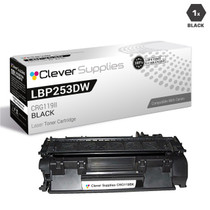
Compatible Canon ImageClass LBP253dw Toner Cartridge Black (CRG119II)
/>



Canon
Compatible Canon ImageClass MF416dw Toner Cartridge Black (CRG119II)
/>


Canon
Compatible Canon ImageClass MF5850DN Toner Cartridge Black (CRG119II)
/>


Canon
Compatible Canon ImageClass MF6180DW Toner Cartridge Black (CRG119II)
/>