




ImageClass LBP253dw
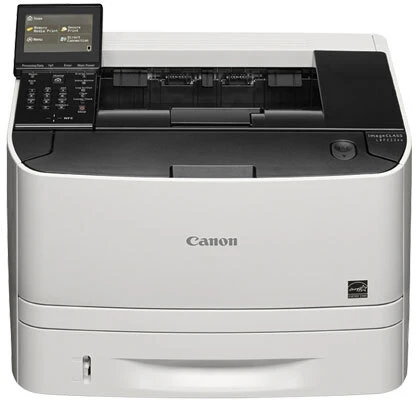
The modern wireless single-function printer of its family, the Canon imageCLASS LBP253dw — a 2019 design — prints at 35 pages per minute behind a 3.5-inch color touchscreen, with Gigabit Ethernet plus Wi-Fi, NFC touch-and-print and Secure Print for confidential jobs. It uses Canon's 119 cartridge: the standard CRG119 rated at up to 2,100 pages, or the high-yield CRG119II in the listings below, which stretches the interval between changes well past the base yield.
Secure Print deserves a supplies footnote: jobs held at the machine until the owner walks up and releases them do not get printed twice by mistake, and NFC tap-to-print cuts the abandoned-output pile that quietly eats toner in shared spaces. In other words, this printer's headline features are not just conveniences — they reduce wasted pages, which is the cheapest toner saving of all. What printing remains is brisk, duplexed and, with the high-yield cartridge fitted, infrequently interrupted.
Toner Cartridges for imageCLASS LBP253dw
The model-named listing comes first; below it, the general CRG119II listings in pack sizes from a single cartridge to ten.
| Cartridge | Color | Page Yield |
|---|---|---|
| CRG119II Black Cartridge — LBP253dw Model Listing | Black | See product page |
| CRG119II Black Cartridge — Single | Black | See product page |
| CRG119II Black Cartridge — 2 Pack | Black | See product page |
| CRG119II Black Cartridge — 3 Pack | Black | See product page |
| CRG119II Black Cartridge — 5 Pack | Black | See product page |
| CRG119II Black Cartridge — 10 Pack | Black | See product page |
Which cartridge should you buy?
A 35-ppm team printer empties a standard 2,100-page cartridge quickly, so the CRG119II high-yield is the sensible default here — every listing on this page is that cartridge. Pack size then follows team size: singles for a satellite desk, a two- or three-pack for a workgroup that prints daily, and five- or ten-packs where this machine anchors a department and running dry would be an event. There is no difference in the cartridge between the model-named listing and the general ones; the named listing simply makes reordering foolproof for whoever manages supplies. All are compatible cartridges with a one-year warranty and one-year returns.
Chip, toner and everyday use
The color touchscreen earns its keep with supplies: toner level reads plainly on the panel, backed by the cartridge chip's own reporting, so there is no guessing whether a big job will finish. When the gauge drops low, order the replacement then — not at the first warning, and not after the fade. Fitting is the usual routine: sealing tape out in one pull, cartridge in until it clicks. Keep the spare sealed and stored flat away from windows; toner is light-sensitive, and a cartridge that has sat open on a sunny shelf will not print like a fresh one.
Frequently Asked Questions
Which toner does the imageCLASS LBP253dw use?
Canon's 119 family — either the standard cartridge rated at up to 2,100 pages or the high-yield CRG119II. The listings here are all the high-yield version, the practical choice for a printer of this speed.
Do NFC and Secure Print change which cartridge I need?
Not at all. Those features govern how jobs reach the printer, not what it prints with. Any CRG119II cartridge fits and works the same regardless of how a document was sent.
Is the high-yield cartridge worth it for a team printer?
For a shared 35-ppm machine, yes in most cases: the standard cartridge's 2,100 pages disappear quickly under team volume, while the high-yield version cuts changeovers and the chance of running dry mid-job. Light-use desks are the only ones that might not notice the difference.
The touchscreen says toner is low but prints still look fine. Change it now?
Not yet. The low warning is an estimate with reserve built in, and output quality is the honest signal — keep printing until pages genuinely begin to fade, then swap. Just have the spare on site so the changeover takes a minute when it comes.
More printers that use the same cartridges
The CRG119II family stretches well beyond this model: imageCLASS MF6100, imageCLASS MF5900, i-Sensys LBP6650DN, LBP-6670DN, LBP-6670, LBP-6650DN, LBP-6650, LBP-6300DN, LBP-6300, ImageClass MF6180DW, ImageClass MF6180, ImageClass MF6160DW, ImageClass MF6160, ImageClass MF5960DN, ImageClass MF5960, ImageClass MF5950DW, ImageClass MF5950, ImageClass MF5880DN, ImageClass MF5880, ImageClass MF5850DN, ImageClass MF5850, ImageClass MF419dw, ImageClass MF416dw, ImageClass MF414dw, ImageClass M6160DW, ImageClass LBP6670DN, ImageClass LBP6670, ImageClass LBP6650DN, ImageClass LBP6650, ImageClass LBP6300DN, ImageClass LBP6300, ImageClass LBP251dw, ImageClass LBP 6650DN, ImageClass LBP 6300DN.