




ImageClass LBP251dw
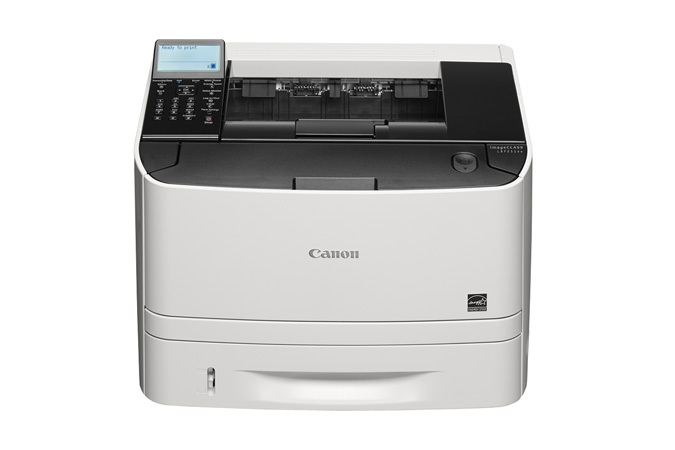
The budget sibling of its line, the Canon imageCLASS LBP251dw keeps the essentials and skips the frills: 30 pages per minute, automatic duplexing, Gigabit Ethernet plus Wi-Fi, and a plain five-line LCD where its pricier brother fits a touchscreen. Toner is Canon's 119 — the standard CRG119 rated at up to 2,100 pages — and this printer also accepts the high-yield CRG119II stocked below, built for desks that would rather change toner less often.
Everything about the 251dw is pitched at the small office watching its spending: wireless printing without a cable run, two-sided output by default to hold paper costs down, and a panel you can learn in a minute. Choosing the high-yield cartridge extends that same logic to supplies — the cost of the printer is only the start, and the cheapest machine to run is the one you are not constantly feeding with small cartridges.
Toner Cartridges for imageCLASS LBP251dw
Six ways to buy the same high-yield cartridge: the general listings in pack sizes one through ten, plus the listing that carries this model's name.
| Cartridge | Color | Page Yield |
|---|---|---|
| CRG119II Toner — Single Cartridge | Black | See product page |
| CRG119II Toner — Two Pack | Black | See product page |
| CRG119II Toner — Three Pack | Black | See product page |
| CRG119II Toner — Five Pack | Black | See product page |
| CRG119II Toner — Ten Pack | Black | See product page |
| CRG119II Toner — LBP251dw Model Listing | Black | See product page |
Which cartridge should you buy?
For a printer bought on a budget, the high-yield CRG119II is the natural partner: it holds more toner than the standard 2,100-page cartridge, so the per-page story and the change interval both improve. A home office or two-person desk will do fine with a single cartridge and a reorder when the gauge runs low. A small team printing over Wi-Fi all day should keep a two-pack — one in the machine, one in the drawer — and busier offices can step up to three- and five-packs. The model-named listing and the general listings contain the identical cartridge, so choose by whichever name you will search for next time. One-year warranty and one-year returns cover every compatible cartridge here.
Chip, toner and everyday use
Do not swap the cartridge at the first low-toner warning. The chip's estimate is deliberately cautious, and a CRG119II typically has a useful reserve left when the message appears — print on until output actually starts to fade, then change it. When you do fit the replacement, pull the orange sealing tape fully out and push the cartridge home until it clicks; most recognition complaints trace back to a tape tab left behind or a cartridge seated a fraction short. Store the spare sealed and flat in a drawer, and remember the family's yield figures assume light text coverage, so a month of dense documents will always land shorter than the headline number.
Frequently Asked Questions
What toner cartridge does the imageCLASS LBP251dw take?
Canon's 119 family. The standard cartridge is rated at up to 2,100 pages, and every listing on this page is the high-yield CRG119II version — same fit, more toner, fewer changes.
Does the LBP251dw use the same cartridge as the LBP253dw?
Exactly the same. The imageCLASS LBP253dw adds a touchscreen and a little speed, but both machines run on the CRG119II, so an office with one of each stocks a single toner.
Does printing over Wi-Fi use more toner than printing by cable?
No — the connection method makes no difference to toner consumption. What a page costs is decided by how much of it is covered in text and graphics, not by whether the job arrived by Wi-Fi, Ethernet or USB.
Which pack suits a home office?
A single cartridge, with a two-pack once you know your rhythm. At light volumes a high-yield cartridge lasts a long while, so there is no need to stock deep — just keep one spare so a deadline never waits on a delivery.
More printers that use the same cartridges
This cartridge serves a long list of Canon machines beyond this one: ImageClass MF5950, ImageClass MF5950DW, ImageClass MF5960, ImageClass MF5960DN, ImageClass MF6160, ImageClass MF6160DW, ImageClass MF6180, ImageClass MF6180DW, LBP-6300, LBP-6300DN, LBP-6650, LBP-6650DN, LBP-6670, LBP-6670DN, i-Sensys LBP6650DN, imageCLASS MF5900, imageCLASS MF6100, ImageClass LBP 6300DN, ImageClass LBP 6650DN, ImageClass LBP253dw, ImageClass LBP6300, ImageClass LBP6300DN, ImageClass LBP6650, ImageClass LBP6650DN, ImageClass LBP6670, ImageClass LBP6670DN, ImageClass M6160DW, ImageClass MF414dw, ImageClass MF416dw, ImageClass MF419dw, ImageClass MF5850, ImageClass MF5850DN, ImageClass MF5880, ImageClass MF5880DN.