




ImageClass LBP6300DN
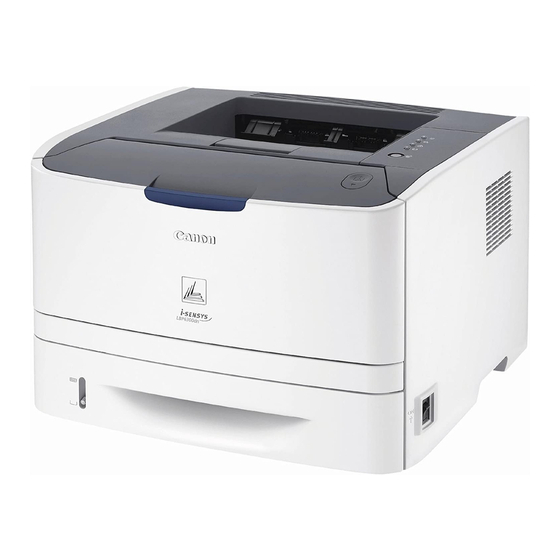
The Canon imageCLASS LBP6300dn was designed as a small workgroup's first shared laser printer: 30 pages per minute, automatic two-sided printing, and both a 10/100 Ethernet port and USB on the back panel. It prints with Canon's CRG-119 standard cartridge, rated at about 2,100 pages, and for heavier queues there is a high-yield alternative, the CRG-119II. That high-yield cartridge is also catalogued without the hyphen, as CRG119II, while the standard cartridge is sometimes shortened in listings to CRG119.
Sharing is the whole point of this model. Several desks feed one machine, duplex output trims paper use on long documents, and a 25,000-page monthly duty cycle leaves headroom far beyond what a small team normally asks of it. Canon's Single Cartridge System folds toner and drum into the one cartridge, so a supply change is a single swap with no separate imaging part to stock or schedule. On a printer shared this way, the cartridge plan quietly decides the running cost — which makes the standard-versus-high-yield choice the decision that matters.
Toner Cartridges for ImageClass LBP6300DN
Standard yield — CRG-119
| Cartridge | Color | Page Yield |
|---|---|---|
| Canon CRG-119 Toner Cartridges Black 3 Pack | Black | 2,100 pages per cartridge |
| Canon CRG-119 Toner Cartridge Black | Black | 2,100 pages |
| Canon CRG-119 Toner Cartridge MICR Black | Black | See product page |
High yield — CRG-119II
| Cartridge | Color | Page Yield |
|---|---|---|
| Canon CRG-119II Toner Cartridges High Yield Black 2 Pack | Black | See product page |
| Canon CRG-119II Toner Cartridge High Yield Black | Black | See product page |
| Canon CRG-119II Toner Cartridge High Yield MICR Black | Black | See product page |
| Canon CRG-119II Premium Quality Toner Cartridges High Yield Black 5 Pack | Black | See product page |
| Canon CRG-119II Toner Cartridges High Yield Black 5 Pack | Black | See product page |
CRG119 listings
| Cartridge | Color | Page Yield |
|---|---|---|
| Canon CRG119 Toner Cartridges Black | Black | See product page |
| Canon CRG119 Toner Cartridges Black 2 Pack | Black | See product page |
| Canon CRG119 Toner Cartridges Black 3 Pack | Black | See product page |
| Canon CRG119 Toner Cartridges Black 5 Pack | Black | See product page |
| Canon CRG119 Toner Cartridges Black 10 Pack | Black | See product page |
Listed for this model by name
| Cartridge | Color | Page Yield |
|---|---|---|
| Canon ImageClass LBP6300DN Toner Cartridge Black | Black | See product page |
The high-yield cartridge is also stocked under listings named for the other models in this family — the cartridge inside is the same: LBP251dw, LBP253dw, LBP6650DN, LBP6670DN, MF414dw, MF416dw, MF419dw, MF5850DN, MF5880DN, MF5950DW, MF5960DN, MF6160dw, MF6180DW.
Which cartridge should you buy?
Start with volume. The standard CRG-119, at roughly 2,100 pages, suits a 6300dn that prints in modest daily batches and sits idle between them. The high-yield CRG-119II carries more toner in the same fitting, so a shared machine goes longer between swaps and the cost per page falls — the natural pick once several people print through the same tray. Offices that standardize on this family can hold the 2 pack, 3 pack, 5 pack or 10 pack listings instead of singles, and both yields exist in MICR builds for check printing. Every listing on this page fits this printer; the difference is how much toner arrives in the box.
Chip, toner and everyday use
Lift the front cover, pull the spent cartridge straight out, and rock its replacement gently from side to side before sliding it in — that settles the toner evenly for the first pages. If the printer questions a newly fitted cartridge, opening and closing the cover and reseating the unit usually settles the prompt; a shared machine gives no warning before a big job lands, so keep one spare on the shelf. Page ratings assume about 5% coverage on plain documents, and dense reports or graphics-heavy pages will finish a cartridge sooner. Compatible cartridges from Clever Supplies carry a 1-year warranty with 1-year returns.
Frequently Asked Questions
What toner does the imageCLASS LBP6300dn use?
It takes the Canon CRG-119 standard cartridge, rated at about 2,100 pages, or the high-yield CRG-119II when the print queue is busy. Both fit the same slot, and both are listed on this page in single and multi-pack options.
Does the LBP6300dn need a separate drum unit?
No. This printer follows Canon's Single Cartridge System, so the drum lives inside the cartridge itself. Changing the cartridge renews both parts at once, and there is no second component to order.
How many pages does the high-yield cartridge print?
Canon's high-yield build holds more toner than the 2,100-page standard cartridge; the exact rating for each CRG-119II listing is shown on its product page. In practice it stretches the interval between swaps on a shared printer, which is where its value shows.
Can this printer handle check printing?
Yes — MICR versions of both the standard CRG-119 and the high-yield CRG-119II are listed on this page. MICR toner carries the magnetic formulation that check readers expect, in the same cartridge fitting.
More printers that use the same cartridges
One cartridge family covers a whole generation of Canon office machines, so the same standard and high-yield cartridges also fit every model in this list: ImageClass LBP253dw, ImageClass LBP6300, ImageClass LBP6650, ImageClass LBP6650DN, ImageClass LBP6670, ImageClass LBP6670DN, ImageClass M6160DW, ImageClass MF414dw, ImageClass MF416dw, ImageClass MF419dw, ImageClass MF5850, ImageClass MF5850DN, ImageClass MF5880, ImageClass MF5880DN, ImageClass MF5950, ImageClass MF5950DW, ImageClass MF5960, ImageClass MF5960DN, ImageClass MF6160, ImageClass MF6160DW, ImageClass MF6180, ImageClass MF6180DW, LBP-6300, LBP-6300DN, LBP-6650, LBP-6650DN, LBP-6670, LBP-6670DN, i-Sensys LBP6650DN, imageCLASS MF5900, imageCLASS MF6100, ImageClass LBP 6300DN, ImageClass LBP 6650DN, ImageClass LBP251dw.