




ImageClass MF414dw
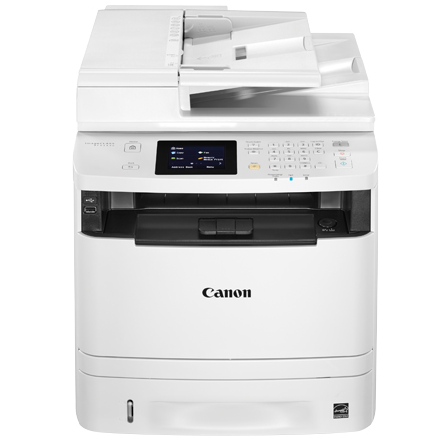
The base model of its series and proud of it, the Canon imageCLASS MF414dw is a 35-ppm 4-in-1 — print, scan, copy and Super G3 fax — with automatic duplexing, Gigabit Ethernet plus Wi-Fi, UFR II and PCL print languages, and a 250-sheet cassette. It uses Canon's 119 cartridge: the standard CRG119 rated at up to 2,100 pages, with the high-yield CRG119II in the listings here as its bigger brother — the pick when fax and copy volume keep the tray busy.
A multifunction machine consumes toner on more fronts than a plain printer: every copy off the glass and every received fax lands on paper too, so the cartridge works harder than the print queue alone suggests. That is the honest case for the high-yield version on this model — the 414dw is the office's no-frills workhorse precisely because it does everything, and everything it does draws on the same single cartridge.
Toner Cartridges for imageCLASS MF414dw
Every listing below is the high-yield CRG119II: general listings in pack sizes one to ten, and a listing that carries this model's own name.
| Cartridge | Color | Page Yield |
|---|---|---|
| CRG119II — Single Cartridge | Black | See product page |
| CRG119II — Pack of 2 | Black | See product page |
| CRG119II — Pack of 3 | Black | See product page |
| CRG119II — Pack of 5 | Black | See product page |
| CRG119II — Pack of 10 | Black | See product page |
| CRG119II — MF414dw Model Listing | Black | See product page |
Which cartridge should you buy?
Choose the high-yield CRG119II and then size the pack to the machine's workload. A small office that mostly prints will find a two-pack comfortable — one fitted, one waiting. Offices that copy and receive faxes daily should hold three or five, because that extra volume arrives unscheduled and the cartridge does not care which function used it. The ten-pack is for whoever supplies several machines or a genuinely busy department. The model-named listing holds the identical cartridge to the general listings, so reorder by whichever name your supplies list already uses. Each compatible cartridge is backed by a one-year warranty and one-year returns.
Chip, toner and everyday use
Keep the spare close to the machine. On a 4-in-1, toner runs out in the middle of other people's work — a fax arriving, a colleague copying a contract — so a cartridge stored in another room becomes a delay everyone feels. The chip reports the level, and the moment it reads low is the moment to make sure the spare is in the cabinet beside the printer. When fitting day comes, pull the seal fully, seat the cartridge until it clicks, and run a test print; a copy off the glass straight after confirms everything at once. Sealed spares store flat and keep indefinitely in a cool drawer.
Frequently Asked Questions
What toner cartridge does the imageCLASS MF414dw use?
Canon's 119 family. The standard cartridge is rated at up to 2,100 pages, and the listings on this page are its high-yield CRG119II version — the better match for a machine that copies and faxes as well as prints.
Does faxing and copying use the same toner as printing?
Yes. Received faxes and copies are printed output, so they draw on the same cartridge as documents from a computer. Scanning to email or a folder, by contrast, produces no paper and uses no toner at all.
Is the MF414dw-named listing a different cartridge from the general ones?
No — it is the same CRG119II cartridge under a model-specific listing name, created so buyers can order by printer model with confidence. The general listings fit identically.
How will I know the cartridge is nearly finished?
The printer reports toner level from the cartridge chip, and fading or streaky output is the visible confirmation. Rocking the cartridge gently can even the toner out for a short while, but treat that as the signal to fit the spare, not a long-term fix.
More printers that use the same cartridges
One cartridge covers a broad stretch of Canon's range, including every model here: ImageClass MF6180, ImageClass MF6180DW, LBP-6300, LBP-6300DN, LBP-6650, LBP-6650DN, LBP-6670, LBP-6670DN, i-Sensys LBP6650DN, imageCLASS MF5900, imageCLASS MF6100, ImageClass LBP 6300DN, ImageClass LBP 6650DN, ImageClass LBP251dw, ImageClass LBP253dw, ImageClass LBP6300, ImageClass LBP6300DN, ImageClass LBP6650, ImageClass LBP6650DN, ImageClass LBP6670, ImageClass LBP6670DN, ImageClass M6160DW, ImageClass MF416dw, ImageClass MF419dw, ImageClass MF5850, ImageClass MF5850DN, ImageClass MF5880, ImageClass MF5880DN, ImageClass MF5950, ImageClass MF5950DW, ImageClass MF5960, ImageClass MF5960DN, ImageClass MF6160, ImageClass MF6160DW.