




ImageClass LBP 6650DN
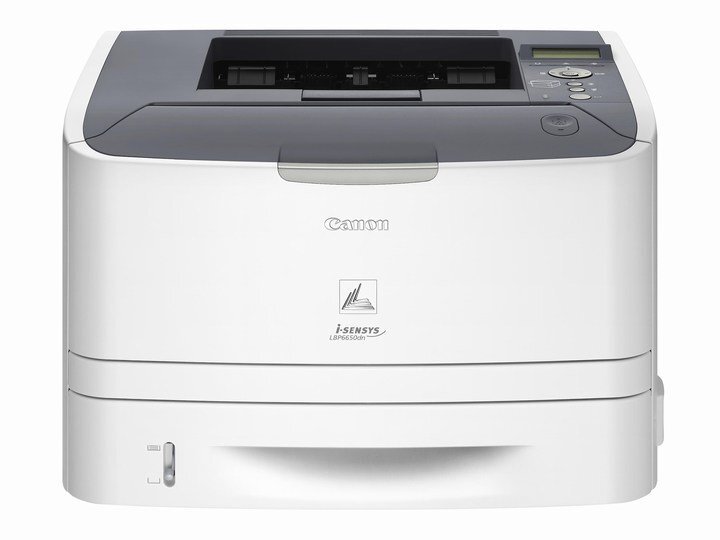
A 2012-era workhorse that has earned its keep, the Canon imageCLASS LBP6650dn prints at 35 pages per minute on letter paper, with automatic duplexing, 10/100 Ethernet and USB, a 50,000-page monthly duty cycle and a first print out in about six seconds. Its cartridge is Canon's 119 — the standard CRG119 rated at up to 2,100 pages — and where that standard cartridge runs short, the high-yield CRG119II sold in the listings below is the upgrade path: same bay, more toner per cartridge.
Printers of this vintage survive in offices for a simple reason: the work they do has not changed. Shared correspondence, forms and reports flow through a 6650dn exactly as they did a decade ago, and the machine's generous duty cycle means it rarely feels its age. What keeps an older workhorse economical is supply — a compatible high-yield cartridge at a sensible price turns a printer some offices would retire into one that keeps earning its floor space.
Toner Cartridges for imageCLASS LBP6650dn
The listing named for this model leads the table; the general CRG119II listings that follow are the same cartridge in pack sizes from one to ten.
| Cartridge | Color | Page Yield |
|---|---|---|
| CRG119II for the LBP6650DN — Single | Black | See product page |
| CRG119II Black (Single) | Black | See product page |
| CRG119II Black (2 Pack) | Black | See product page |
| CRG119II Black (3 Pack) | Black | See product page |
| CRG119II Black (5 Pack) | Black | See product page |
| CRG119II Black (10 Pack) | Black | See product page |
Which cartridge should you buy?
Think about this machine's ceiling first. A 50,000-page monthly duty cycle means even the high-yield CRG119II is a consumable you will cycle through regularly if the printer works hard, so buying one cartridge at a time invites an outage at the worst moment. A two- or three-pack is the practical baseline for a working 6650dn; offices that lean on it daily should hold the five-pack, and the ten-pack suits whoever stocks supplies for a whole department. The standard-yield 119 remains fine for a barely used backup unit, but for the printer doing the office's real volume, the II's extra toner is the point. These compatible cartridges carry a one-year warranty and one-year returns.
Chip, toner and everyday use
The clearest sign a CRG119II is finishing is output that fades toward one edge of the page. Before ordering in a panic, lift the cartridge out and rock it slowly from side to side — the remaining toner redistributes and print usually darkens again for a while, buying time for the replacement to arrive. Fit the new cartridge soon after that trick stops working; running a cartridge to absolute empty on a high-mileage machine leaves toner dust where you do not want it. Spares keep best sealed, flat and away from heat — a supply cabinet shelf, not the top of the printer.
Frequently Asked Questions
What toner does the imageCLASS LBP6650dn use?
It uses Canon's 119 cartridge family. The standard cartridge is rated at up to 2,100 pages; the listings here are the high-yield CRG119II version, which drops into the same slot and stretches the interval between changes.
This printer dates from 2012 — are cartridges still available?
Yes. Because the 119 family is shared across dozens of Canon models, compatible CRG119II cartridges like the ones on this page remain in active production and stock — an older machine does not mean an orphaned one.
Does the European i-SENSYS version of this printer take the same cartridge?
It does. The i-SENSYS LBP6650dn is the same machine sold under Canon's European badge, and it runs on the identical CRG119II cartridge.
How often will we change toner at office volume?
That depends on pages per month and how dense they are. A department printing a few thousand pages monthly will measure a high-yield cartridge's life in months; a printer pushed toward its 50,000-page duty cycle will cycle cartridges every few weeks — another reason to keep a pack on the shelf.
More printers that use the same cartridges
Plenty of Canon models share this cartridge family. The full list: ImageClass M6160DW, ImageClass MF414dw, ImageClass MF416dw, ImageClass MF419dw, ImageClass MF5850, ImageClass MF5850DN, ImageClass MF5880, ImageClass MF5880DN, ImageClass MF5950, ImageClass MF5950DW, ImageClass MF5960, ImageClass MF5960DN, ImageClass MF6160, ImageClass MF6160DW, ImageClass MF6180, ImageClass MF6180DW, LBP-6300, LBP-6300DN, LBP-6650, LBP-6650DN, LBP-6670, LBP-6670DN, i-Sensys LBP6650DN, imageCLASS MF5900, imageCLASS MF6100, ImageClass LBP 6300DN, ImageClass LBP251dw, ImageClass LBP253dw, ImageClass LBP6300, ImageClass LBP6300DN, ImageClass LBP6650, ImageClass LBP6650DN, ImageClass LBP6670, ImageClass LBP6670DN.