




WorkCentre 7425
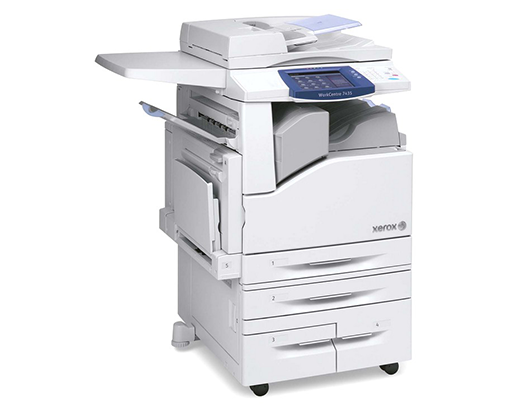
Bright, consistent color for the whole department is the Xerox WorkCentre 7425's promise: a color laser multifunction built for shared office use. Its black cartridge is the 006R01395, and color work runs on three more cartridges — 006R01398 cyan, 006R01397 magenta and 006R01396 yellow. When print quality eventually fades, the 013R00647 drum unit is the part that gets replaced on the 7425.
The base configuration is the reference point for a large family of configured versions, and it set the supply standard all of them follow. A single shared machine in a busy office lives or dies by how predictable its supplies are, and four cartridges plus one drum is a list anyone can manage.
Toner Cartridges for WorkCentre 7425
| Cartridge | Color | Page Yield |
|---|---|---|
| 006R01395 | Black | See product page |
| 006R01398 | Cyan | See product page |
| 006R01397 | Magenta | See product page |
| 006R01396 | Yellow | See product page |
Drum unit: the 013R00647 drum unit is sold as a single, and also in a Drum Unit 2 Pack (13R647) and a Drum Unit 4 Pack (13R647) for offices that service several machines.
Sets and multipacks: 006R01395 Black 2 Pack for the black position; the 3 Color Set for the three colors together; the Toner Cartridges 4 Color Set, WorkCentre 7425 4 Color Set and WorkCentre 7425 Premium Quality 4 Color Set for a full four-color refill; and the 5 Color Set for the deepest stock-up.
Which cartridge should you buy?
This page lists more ways to buy the same cartridges than most: singles, a black 2 pack, color-only and full-color sets, and multipacks. The sensible default for a shared departmental machine is singles — one cartridge, replaced when its own color actually runs out, because the four are consumed at different rates. Move up to the black 2 pack if the machine's black output is heavy and you would rather not reorder as often. A set makes sense when a machine is being set up, returned to service, or refreshed on all four colors at once. Check each product page for its current yield rating before comparing cost per page. Every compatible cartridge here carries a 1-year warranty and 1-year returns.
Chip, toner and everyday use
Shared machines punish guesswork, so let the panel do the tracking: the chip in every cartridge reports its level, and the machine warns before quality suffers. Swap in the fresh cartridge promptly once the warning appears — pushing a cartridge far past empty can leave a job half-printed in the middle of the night. Before installing, rock the cartridge gently a few times so the toner inside is loose and level, and keep the new cartridge sealed in its bag until the moment of the swap so dust and light stay off its working surfaces. Store the office's spare set somewhere everyone on the team can find, labeled with the machine it belongs to.
Frequently Asked Questions
What toner does the WorkCentre 7425 use?
Four cartridges: 006R01395 for black, 006R01398 for cyan, 006R01397 for magenta and 006R01396 for yellow. The whole 7425 configuration family uses this same set.
Does the 7425 have a separate drum?
Yes — the 013R00647 drum unit is a stand-alone imaging part, replaced separately from the toner. It is listed here as a single and in 2 pack and 4 pack form under its short code, 13R647.
What is the difference between the 3, 4 and 5 color sets?
The 3 color set covers the three color cartridges only. The 4 color sets add the black cartridge for a complete refill, and the 5 color set is the largest bundle listed for stocking up. All of them contain the same family cartridges by number.
Can I change only the color that ran out?
Yes. Each of the four cartridges is independent, so an empty yellow never forces a cyan purchase. Singles exist precisely for that rhythm of shared-office printing.
More printers that use the same cartridges
This is the family page for the whole 7425 line — every configuration below takes the same four cartridges and drum: WorkCentre 7425 FB, WorkCentre 7425 FBX, WorkCentre 7425 FL, WorkCentre 7425 FLX, WorkCentre 7425 FX, WorkCentre 7425 R, WorkCentre 7425 RB, WorkCentre 7425 RBX, WorkCentre 7425 RL, WorkCentre 7425 RLX, WorkCentre 7425 RX, WorkCentre 7425FB, WorkCentre 7425FBX, WorkCentre 7425FL, WorkCentre 7425FLX, WorkCentre 7425FX, WorkCentre 7425R, WorkCentre 7425RB, WorkCentre 7425RBX, WorkCentre 7425RL, WorkCentre 7425RLX, WorkCentre 7425RX, WorkCentre 7428, WorkCentre 7428 FB, WorkCentre 7428 FBX, WorkCentre 7428 FLX, WorkCentre 7428 FX, WorkCentre 7428 R, WorkCentre 7428 RB, WorkCentre 7428 RBX, WorkCentre 7428 RL, WorkCentre 7428 RLX, WorkCentre 7428 RX, WorkCentre 7428FB, WorkCentre 7428FBX, WorkCentre 7428FLX, WorkCentre 7428FX, WorkCentre 7428R, WorkCentre 7428RB, WorkCentre 7428RBX, WorkCentre 7428RL, WorkCentre 7428RLX, WorkCentre 7428RX, WorkCentre 7435, WorkCentre 7435 FB, WorkCentre 7435 FBX, WorkCentre 7435 FL, WorkCentre 7435 FLX, WorkCentre 7435 FX, WorkCentre 7435 R, WorkCentre 7435 RB, WorkCentre 7435 RBX, WorkCentre 7435 RL, WorkCentre 7435 RLX, WorkCentre 7435 RX, WorkCentre 7435FB, WorkCentre 7435FBX, WorkCentre 7435FL, WorkCentre 7435FLX, WorkCentre 7435FX, WorkCentre 7435R, WorkCentre 7435RB, WorkCentre 7435RBX, WorkCentre 7435RL, WorkCentre 7435RLX.