




WorkCentre 7425 RLX
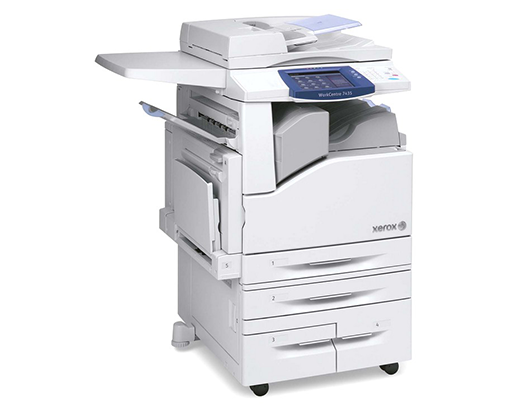
Xerox's WorkCentre 7425 RLX pairs the 7425 color MFP engine with an expanded configuration, and it takes the standard 006R01395 black toner — approximately 26,000 pages per cartridge. Color comes from the same trio its siblings stock: 006R01398 cyan, 006R01397 magenta and 006R01396 yellow, with the 013R00647 drum unit working behind them.
An expanded configuration usually means the machine was specced for a heavier workload, and heavier workloads reward long-life supplies. Fewer toner orders and less downtime are the practical result of a 26,000-page black cartridge in a machine that other people depend on all day.
Toner Cartridges for WorkCentre 7425 RLX
| Cartridge | Color | Page Yield |
|---|---|---|
| 006R01396 | Yellow | See product page |
| 006R01395 | Black | Approx. 26,000 pages |
| 006R01397 | Magenta | See product page |
| 006R01398 | Cyan | See product page |
Drum unit: the 013R00647 drum unit supports the imaging process and is a separate purchase from any toner cartridge.
Sets: choose the Toner Cartridges 4 Color Set for a one-box refill of every position, or the model-matched WorkCentre 7425 RLX 4 Color Set and WorkCentre 7425 RLX Premium Quality 4 Color Set.
Which cartridge should you buy?
On a machine configured for volume, the purchasing habit that pays is keeping the black ahead of demand. The 006R01395 runs to roughly 26,000 pages, yet it is still the cartridge most likely to stop a deadline when it empties, simply because every document uses it. The color cartridges can be ordered as they fall — they are individual cartridges, so replacing a spent cyan never means discarding a usable magenta. When the whole set ages together, the 4 color sets on this page reset all four positions in one delivery. Every compatible cartridge sold here is backed by a 1-year warranty and 1-year returns.
Chip, toner and everyday use
The chip in each cartridge reports toner level to the machine, and the estimate is based on coverage history — a week of dense color brochures will move the gauge faster than a week of memos. If a newly installed cartridge is not recognized, remove it, check that the protective strip is fully off, and reseat it with steady pressure until it locks. Toner that has sat in a warm room can clump; store spares somewhere cool and dry, lying flat, and give each cartridge a slow rock end to end before it goes in. Faint prints late in a cartridge's life often recover for a while after that same rocking trick.
Frequently Asked Questions
Which toner does the WorkCentre 7425 RLX use?
The 006R01395 black cartridge plus 006R01398 cyan, 006R01397 magenta and 006R01396 yellow — the standard 7425 family set. If it fits another 7425 configuration, it fits the RLX.
How long will the black cartridge run in the RLX?
Approximately 26,000 pages at 5% coverage. In an expanded-configuration machine doing heavy daily volume, calendar life depends on throughput more than on the rating, so keep a spare ready.
When do I replace the drum in the 7425 RLX?
The 013R00647 drum is replaced on its own cycle, not with the toner. Persistent streaks, spots that repeat down the page, or a drum message on the panel are the signals — fresh toner will not cure them.
Why are there three different 4 color sets listed?
They are alternative listings of the same four-cartridge combination for this model — a standard set, a model-named set and a premium quality set. Any of them restocks black, cyan, magenta and yellow together.
More printers that use the same cartridges
All of the following configurations run on this same black cartridge, so their supply pages are interchangeable with this one: WorkCentre 7425, WorkCentre 7425 FB, WorkCentre 7425 FBX, WorkCentre 7425 FL, WorkCentre 7425 FLX, WorkCentre 7425 FX, WorkCentre 7425 R, WorkCentre 7425 RB, WorkCentre 7425 RBX, WorkCentre 7425 RL, WorkCentre 7425 RX, WorkCentre 7425FB, WorkCentre 7425FBX, WorkCentre 7425FL, WorkCentre 7425FLX, WorkCentre 7425FX, WorkCentre 7425R, WorkCentre 7425RB, WorkCentre 7425RBX, WorkCentre 7425RL, WorkCentre 7425RLX, WorkCentre 7425RX, WorkCentre 7428, WorkCentre 7428 FB, WorkCentre 7428 FBX, WorkCentre 7428 FLX, WorkCentre 7428 FX, WorkCentre 7428 R, WorkCentre 7428 RB, WorkCentre 7428 RBX, WorkCentre 7428 RL, WorkCentre 7428 RLX, WorkCentre 7428 RX, WorkCentre 7428FB, WorkCentre 7428FBX, WorkCentre 7428FLX, WorkCentre 7428FX, WorkCentre 7428R, WorkCentre 7428RB, WorkCentre 7428RBX, WorkCentre 7428RL, WorkCentre 7428RLX, WorkCentre 7428RX, WorkCentre 7435, WorkCentre 7435 FB, WorkCentre 7435 FBX, WorkCentre 7435 FL, WorkCentre 7435 FLX, WorkCentre 7435 FX, WorkCentre 7435 R, WorkCentre 7435 RB, WorkCentre 7435 RBX, WorkCentre 7435 RL, WorkCentre 7435 RLX, WorkCentre 7435 RX, WorkCentre 7435FB, WorkCentre 7435FBX, WorkCentre 7435FL, WorkCentre 7435FLX, WorkCentre 7435FX, WorkCentre 7435R, WorkCentre 7435RB, WorkCentre 7435RBX, WorkCentre 7435RL, WorkCentre 7435RLX.