




WorkCentre 7428 RBX
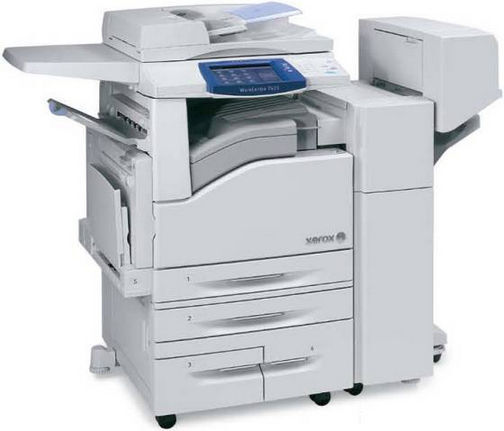
The WorkCentre 7428 RBX rounds out the R-configurations of Xerox's 7428 tabloid color MFP, sharing the 006R01395 black toner cartridge — about 26,000 pages per cartridge — with the full 74xx family. Its color slots take 006R01398 cyan, 006R01397 magenta and 006R01396 yellow, and behind all four toners works a separate drum unit, the 013R00647.
The RBX runs two consumable systems on two different clocks, and understanding that saves money. Toner is spent by the page: when a cartridge is empty, it is empty. The drum unit ages by imaging every page the machine produces, full or nearly blank, and it announces itself through print quality — a general tiredness across all colors — rather than through a supply gauge. Owners who grasp the distinction stop throwing away half-full toner cartridges when output fades: they check whether the symptom follows one color or all four. One color misbehaving points at its cartridge; everything looking washed out at once points at the drum.
Toner Cartridges for WorkCentre 7428 RBX
| Cartridge | Color | Page Yield |
|---|---|---|
| 006R01395 | Black | Approx. 26,000 pages |
| 006R01398 | Cyan | See product page |
| 006R01397 | Magenta | See product page |
| 006R01396 | Yellow | See product page |
| 006R01395 / 006R01398 / 006R01397 / 006R01396 — 4 Color Set | Black + CMY | See product page |
| 006R01395 / 006R01398 / 006R01397 / 006R01396 — 4 Color Set | Black + CMY | See product page |
| 006R01395 / 006R01398 / 006R01397 / 006R01396 — 4 Color Set (Premium Quality) | Black + CMY | See product page |
Drum unit, replaced separately from the toner:
- 013R00647 Drum Unit — Black — See product page
Which cartridge should you buy?
Stock the two systems differently. Toner deserves depth: the black 006R01395 at roughly 26,000 pages per cartridge, plus the color singles as your usage dictates, with singles bought one at a time when only one color is spent. The 4 Color Set — listed here in standard, Premium Quality and 7428 RBX versions — suits a planned full-bank change. Drums deserve the opposite treatment: they move slowly and cost real money, so one spare 013R00647 kept boxed is a sensible reserve, while a shelf of them is capital sitting still. If you are setting up supplies for a newly installed RBX, the balanced starter shelf is one spare black, one of each color, and the single spare drum — that combination covers every stoppage the machine can have.
Chip, toner and everyday use
Handle the drum differently from the toner. A drum unit's surface is light-sensitive, so keep it in its opaque bag until the moment it goes in, and never leave a removed drum sitting under office lights while you fetch something. Toner cartridges are hardier: a gentle rock before fitting levels the powder, and a firm push until the chip seats avoids recognition errors. Yields on this page are quoted at roughly 5% coverage, the industry yardstick — pages carrying photographs or solid color blocks use several times that and shorten cartridge life accordingly. Store everything flat and sealed, and if print quality dips, run the cheapest test first: swap in a known-good cartridge of the affected color before condemning the drum.
Frequently Asked Questions
What does the drum unit actually do on the 7428 RBX?
The 013R00647 drum unit carries the image from the laser to the page for all four toners. It is a wear part with its own life, sold and replaced separately from the cartridges — you will find it in its own list under the table.
How do I tell a toner problem from a drum problem?
If one color prints weakly while the others stay strong, suspect that color's cartridge. If output looks faded or streaked across every color at the same time, the shared drum is the likelier cause. Replacing toner will not cure a tired drum.
Are the RBX cartridges the same as the RB's?
Yes — every R-configuration of the 7428, and indeed the whole 74xx family on this page, uses the 006R01395 black and the same cyan, magenta and yellow singles. The configuration letters describe the machine, not different supplies.
Can I replace a single color, or must the set go in together?
Singles, always, when only one color is spent. The set exists for convenience when the whole bank is low; nothing about the machine requires the four cartridges to be changed as a group.
More printers that use the same cartridges
Supply compatibility is the theme of this family — these models all use the same black cartridge: WorkCentre 7425, WorkCentre 7425 FB, WorkCentre 7425 FBX, WorkCentre 7425 FL, WorkCentre 7425 FLX, WorkCentre 7425 FX, WorkCentre 7425 R, WorkCentre 7425 RB, WorkCentre 7425 RBX, WorkCentre 7425 RL, WorkCentre 7425 RLX, WorkCentre 7425 RX, WorkCentre 7425FB, WorkCentre 7425FBX, WorkCentre 7425FL, WorkCentre 7425FLX, WorkCentre 7425FX, WorkCentre 7425R, WorkCentre 7425RB, WorkCentre 7425RBX, WorkCentre 7425RL, WorkCentre 7425RLX, WorkCentre 7425RX, WorkCentre 7428, WorkCentre 7428 FB, WorkCentre 7428 FBX, WorkCentre 7428 FLX, WorkCentre 7428 FX, WorkCentre 7428 R, WorkCentre 7428 RB, WorkCentre 7428 RL, WorkCentre 7428 RLX, WorkCentre 7428 RX, WorkCentre 7428FB, WorkCentre 7428FBX, WorkCentre 7428FLX, WorkCentre 7428FX, WorkCentre 7428R, WorkCentre 7428RB, WorkCentre 7428RBX, WorkCentre 7428RL, WorkCentre 7428RLX, WorkCentre 7428RX, WorkCentre 7435, WorkCentre 7435 FB, WorkCentre 7435 FBX, WorkCentre 7435 FL, WorkCentre 7435 FLX, WorkCentre 7435 FX, WorkCentre 7435 R, WorkCentre 7435 RB, WorkCentre 7435 RBX, WorkCentre 7435 RL, WorkCentre 7435 RLX, WorkCentre 7435 RX, WorkCentre 7435FB, WorkCentre 7435FBX, WorkCentre 7435FL, WorkCentre 7435FLX, WorkCentre 7435FX, WorkCentre 7435R, WorkCentre 7435RB, WorkCentre 7435RBX, WorkCentre 7435RL, WorkCentre 7435RLX.