




Phaser EX7750DXF
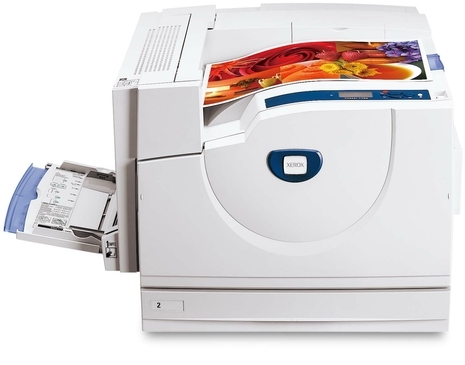
The Xerox Phaser EX7750DXF is a workhorse for shared office printing, turning out crisp text and clean graphics on plain office paper. Its consumables pair up neatly: four toner cartridges — black 106R00652, cyan 106R00653, magenta 106R00654 and yellow 106R00655 — plus the 108R00581 drum unit that images every page the machine produces. Toner and drum are separate purchases with separate lifespans, and knowing which one a symptom belongs to is most of owning this printer well.
Plain paper is the honest test of a color laser: no coating to hide behind, so text edges and graphic fills show exactly what the cartridges are doing. A workhorse in a shared office also sees every kind of job — a spreadsheet from one desk, a chart-heavy report from the next — which means its colors empty unevenly and its black cartridge works hardest of all. Supplies for this machine are best managed by watching what the printer reports, color by color, rather than by any fixed schedule.
Toner Cartridges for Xerox Phaser EX7750DXF
| Cartridge | Color | Page Yield |
|---|---|---|
| 106R00652 | Black | See product page |
| 106R00653 | Cyan | See product page |
| 106R00654 | Magenta | See product page |
| 106R00655 | Yellow | See product page |
| 4 Color Set | Black, cyan, magenta and yellow | See product page |
| Phaser EX7750DXF 4 Color Set | Black, cyan, magenta and yellow | See product page |
| Phaser EX7750DXF Premium 4 Color Set | Black, cyan, magenta and yellow | See product page |
The Phaser EX7750DXF separates its imaging from its toner. The 108R00581 drum unit cartridge, black, is therefore sold on its own, apart from the toner cartridges listed above. Because the drum follows its own service life, it gets replaced independently — there is no need to change it each time a toner cartridge runs out.
Which cartridge should you buy?
In a text-first office, black empties two or three times for every color change, so the 106R00652 single is the standing order and the colors — 106R00653, 106R00654, 106R00655 — are bought as the panel names them. Flip the logic for a graphics-heavy team: when a presentation season drains several colors together, the model 4 Color Set refreshes the row in one order, and the same contents come as the 4 Color Set or the Premium 4 Color Set. Either way, resist replacing a color early just because another one is out; the cartridges are independent, and a half-full cyan swapped early is money left in the old cartridge. Each product page states its rating for planning purposes.
Chip, toner and everyday use
Installation on this machine is keyed by color: every cartridge belongs to exactly one slot, and the printer will tell you if a supply is not recognized after a change. Work cleanly — leave the new cartridge sealed until the moment it goes in, hold it level, and do not touch the chip contacts. If output right after a swap shows one color missing entirely, the likeliest cause is a protective seal not fully removed or a cartridge seated shallow; reopen the cover, check that slot, and reseat before assuming the cartridge itself is faulty.
Frequently Asked Questions
Only one color has run out. Do I have to replace all four?
No — and on this printer you rarely should. The four cartridges live independent lives, so replace the empty one and keep the rest. Order a set only when the levels show several colors near the end together.
Which toner cartridge fits the Xerox Phaser EX7750DXF?
One cartridge per color: 106R00652 for black, 106R00653 for cyan, 106R00654 for magenta and 106R00655 for yellow. The code is also printed on the cartridge you remove, so the old unit in your hand is the surest reference when you reorder.
Streaks keep appearing even after a toner change. Why?
Because the image is formed before toner is applied. The 108R00581 drum unit transfers that image to the page, and a worn or marked drum repeats its flaw on every sheet. Fresh toner cannot fix a drum symptom — inspect the drum next.
How do I know which color to reorder?
Check the supply levels on the printer: the low color is named there, and each color maps to one code — 106R00652, 106R00653, 106R00654 or 106R00655. Reorder by that code and the replacement will match the slot the machine is asking about.
More printers that use the same cartridges
- Document Centre 250
- Document Centre 250CF
- Document Centre 250FS
- Phaser EX 7750GX
- Phaser EX 7760
- Phaser EX 7800
- Phaser EX7894
- PhaserEX 7750
- PhaserEX 7750DXF
Shared offices often mix models, and this family shares one supply list — the cartridges above also fit these printers: Phaser 7750, Phaser 7750B, Phaser 7750DN, Phaser 7750DXF, Phaser 7750GX, Phaser EX7750, Phaser EX7750B, Phaser EX7750DFX, Phaser EX7750DN, Phaser EX7750GX, Phaser EX7760, Phaser EX7800, Phaser EX7890.