




Phaser EX7750
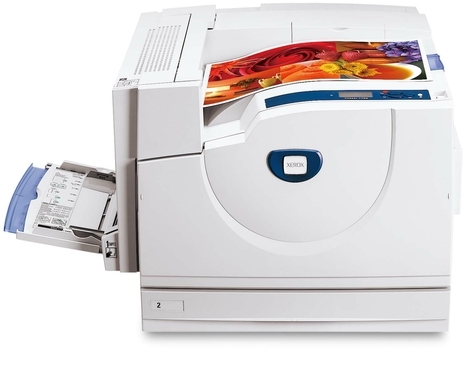
Small type is where a color laser earns its keep, and the Xerox Phaser EX7750 was built for exactly that kind of scrutiny: its output stays sharp and legible even at small sizes. Feeding it is a four-cartridge routine — 106R00652 in black, 106R00653 in cyan, 106R00654 in magenta and 106R00655 in yellow — each color in its own slot and each replaceable on its own schedule. Behind those cartridges sits a separate imaging component, the 108R00581 drum unit, which is not part of any toner swap and is renewed only when overall print quality starts to fade.
A machine trusted with fine detail usually spends its life on work people read closely: spec sheets, proofs, labeled drawings and reports where a footnote has to survive the page. That kind of output is unforgiving of a tired cartridge, because soft edges and washed-out color show up first in small characters and thin lines. Keeping fresh, correctly matched toner in this printer is less about volume than about standards — when the work is inspected up close, the cartridge is part of the quality check.
Toner Cartridges for Xerox Phaser EX7750
| Cartridge | Color | Page Yield |
|---|---|---|
| 106R00652 | Black | See product page |
| 106R00653 | Cyan | See product page |
| 106R00654 | Magenta | See product page |
| 106R00655 | Yellow | See product page |
| 4 Color Set | Black, cyan, magenta and yellow | See product page |
| Phaser EX7750 4 Color Set | Black, cyan, magenta and yellow | See product page |
| Phaser EX7750 Premium 4 Color Set | Black, cyan, magenta and yellow | See product page |
The Phaser EX7750 pairs its four toner cartridges — 106R00652 black, 106R00653 cyan, 106R00654 magenta and 106R00655 yellow — with a drum unit that is sold separately, not bundled in with the toner. That imaging part is the 108R00581 drum unit cartridge in black, and because it wears on its own service life, you replace it on its own schedule rather than swapping it every time a toner runs out on the EX7750.
Which cartridge should you buy?
Start from how the machine actually empties. Text-heavy pages burn through black long before the colors move, so most owners reorder the 106R00652 on its own and leave the color slots alone until the printer names one. When several colors run low together — after a big proofing run, for instance — the model 4 Color Set replaces the whole row in one order, and the same four codes also come as the 4 Color Set or the Premium 4 Color Set if you prefer either of those listings. There is no high-yield line for this family on this page, so the real choice is singles against sets: singles for the color that is actually empty, a set when the whole row is due. Page ratings for each cartridge are printed on its product page, so compare them there before a bulk order.
Chip, toner and everyday use
Each cartridge carries a chip the printer reads on installation, and recognition is normally immediate. If a new cartridge is not accepted, power the machine down, slide the cartridge out and reseat it firmly until it clicks — a half-seated cartridge is the most common cause. Wipe no contacts and press nothing by force. It also pays to install cartridges one at a time and close the cover between swaps: on a four-color machine, changing a single slot cleanly avoids mixing up which color went where, and the supply screen can confirm each level as you go.
Frequently Asked Questions
Which toner cartridges does the Xerox Phaser EX7750 take?
Four color cartridges, ordered by number: 106R00652 black, 106R00653 cyan, 106R00654 magenta and 106R00655 yellow. Imaging is handled separately by the 108R00581 drum unit, so a full supply list for this printer is five parts, not four — four toners plus one drum.
Only one color has run out. Do I have to replace all four?
No. Each cartridge is an independent unit in its own slot, and the printer tracks the levels separately. Replace just the color the machine reports as empty and keep printing with the other three; a full set only makes sense when several colors are low at the same time.
My prints look streaky even with a fresh cartridge. What else should I check?
Look at the drum. The 108R00581 drum unit forms the image before toner is laid down, and a worn drum leaves streaks, spots or a faded band that new toner cannot cure. If a fresh cartridge changed nothing, the drum is the part to inspect next.
Are these cartridges covered by any warranty?
Yes. The compatible cartridges on this page are covered by a one-year warranty, and returns run for one year as well. If a cartridge fails early or prints poorly out of the box, contact us within that window rather than throwing it away.
More printers that use the same cartridges
- Document Centre 250
- Document Centre 250CF
- Document Centre 250FS
- Phaser EX 7750GX
- Phaser EX 7760
- Phaser EX 7800
- Phaser EX7894
- PhaserEX 7750
- PhaserEX 7750DXF
The same four cartridges and drum also serve the rest of this Phaser family, so a supply shelf built for one of these machines covers the others: Phaser 7750, Phaser 7750B, Phaser 7750DN, Phaser 7750DXF, Phaser 7750GX, Phaser EX7750B, Phaser EX7750DFX, Phaser EX7750DN, Phaser EX7750DXF, Phaser EX7750GX, Phaser EX7760, Phaser EX7800, Phaser EX7890.