




Phaser EX7750B
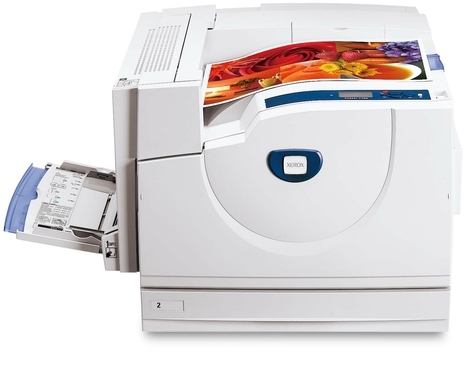
On a shared departmental floor, a printer's supplies have to suit more than one person's habits, and the Xerox Phaser EX7750B is stocked accordingly: its paper handling and duty cycle were matched to shared departmental use. Four toner cartridges carry the color work — 106R00652 in black, 106R00653 in cyan, 106R00654 in magenta and 106R00655 in yellow — while imaging is handled by the separate 108R00581 drum unit stocked alongside them, a part nobody needs to think about until output quality dips.
Departmental machines live a different life from a personal printer. Jobs arrive from a dozen desks, nobody owns the supply cupboard, and the person who discovers an empty cartridge is rarely the person who ordered the last one. That is exactly the setting where a short, fixed supply list pays off: four numbered cartridges and one drum, the same list every time, so anyone in the department can reorder correctly without a manual or a guess.
Toner Cartridges for Xerox Phaser EX7750B
| Cartridge | Color | Page Yield |
|---|---|---|
| 106R00652 | Black | See product page |
| 106R00653 | Cyan | See product page |
| 106R00654 | Magenta | See product page |
| 106R00655 | Yellow | See product page |
| 4 Color Set | Black, cyan, magenta and yellow | See product page |
| Phaser EX7750B 4 Color Set | Black, cyan, magenta and yellow | See product page |
| Phaser EX7750B Premium 4 Color Set | Black, cyan, magenta and yellow | See product page |
The Phaser EX7750B images through a drum that is sold separately from the 106R00652–106R00655 toners above: the 108R00581 drum unit cartridge, black. As an imaging part with its own service life, the drum follows its own replacement schedule instead of being swapped with every toner change.
Which cartridge should you buy?
For a shared machine, the practical split is between topping up and restocking. When the panel names a single color, order that single — 106R00652, 106R00653, 106R00654 or 106R00655 — and the department keeps moving. When two or more colors are trending low, restock in one pass with the model 4 Color Set; the same four codes are also listed as the 4 Color Set and the Premium 4 Color Set. A standing habit that works well in departments: keep one full set on the shelf as the buffer, reorder the buffer the day it is opened, and let singles handle surprises in between. Check each product page for its page rating when you compare cost across the listings.
Chip, toner and everyday use
Shared printers reward a visible routine. Keep the next set sealed in its box next to the machine, and write the cartridge codes on the shelf edge — black is 106R00652, and the colors run 106R00653, 106R00654 and 106R00655 — so a colleague restocking at 5 p.m. cannot grab the wrong one. A low-toner warning is a reorder signal, not an emergency: there is still toner in the cartridge, but on a departmental machine the warning should reach whoever orders supplies the same day, not the day the cartridge actually stops.
Frequently Asked Questions
What toner is compatible with the Xerox Phaser EX7750B?
The four cartridges made for this model are 106R00652 black, 106R00653 cyan, 106R00654 magenta and 106R00655 yellow, all listed in the table above. The printer also uses a separate 108R00581 drum unit, which is a different part from the toner cartridges and is replaced far less often.
What is the difference between the set listings on this page?
All three sets carry the same four cartridges — one each of black, cyan, magenta and yellow. They are simply separate listings for that bundle: a general 4 Color Set, a model 4 Color Set listed under this model's name, and a Premium 4 Color Set. Pick whichever listing you prefer; the cartridges inside match this printer either way.
How do I know which color to reorder?
The printer's supply status names the color that is low, and each color has its own number: 106R00652 for black, 106R00653 for cyan, 106R00654 for magenta and 106R00655 for yellow. Match the number on the cartridge you pull out with the listing before you order, and the two will agree.
Does the Xerox Phaser EX7750B use a separate drum unit?
Yes. The 108R00581 drum unit images every page and wears on its own timeline, independent of toner levels. A printer can show healthy toner and still need a drum — the usual sign is print quality that stays poor right after a cartridge change.
More printers that use the same cartridges
- Document Centre 250
- Document Centre 250CF
- Document Centre 250FS
- Phaser EX 7750GX
- Phaser EX 7760
- Phaser EX 7800
- Phaser EX7894
- PhaserEX 7750
- PhaserEX 7750DXF
Departments running more than one model from this family are in luck: the cartridges on this page fit the whole group below, so one shelf of stock serves every machine: Phaser 7750, Phaser 7750B, Phaser 7750DN, Phaser 7750DXF, Phaser 7750GX, Phaser EX7750, Phaser EX7750DFX, Phaser EX7750DN, Phaser EX7750DXF, Phaser EX7750GX, Phaser EX7760, Phaser EX7800, Phaser EX7890.