




Phaser EX7750DFX
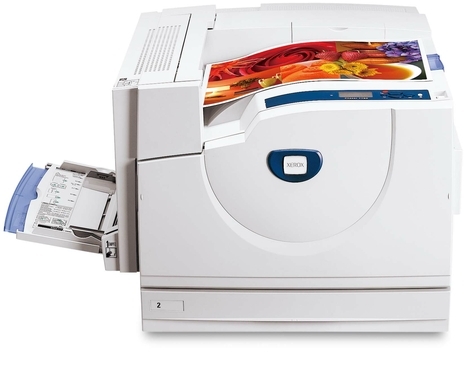
Some printers are bought for a feature list; the Xerox Phaser EX7750DFX was bought to deliver day after day. Its supply list is short and predictable: 106R00652 black, 106R00653 cyan, 106R00654 magenta and 106R00655 yellow toner — four cartridges that drop in one at a time as each color is spent. The 108R00581 drum unit works on a longer cycle of its own and is changed separately, when the machine's output, not the calendar, says it is time.
Endurance in a printer is mostly about boring predictability: the same jobs, the same paper, the same four cartridges, month after month. Machines like this one tend to sit in shared departmental spaces where downtime is noticed by everyone at once, so the supply routine matters as much as the hardware. A consumables list that never changes means the reorder conversation takes thirty seconds — someone reads the code off the empty cartridge, and the replacement is ordered by number.
Toner Cartridges for Xerox Phaser EX7750DFX
| Cartridge | Color | Page Yield |
|---|---|---|
| 106R00652 | Black | See product page |
| 106R00653 | Cyan | See product page |
| 106R00654 | Magenta | See product page |
| 106R00655 | Yellow | See product page |
| 4 Color Set | Black, cyan, magenta and yellow | See product page |
| Phaser EX7750DFX 4 Color Set | Black, cyan, magenta and yellow | See product page |
| Phaser EX7750DFX Premium 4 Color Set | Black, cyan, magenta and yellow | See product page |
Alongside the 106R00652 black, 106R00653 cyan, 106R00654 magenta and 106R00655 yellow toners above, the Phaser EX7750DFX also needs a drum, and it is sold separately from the toner: the 108R00581 drum unit cartridge, black. Because the drum is an imaging part with a service life of its own, it is replaced on its own schedule rather than with every toner change.
Which cartridge should you buy?
With a machine that simply has to keep running, the buying rule is about never being caught empty. Singles — 106R00652, 106R00653, 106R00654, 106R00655 — handle the normal rhythm, one color at a time. The model 4 Color Set earns its place as the shelf spare: a full row of cartridges waiting means a color running out midweek costs five minutes, not a day. The same bundle appears as the 4 Color Set and the Premium 4 Color Set if either listing suits your ordering better. Whichever route you take, the drum stays a separate decision — it is not in any set, and it is ordered only when print quality points at it. Ratings for each cartridge are on its product page.
Chip, toner and everyday use
Learn to tell two kinds of fading apart, because they have different cures. When a single color washes out while the others stay strong, that cartridge is nearly empty; taking it out and rocking it gently side to side can spread the remaining toner for a few more days of printing. When every color fades together, or the same mark repeats down the page, toner is not the problem — the drum is. Treating a drum symptom with new toner wastes a cartridge, so match the symptom to the part before you order anything.
Frequently Asked Questions
Does the Xerox Phaser EX7750DFX use a separate drum unit?
It does. The 108R00581 drum unit sits behind the four toner cartridges and forms the image on every page. It is replaced on its own cycle, separately from toner, and a healthy drum typically outlasts several rounds of cartridges.
How long will a cartridge last in this printer?
There is no single honest number: yield ratings are measured at five percent page coverage, and real departments print denser pages than that. Each listing on this page links to a product page carrying its rating, so use that figure as a comparison between cartridges rather than a promise for your own workload.
Will compatible toner damage the Xerox Phaser EX7750DFX?
The compatible cartridges listed here are built for this model and are covered by a one-year warranty with one-year returns. Installed correctly and matched by code — 106R00652, 106R00653, 106R00654, 106R00655 — they print as the machine was designed to print.
Which toner cartridge fits the Xerox Phaser EX7750DFX?
Four cartridges fit, one per color: 106R00652 black, 106R00653 cyan, 106R00654 magenta and 106R00655 yellow. If your printer is asking for a cartridge, its message names the color; match that color's code in the table above and order that single.
More printers that use the same cartridges
- Document Centre 250
- Document Centre 250CF
- Document Centre 250FS
- Phaser EX 7750GX
- Phaser EX 7760
- Phaser EX 7800
- Phaser EX7894
- PhaserEX 7750
- PhaserEX 7750DXF
That predictability extends across the family — the identical cartridge set and drum run in every model listed here: Phaser 7750, Phaser 7750B, Phaser 7750DN, Phaser 7750DXF, Phaser 7750GX, Phaser EX7750, Phaser EX7750B, Phaser EX7750DN, Phaser EX7750DXF, Phaser EX7750GX, Phaser EX7760, Phaser EX7800, Phaser EX7890.