




Color Laser Laser B1160
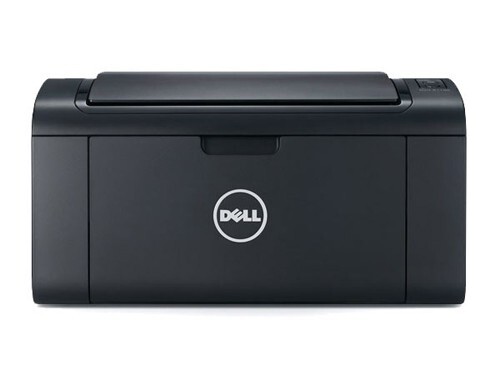
Small footprint, real laser output: the Dell B1160 gives home offices and students a true monochrome laser multifunction printer — fast first-page-out, crisp text, and none of the dried-ink frustration of an inkjet left sitting between jobs. Infrequent printing is exactly where laser shines and where toner longevity matters most. This page stocks the one supply the machine needs, the 331-7335 black toner cartridge, as a single and in multi-packs.
The B1160's typical owner prints in bursts: an essay the night before it is due, a stack of invoices at month's end, boarding passes and forms in between — then nothing for two weeks. An inkjet punishes that rhythm with clogged nozzles; a toner cartridge simply waits. That patience shapes how you should buy for this printer: shelf life and a low cost per page matter more here than squeezing out maximum yield.
Toner Cartridges for Laser B1160
| Cartridge | Color | Page Yield |
|---|---|---|
| 331-7335 Black Toner Cartridge — Single | Black | See product page |
| 331-7335 Black Toner Cartridges — 2 Pack | Black | See product page |
| 331-7335 Black Toner Cartridges — 3 Pack | Black | See product page |
| 331-7335 Black Toner Cartridges — 5 Pack | Black | See product page |
| 331-7335 Black Toner Cartridges — 10 Pack | Black | See product page |
Which cartridge should you buy?
For most B1160 owners the single 331-7335 is the natural purchase: one cartridge, installed in minutes, and the printer is provisioned for a long stretch of everyday documents. If the machine supports a small business — weekly invoices, shipping labels, regular correspondence — the 2 pack adds a sealed spare that can sit in a drawer without any worry about it aging. The larger packs exist for the busiest end of this model's audience, such as a home office that doubles as a family print station for several students. Buy to your burst pattern, not your busiest single day.
Chip, toner and everyday use
The cartridge chip tells the printer a genuine supply conversation has happened — the machine recognizes the cartridge and tracks its level from the first page. Because toner is a dry powder, a cartridge installed after months in a drawer prints its first page as cleanly as one installed the day it arrived. Keep the printer's environment ordinary — no steamy rooms, no radiators — and if output ever looks faint after a long idle stretch, a gentle rock of the cartridge side to side evens the toner bed out again.
Frequently Asked Questions
Which cartridge does the Dell B1160 take?
The 331-7335 black cartridge, sold above as a single and in 2, 3, 5 and 10 packs. It is the only supply this monochrome machine uses.
Will toner go bad if I print only occasionally?
No — that is the laser advantage this printer was bought for. Toner does not dry out or clog the way liquid ink can, so a cartridge stays ready through quiet weeks and prints normally when the next job arrives.
What can this multifunction model do besides print?
The B1160 is a multifunction machine, so copying and scanning share the same hardware — and the same single black cartridge supports the copies it makes. One supply covers the whole device.
Is a compatible cartridge a safe choice for a home printer?
Yes. Our compatible 331-7335 cartridges are covered by a 1-year warranty and 1-year returns, and they deliver the crisp text this compact laser is known for at a lower cost per page than the original.
More printers that use the same cartridges
The B1160 belongs to a compact family whose members share this cartridge, so the models below all draw on the same supply: Color Laser Laser B1160W, Color Laser Laser B1163W, Color Laser Laser B1165NFW, Dell 331-7335, Laser B1160, Laser B1160W, Laser B1163, Laser B1163W, Laser B1165, Laser B1165NFW, Multifunction B1160, Multifunction B1160W.