






 See Compatible Printers
 Read more about our ink!
Hewlett Packard
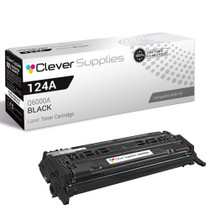
Compatible HP 2600N (Q6000A) Toner Cartridge 2 Black
- Page Yield:
- Black: 2,500
- Availability:
- In Stock
- Shipping:
- Free Shipping

Amazon Price:

- Page Yield:
- Black: 2,500
- Availability:
- In Stock
- Shipping:
- Free Shipping
- Compatible Printers
- Color LaserJet 1600
- Color LaserJet 2600n
- Color LaserJet 2605dn
- Color LaserJet 2605dtn
- Color LaserJet CM1015mfp
- Color LaserJet CM1017mfp
- LaserJet 1600
- LaserJet 2600n
- LaserJet 2605dn
- LaserJet 2605dtn
- LaserJet CM1015mfp
- LaserJet CM1017mfpi>
- Color LaserJet 2600
- Color LaserJet 2600DN
- Color LaserJet 2605
- Color LaserJet CM1015
- Color LaserJet CM1017
- Color LaserJet CM1300
- Color LaserJet CM1312
- Color LaserJet CM1312 MFP
- Color LaserJet CM1312NFI
- Color LaserJet CP1210
- Color LaserJet CP1215
- Color LaserJet CP1215N
- Color LaserJet CP1217
- Color LaserJet CP1312
- Color LaserJet CP1312MFP
- Color LaserJet CP1510
- Color LaserJet CP1512
- Color LaserJet CP1512MFP
- Color LaserJet CP1515
- Color LaserJet CP1515N
- Color LaserJet CP1515NI
- Color LaserJet CP1518
- Color LaserJet CP1518NI
- HP 124A
- HP 125A
- Specifications
- SKU:
- CLS-HP-2600N-2BK
- Printer Brand:
- Hewlett Packard
- OEM Number:
- Q6000A
- Ink Color:
- Black
- Page Yield:
- Black: 2,500
- Printer Type:
- Laser Cartridge
- Condition:
- New Compatible
- Description
- Reviews



Discover the versatile and reliable printing capabilities of the HP 124A Color LaserJet Series, encompassing a range of printers and multifunction devices to meet various printing needs. The Color LaserJet 1600, 2600, 2600N, 2605, and 2605DN models offer vibrant color printing, while the 2605DTN and CM1015MFP deliver multifunction capabilities for added versatility. Experience seamless printing with the CM1017MFP and CM1017 models, offering efficient printing, scanning, and copying functionalities. The LaserJet 2600DN and CM1015 printers ensure consistent and reliable performance for all your printing tasks. Enhance your printing experience with the Q6000A Black, Q6001A Cyan, Q6003A Magenta, and Q6002A Yellow toner cartridges, compatible with the HP 124A toner cartridge and toner cartridge options. These cartridges guarantee exceptional print quality for both everyday documents and professional projects. Invest in a printing solution that meets your business needs with the HP 124A Color LaserJet Series, known for its reliability, versatility, and professional-grade results. Whether it's the Color LaserJet 1600, 2600 series, or CM1015 and CM1017 models, these printers deliver superior performance and exceptional print quality. Every configuration this family is sold in — for the Color LaserJet 1600, 2600 and 2605 series and CM1015/CM1017 printers: the four-color set, the tri-color set, the six-, five- and eight-color sets, the four singles and the two- and three-black packs — is compared side by side in our Best HP 124A (Q6000–Q6003) Toner Cartridges guide.
Frequently Asked Questions
What exactly is inside this box?
Two black Q6000A cartridges, the 124A black for the Color LaserJet 2600n. One goes in the printer today; the second waits sealed on the shelf for the day the first runs dry — $89.30 for the pair.
Why would a 2600n want two blacks at once?
The 2600n is a shared, networked printer, and shared printers do not get to choose a quiet moment to run out. Black is the cartridge a workgroup spends fastest, so a spare on site turns a toner emergency into a two-minute swap somebody makes between jobs.
How far does each cartridge go?
Each Q6000A is rated at about 2,500 pages at standard coverage, and each is spent one at a time — the printer draws on the cartridge that is installed, not on the spare. Expect a busy small office to measure a cartridge's life in weeks to a few months, depending on how text-heavy the work is.
How should I store the second cartridge?
Sealed in its bag, flat, in a normal room — a supply cupboard shelf is ideal. Kept that way it waits patiently; there is no clock running on an unopened cartridge the way there is on one already in service.
Is fitting the spare the same job as fitting the first?
Identical. Open the 2600n's front, lift the empty out by its handle, unbag the spare, pull its sealing tape, rock it gently to level the toner, and slide it home. Every compatible Q6000A we sell through our HP range follows the same shape and the same routine.
What cover do the two cartridges carry?
Both are covered by a 1-year warranty and 1-year free returns, with support Monday–Friday, 9 AM–5 PM CST and dispatch from our Illinois, Pennsylvania, Georgia or California warehouses. The shipping & returns page sets out the details.
How can the workgroup learn its real cartridge cycle from this pack?
Write the install date on the first cartridge's carton and keep the carton on the shelf. When the second Q6000A goes in, the gap between those two dates is the 2600n's true black cycle under your team's workload — far more useful for planning than the rated 2,500 pages, because it already includes your actual page mix, copies and all.
The 2600n started printing gray text in the middle of a shared run. Swap or shake?
On a networked machine, swap. A gentle rock may rescue a page or two, but a workgroup printer that fades mid-run will fade again during somebody else's job. The spare Q6000A is on the shelf precisely so the change can be made on the spot. The removed cartridge can be rocked and tested later, at leisure, if anyone wants its last pages.
Whoever changes the cartridge — what should they leave behind for the next person?
Two things: the empty, bagged and set where the office collects spent cartridges, and a note of which cartridge from the pack is now running — first or second. That small record prevents the classic shared-printer surprise, where the whole team believes a spare is still on the shelf months after it was actually fitted.
What is the quickest proof that the spare went in correctly?
Reprint the last page that came out gray. The same page, through the fresh Q6000A, should show dense, even text with no pale band down one side. If it does, the swap is done and the interrupted run can restart. A page the team already knows is a stricter test than any built-in sample, because everyone has seen how it should look.
About This 2600n Two-Black Pack
A networked printer serving several desks earns its keep by never being the reason work stops, and running out of black is the most ordinary way it could stop. This two-cartridge pack is the cheap insurance: one Q6000A working, one waiting, and a workgroup that never has to schedule its printing around a delivery.
Related Items


Hewlett Packard
Compatible HP 2600N (Q6000A) Toner Cartridge 3 Black



Hewlett Packard
Compatible HP 2600n (Q6000A, Q6001A, Q6002A, Q6003A) Toner Cartridge 4 Color Set


Hewlett Packard
Compatible HP 2600N (Q6000A, Q6001A, Q6002A, Q6003A) Toner Cartridge 5 Color Set

Hewlett Packard
Compatible HP CM1017mfp (Q6000A) Toner Cartridge Black