




LaserJet Enterprise MFP M631z
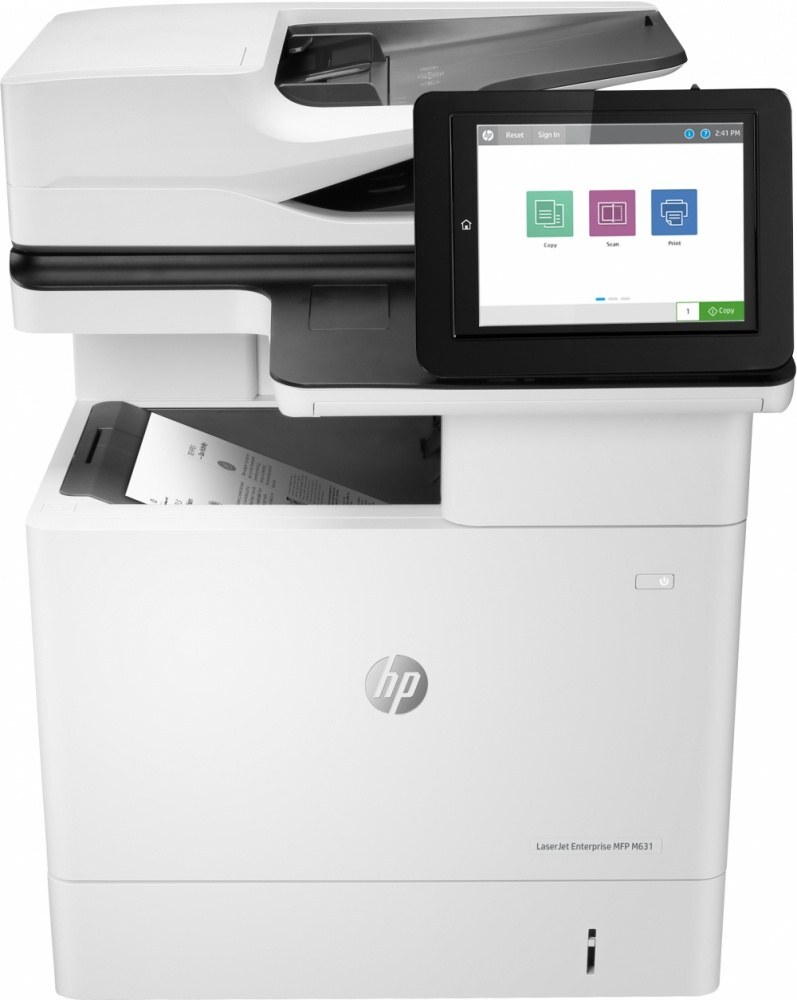
HP's mono range of the late 2010s included the LaserJet Enterprise MFP M631z, a multifunction printer aimed at everyday office document printing rather than spec-sheet bragging rights — and ask around about it and you hear the same story: years of work with minimal fuss. It folds scanning and copying into the print cabinet, and it runs on the HP 37A cartridge family. The listing line stocked here is the family's high-yield 37X (CF237X), offered as a single cartridge, in packs of two and four, and in a parallel Jumbo line. CF237A, the model's standard cartridge, and CF237Y complete the family; both fit the M631z, but this page's shelf is CF237X only.
There is a particular kind of office machine that never gets discussed because it never gives anyone a reason to discuss it, and the M631z is built in that mold. Supplies strategy for such a printer is equally undramatic: because the cartridge family is shared across the Enterprise line, reordering is a known quantity, and the deepest thinking required is whether the supply shelf holds one spare or two.
Toner Cartridges for LaserJet Enterprise MFP M631z
- CF237X on its own — one cartridge for a straightforward swap.
- CF237X in a 2-pack — a working cartridge plus one on the shelf.
- CF237X in a 4-pack — the deepest stock-up on the standard line.
- CF237X Jumbo, single — the Jumbo line's one-cartridge listing.
- CF237X Jumbo, 2-pack — two Jumbo cartridges in one box.
- CF237X Jumbo, 4-pack — the largest Jumbo bundle listed here.
Which cartridge should you buy?
The shelf here answers the yield question for you: it is high-yield CF237X in six forms. Pick the single if the printer's workload is light or shared with other machines; pick a two-pack if it is the department's only MFP, so a change never waits on shipping; pick a four-pack if toner is bought on a quarterly cycle. The Jumbo line repeats the same three sizes under the same code — the individual product pages carry each listing's details. The standard CF237A remains the family's lighter-duty option for this model, available elsewhere in the store's catalog rather than on this page.
Chip, toner and everyday use
When output turns faded or streaky, work in order: read the toner gauge first, because this machine flags a low cartridge before quality visibly drops; reseat the cartridge; then run a cleaning cycle from the maintenance menu. Streaks that survive a fresh cartridge are rarely a toner problem at all — look to the paper path instead. For the change itself, power on, door open, old cartridge out by its handle, seal off the new one, straight in until it clicks, and a test page to close the job.
Frequently Asked Questions
How do I know I am buying the right toner for the M631z?
Compare the code on the box against this model's list: CF237A, CF237X, CF237Y. HP makes look-alike cartridges for different printer families, so the exact code match — not the cartridge's shape or a similar number — is the guarantee that it will fit and be recognized.
My prints have gone faded or streaky. Where do I start?
Start with the toner level, then reseat the cartridge and run the cleaning cycle from the printer's maintenance menu. If the streaks persist after a fresh CF237X is installed and seated, the cause most likely sits elsewhere in the paper path rather than in the toner supply.
Why does this page list CF237X in two different lines?
The standard listings and the Jumbo listings are two lines for the same CF237X cartridge code, each sold as a single, a two-pack and a four-pack. Fit is determined by the code, so either line serves the M631z; choose by pack size and the specifics on each product page.
Can I install a new cartridge while the printer is in use all day?
Yes — the swap itself takes a few minutes and needs no tools or service visit. Power the machine on, open the cartridge door, exchange the units, and print a test page. Jobs queued behind the change simply wait for the door to close.
More printers that use the same cartridges
The models below run on the same 37A cartridges as the M631z, listed alphabetically: LaserJet Enterprise M608dn, LaserJet Enterprise M608n, LaserJet Enterprise M608x, LaserJet Enterprise M609 x, LaserJet Enterprise M609dh, LaserJet Enterprise M609dn, LaserJet Enterprise M609x MFP, LaserJet Enterprise M631 dn, LaserJet Enterprise MFP M631 h, LaserJet Enterprise MFP M631dn, LaserJet Enterprise MFP M632fht, LaserJet Enterprise MFP M632h, LaserJet Enterprise MFP M633 fh, LaserJet Enterprise MFP M633 z, LaserJet Enterprise flow MFP M632z.