




ImageClass D570
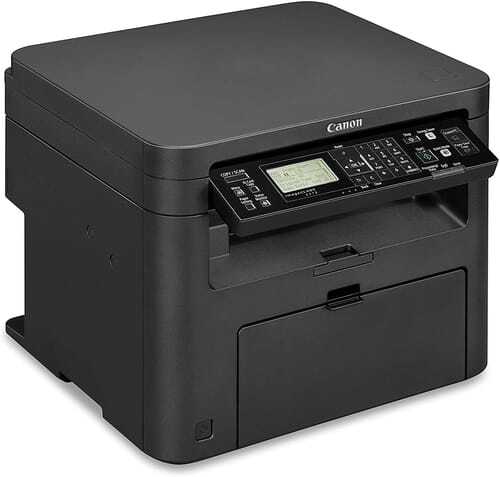
A 2016-era refresh of the desktop multifunction idea, the Canon imageCLASS D570 runs at 28 pages per minute with print, copy, scan and fax all aboard. Duplex printing is standard, and both Wi-Fi and Ethernet connect it — a thoroughly modern connectivity mix for its class. It takes the Canon 137 cartridge, rated for 2,400 pages, which it shares with the wider MF240 generation of Canon machines.
The D570's character is completeness at a desk scale: four functions, both connection types, two-sided printing, nothing held back for a higher tier. One caution travels with this model and is worth stating plainly — some of its configuration details in circulation are inferred from the MF240-series class rather than published line by line, so anything beyond the headline specification is best verified against your physical unit. The cartridge question, fortunately, is not among the uncertainties: it is the standard 137, full stop.
Toner Cartridges for ImageClass D570
| Cartridge | Color | Page Yield |
|---|---|---|
| Canon 137 for ImageClass D570 — Black | Black | 2,400 pages |
| Canon 137 Black 2 Pack | Black | 2,400 pages per cartridge |
| Canon 137 Toner Cartridge — Black | Black | 2,400 pages |
| Canon 137 Black 3 Pack | Black | 2,400 pages per cartridge |
| Canon 137 Black 5 Pack | Black | 2,400 pages per cartridge |
| Canon 137 Black 10 Pack | Black | 2,400 pages per cartridge |
Which cartridge should you buy?
Owners of the D570 share a supply shelf with a large extended family: the 137 is the standard cartridge across the MF240 generation, so any spare bought for this machine doubles as a spare for its relatives, and vice versa. The listing named for the D570 is the identical unit to the plain 137 — buy whichever label you find easier to reorder by. Desks printing lightly can stay with singles; shared machines do better on the 2-pack rotation, and offices standardizing on this Canon generation often hold the 5-pack as their common pool. No high-yield version exists in this family, so the 2,400-page rating is the constant in every calculation.
Chip, toner and everyday use
The cartridge's chip is what the D570 reads to accept the unit and report its level, so installation stays uneventful: open the cover, exchange the cartridges, close up and print. Rock a new cartridge gently side to side first — toner that has settled through shipping prints unevenly until it is leveled out. Keep spares sealed, flat and away from heat; a cartridge stored beside a sunny window ages before it ever prints. And hold the usual coverage math in mind: 2,400 pages assumes roughly 5% coverage, the density of ordinary correspondence, so form-heavy and graphics-heavy months will call for the next cartridge sooner.
Frequently Asked Questions
What toner does the Canon imageCLASS D570 use?
The Canon 137 black cartridge, rated for 2,400 pages. It is the standard unit for this whole Canon generation, and the D570-named listing on this page is the same cartridge.
What should I verify on my D570 before relying on its specification?
The headline facts — 28 pages per minute, four functions, duplex printing, Wi-Fi and Ethernet — are the model's published shape. Finer configuration details are in some sources inferred from the MF240-series class, so if a specific detail decides a purchase or a setup, confirm it on the unit itself. The toner fit needs no such caution: it is the 137.
Does the D570 connect by both Wi-Fi and cable?
Yes, both are fitted — wireless for flexible placement, Ethernet for a fixed network drop. Few machines in its class and era offer the pair, which is part of this model's appeal.
How many pages will one cartridge print in practice?
Plan around the 2,400-page rating, then adjust for your paper: text correspondence lands near it, dense forms and received faxes land below it. The machine's own toner gauge is the authority as the cartridge ages.
More printers that use the same cartridges
The D570 sits inside a broad cartridge family — the same 137 also keeps these Canon models printing: imageCLASS MF217, ImageClass MF249dw, ImageClass MF247dw, ImageClass MF244dw, ImageClass MF236n, ImageClass MF232w, ImageClass MF229dw, ImageClass MF229, ImageClass MF227DW, ImageClass MF227, ImageClass MF217W, ImageClass MF216N, ImageClass MF216, ImageClass MF212W, ImageClass MF212, ImageClass LBP151dw, ImageClass LBP151dw.