




ImageClass LBP151dw
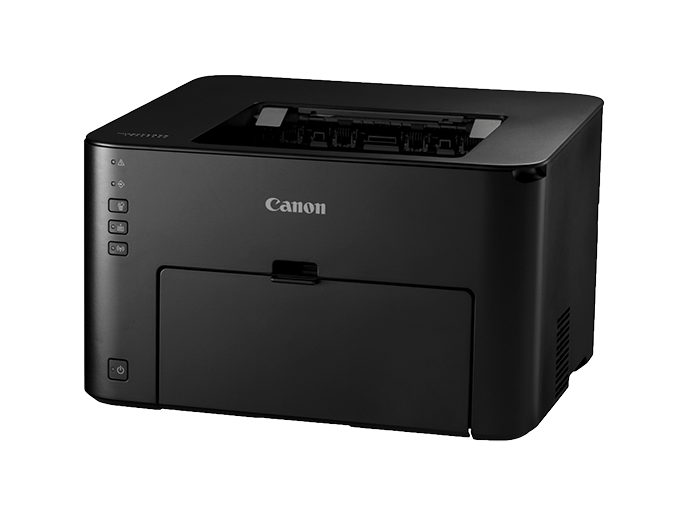
Print-only shops ask a simple question — how little machine can we buy that still prints fast, all day, without fuss? The Canon imageCLASS LBP151dw is Canon's answer: a single-function monochrome laser that runs at 28 pages per minute with automatic duplexing, connects by USB, Ethernet or Wi-Fi, and feeds from a 250-sheet cassette so the tray is not forever empty. There is no display to fuss over. It prints through the Canon 137 black toner cartridge, rated for about 2,400 pages.
A printer like this earns its keep in places where output is the whole job: a shipping counter turning out labels and packing slips, a back office producing invoices, a reception desk that scans nothing because nothing needs scanning. The generous cassette matters more in those settings than any scanner would — fewer refills, fewer interruptions mid-run — and the three connection options mean it can start life on a USB cable at one desk and move onto the office network later without being replaced.
Toner Cartridges for ImageClass LBP151dw
| Cartridge | Color | Page Yield |
|---|---|---|
| Canon 137 Toner Cartridge — Black | Black | 2,400 pages |
Which cartridge should you buy?
This family keeps the decision refreshingly narrow. The LBP151dw takes the standard Canon 137 and there is no high-yield sibling to compare it against, so the only real question is how many cartridges to keep within reach. The single cartridge listed above is the right buy for a light-duty desk. Busier print stations should look at the Canon 137 2-pack: at 28 pages per minute a packing-slip run gets through 2,400 pages faster than intuition suggests, and a spare in the drawer turns a toner-out stoppage into a two-minute swap. Every cartridge in the family carries the same 2,400-page rating, so cost per page improves with pack size rather than with a different cartridge.
Chip, toner and everyday use
The 137 cartridge is chipped, and the LBP151dw confirms it and tracks the remaining toner automatically once the cartridge clicks home. Rock a new cartridge gently side to side before fitting it so the toner settles evenly, and store spares flat, sealed and out of direct sunlight until the day they are needed. That 2,400-page figure is quoted at around 5% page coverage — fine for text documents, optimistic for dense forms — so heavy coverage shortens cartridge life in a way no brand of cartridge escapes. Finally, make two-sided printing your default on long documents: the automatic duplexing is built in, and it halves paper handling even though the toner math stays the same.
Frequently Asked Questions
Which toner cartridge does the imageCLASS LBP151dw take?
The Canon 137 black cartridge, rated for roughly 2,400 pages. It is the only cartridge this printer uses, and the listing above is the single-cartridge option for this page.
Can the LBP151dw scan or copy documents?
No — and that is deliberate. This is a print-only machine with no scanner, copier or fax hardware aboard, which is exactly why it stays compact and inexpensive to run.
How does the LBP151dw connect to our computers?
USB, Ethernet and Wi-Fi are all standard, so it can serve one workstation directly or join the office network for shared printing. There is no display panel; setup and status are handled through the computer instead.
Is the 2,400-page rating what we will actually see?
Treat it as the benchmark rather than a promise. It is measured at about 5% coverage, the density of an ordinary letter. Pages filled with forms, tables or graphics use more toner per sheet and bring the total down accordingly.
More printers that use the same cartridges
The same 137 cartridge powers a wide bench of Canon's compact lasers — keep one spare and it fits every machine on this list: ImageClass MF216N, ImageClass MF217W, ImageClass MF227, ImageClass MF227DW, ImageClass MF229, ImageClass MF229dw, ImageClass MF232w, ImageClass MF236n, ImageClass MF244dw, ImageClass MF247dw, ImageClass MF249dw, imageCLASS MF217, ImageClass D570, ImageClass LBP151dw, ImageClass MF212, ImageClass MF212W, ImageClass MF216.