




ImageClass MF212
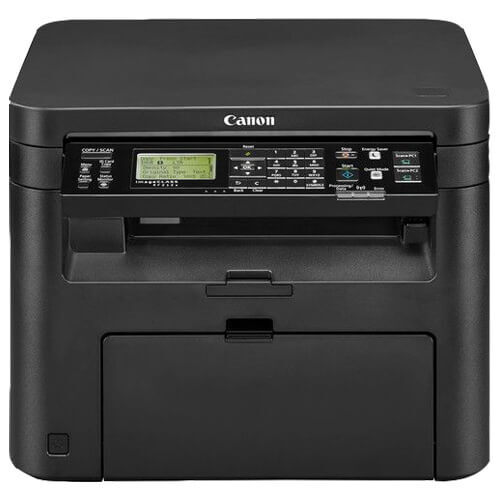
Three jobs, one small box: the Canon imageCLASS MF212 prints, copies and scans at up to 24 pages per minute, and deliberately leaves fax out of the formula. It is understood to be the USB-only member of the MF210 line — that connectivity detail is inferred from the family pattern rather than factory-confirmed, so treat it as approximate. What is not in doubt is the cartridge: the MF212 runs on the Canon 137, rated for 2,400 pages, and that single black cartridge feeds every print and copy the machine makes.
This is a personal-office machine in the truest sense: one person, one desk, one cable. It suits the home worker who scans signed pages, copies IDs and prints documents all day but has not sent a fax in years and does not want to pay for the board. Because it never joins a network, there is nothing to administer — and because the whole MF210/MF220 clan shares one cartridge, the buying decision stays just as simple as the setup.
Toner Cartridges for Canon imageCLASS MF212
| Cartridge | Color | Page Yield |
|---|---|---|
| Canon 137 Black | Black | 2,400 pages |
| Canon 137 Black 4 Pack | Black | 2,400 pages per cartridge |
| Canon 137 Black 5 Pack | Black | 2,400 pages per cartridge |
| Canon 137 Premium Black 5 Pack | Black | 2,400 pages per cartridge |
Which cartridge should you buy?
There is exactly one cartridge decision here, and it is about quantity rather than type. The standard Canon 137 is rated for 2,400 pages, which for a single user printing a few dozen pages a day works out to months between swaps — one cartridge at a time is plenty. If this little machine is secretly the hardest-working printer in the house, the 4-pack and 5-pack boxes bring the per-cartridge price down and park spares within arm's reach. The Premium 5-pack is the same cartridge count with the premium-grade build, for buyers who prefer it. There is no high-yield variant to hunt for and no drum to budget separately; when the shelf holds a spare 137, this printer is fully stocked.
Chip, toner and everyday use
Replacing the cartridge is a front-of-machine job: raise the cover assembly, grip the old cartridge and draw it out, then rock its replacement gently five or six times before removing the packing seal so the toner distributes evenly across the drum. Push it home until it stops, close everything, and the printer identifies the chip by itself. The 2,400-page figure presumes the standard test page at about 5% coverage; a day of full-page scans printed as copies will spend toner faster. If prints begin to streak late in a cartridge's life, a careful rock of the unit often evens the remaining toner out. Spares keep best sealed, flat and out of direct sun.
Frequently Asked Questions
What toner does the Canon imageCLASS MF212 use?
The Canon 137 cartridge, rated for 2,400 pages. Every listing on this page — single, 4-pack, 5-pack and Premium 5-pack — is that same cartridge in different quantities.
Does the MF212 send faxes?
No. The MF212 is a 3-in-1 — print, copy, scan — and fax is the feature this model skips. Sibling models in the list below add it, and the wireless ImageClass MF212W covers the same ground without fax as well.
Is the MF212 really USB-only?
That is the understood configuration, inferred from how Canon laid out the MF210 line rather than confirmed by a dedicated factory sheet. The cartridge fit, by contrast, is certain: this machine takes the Canon 137.
What warranty do the compatible cartridges carry?
A 1-year warranty and 1-year returns cover the compatible Canon 137 cartridges on this page.
More printers that use the same cartridges
The 137 cartridge is shared across the MF210/MF220 family and beyond: ImageClass D570, ImageClass LBP151dw, ImageClass LBP151dw, ImageClass MF212W, ImageClass MF216, ImageClass MF216N, ImageClass MF217W, ImageClass MF227, ImageClass MF227DW, ImageClass MF229, ImageClass MF229dw, ImageClass MF232w, ImageClass MF236n, ImageClass MF244dw, ImageClass MF247dw, ImageClass MF249dw, imageCLASS MF217.