Frequently Asked Questions
I inherited the office — and its C2632 — from someone else. How do I confirm this set matches the machine before I order?
Open the copier's front cover and read the labels on the cartridges already installed. A CopyCentre C2632 runs 006R01175 for black, 006R01176 for cyan, 006R01177 for magenta and 006R01178 for yellow — if those are the numbers staring back at you, this set is the same quartet and can go straight onto the shelf as the machine's reserve.
Does "Premium Quality" in the name mean these cartridges differ from the standard listing?
It does not. Both listings describe the same four cartridges at the same $321.67, with the same rated yields and the same warranty. The extra words belong to the listing title only; nothing about the contents, the fill or the terms changes between the two pages.
The machine needs black today but the colors look fine — must I fit the whole set?
Fit only the black 006R01175 and leave the other three sealed. The set does not have to enter service as a unit; each cartridge is a standalone spare. Most inherited machines are wildly uneven — blacks changed often, colors possibly untouched for a year — and the unopened colors will simply wait for their turn.
How long are the rated lives I should plan around?
Black is rated at approximately 26,000 pages; cyan, magenta and yellow at approximately 16,000 pages each, all at standard coverage. If the previous office manager left no records, treat the first set as your measuring stick: note the meter reading at each change and you will have this machine's real rhythm within one cycle.
What if a cartridge arrives damaged or the machine rejects the match?
Every set is backed by a 1-year warranty and 1-year free returns, set out on our shipping and returns page, and support is staffed Monday to Friday, 9 AM to 5 PM CST if you want to talk the match through first. Deliveries leave warehouses in IL, PA, GA and CA, and the remaining Xerox models are listed on the brand page.
Where should the spare set live in an office with no storeroom?
In its shipping box, flat, in a cupboard near the machine — dry powder toner asks nothing more exotic than a spot out of direct sun and away from heat. Mark the box with the model name, C2632, so a colleague months from now knows what the four cartridges belong to without having to ask.
Before fitting anything, how do we decide which positions actually need changing?
Read the copier's supplies levels position by position, and look at the output with them in mind. A level that is low but printing cleanly can wait; a higher level producing washed-out pages is the one to change. On a machine you have inherited, that pairing — what the panel reports and what the page shows — is the reliable guide, far better than assuming a set must be fitted whole or that a message on the screen is the whole story.
Is there a safe order for working through a set we have inherited the need for?
Fit one cartridge, prove it, then decide about the next. Start with the position the output indicts — usually black 006R01175 — run a few copies, and only open another seal if the page still shows a weakness that belongs to that color. This discipline protects the sealed spares: an unopened cyan 006R01176 or yellow 006R01178 keeps indefinitely, while a seal broken 'just in case' starts a cartridge's service before its turn and muddies your picture of the machine.
How can the boxes be labeled so a colleague can fit the right cartridge unaided?
Write the position on each box in plain words alongside its number — 'BLACK 006R01175', 'MAGENTA 006R01177' — and shelve them in that order. Months from now, whoever the copier stops for will not know what you know today; the labeled shelf tells them. It prevents the classic error of a cartridge forced toward the wrong position and makes a stranger to the machine capable of completing the change correctly in minutes.
What do we do with empties in an office with no supply cupboard culture?
Give them one home: the set's shipping carton beside the copier, with each spent cartridge dropped in as it comes out. Empties left on window sills and desk corners leak residue and vanish into general waste; a single carton keeps them contained and visible, and when it is full it goes out in one trip. It also shows at a glance how much of the set has been consumed — the stocktake performs itself.
About This Xerox CopyCentre C2632 Premium Quality 4 Color Set
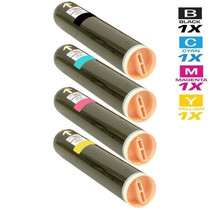
For whoever has taken over a CopyCentre C2632 and its supplies, this $321.67 set removes the guesswork: one each of 006R01175 black (approximately 26,000 pages), 006R01176 cyan, 006R01177 magenta and 006R01178 yellow (approximately 16,000 pages each), verifiable against the labels inside the machine in under a minute. The "Premium Quality" in the title adds no specification and subtracts none — the value here is a complete, checkable reserve for a machine whose history you may not know.
Offices running any of WorkCentre 7335, WorkCentre 7345, WorkCentre 7346, WorkCentre Pro C2128, WorkCentre Pro C2636, CopyCentre C2128, CopyCentre C2636, CopyCentre C3545 and WorkCentre 7328 can standardise on this single toner across all of them. The four cartridges in this set each have their own listing: the black 006R01175 cartridge, cyan (006R01176), the 006R01177 magenta cartridge and the yellow 006R01178 cartridge.







 See Compatible Printers
 Read more about our ink!