




WorkCentre Pro C2636
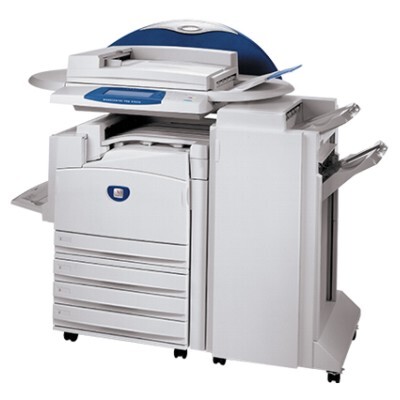
Offices that need color documents and serious black-and-white volume in the same machine are the audience for the Xerox WorkCentre Pro C2636, a color multifunction system. Its black supply is the 006R01175 cartridge, rated near 26,000 pages, and color pages come from three companions that sit beside it: 006R01176 cyan, 006R01177 magenta and 006R01178 yellow. Four cartridges, four independent replacement cycles.
The balancing act this machine performs is a supplies act as much as a printing one. The monochrome stream — letters, invoices, reports — burns through the black cartridge, while color work arrives in bursts and nibbles at the other three. Planning purchases around that split, black often and colors occasionally, keeps the machine fed without money sleeping in unopened color boxes.
Toner Cartridges for WorkCentre Pro C2636
| Cartridge | Color | Page Yield |
|---|---|---|
| 006R01175 | Black | 26,000 pages |
| 006R01176 | Cyan | See product page |
| 006R01177 | Magenta | See product page |
| 006R01178 | Yellow | See product page |
| 006R01175 / 006R01176 / 006R01177 / 006R01178 — 4 Color Set | All four colors | See product page |
| WorkCentre Pro C2636 — 4 Color Set | All four colors | See product page |
| WorkCentre Pro C2636 — Premium 4 Color Set | All four colors | See product page |
Which cartridge should you buy?
Treat black and colors as two separate shopping lists. The 006R01175 black single is the recurring purchase for this machine, and its roughly 26,000-page rating stretches the interval between orders. Colors are best bought one at a time as each gauge falls, since they rarely empty together. A 4 Color Set — standard, model-named, or the Premium Quality line — makes sense for a full refresh, a new installation, or as a shelf spare that guarantees no color outage can idle the machine.
Chip, toner and everyday use
When a color runs dry mid-job, swap only that cartridge and let the job continue; the machine tracks each supply separately. Fit replacements with the power on and the front access open, after a gentle side-to-side rock to settle the toner. Remember that the black rating assumes about 5% coverage, and that color graphics pages pull far more toner per sheet — a week of brochure work can move a color gauge further than a month of memos moves the black.
Frequently Asked Questions
What are the four cartridge codes for the Pro C2636?
006R01175 for black, 006R01176 for cyan, 006R01177 for magenta and 006R01178 for yellow. Each is sold singly on this page, and all four together in the set listings.
Does this machine share cartridges with the other Pro color models?
Yes. The WorkCentre Pro C2128 and the WorkCentre Pro C3545 run on the same four codes, so one stock of spares can serve any of the three.
How many pages does the black cartridge print?
Near 26,000 pages at the standard 5% coverage basis. Heavier coverage lowers the count; lighter text work can exceed it.
Should I keep a full set as a spare?
If the machine cannot afford downtime, yes — a shelf set covers any single-color surprise. If short pauses are acceptable, buying colors individually as they empty is the leaner routine.
More printers that use the same cartridges
The same four cartridges serve this wider family of color machines: CopyCentre C2128, CopyCentre C2632, CopyCentre C2636, CopyCentre C3545, WorkCentre 7245, WorkCentre 7328, WorkCentre 7335, WorkCentre 7345, WorkCentre 7346, WorkCentre C2128, WorkCentre C2636, WorkCentre C3545, WorkCentre Pro C2128, WorkCentre Pro C3545.