Frequently Asked Questions
What cartridges come in this set?
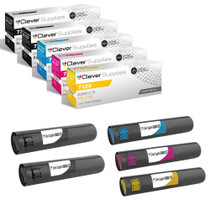
Four cartridges, one for each slot in the machine: black 006R01175, cyan 006R01176, magenta 006R01177 and yellow 006R01178. It is a complete four-color restock in a single box, built for the shared departmental copiers that take this cartridge family.
How far does each cartridge go?
The black 006R01175 is rated at up to 26,000 pages, while the cyan 006R01176, magenta 006R01177 and yellow 006R01178 are each rated at up to 16,000 pages. Ratings follow the standard 5% coverage measure, so a department printing dense color documents will cycle through the color cartridges sooner than one printing mostly text.
Our copier is shared by a whole department. Should all four go in together?
Only if all four are due. Each cartridge swaps independently, so a single empty color can be replaced on its own while the rest stay in service. On a heavily shared machine, though, the four levels tend to drift down together, and many offices fit a full set during one planned visit rather than making four separate trips to the copier room.
Which machines take this set?
The set serves the CopyCentre C2128, C2636 and C3545, the WorkCentre 7328, WorkCentre 7335, WorkCentre 7345 and 7346, plus the WorkCentre Pro C2128 and Pro C2636. Matching any one of the four part numbers on the cartridge you remove confirms the fit.
What protection does the purchase carry?
All four cartridges are backed by a 1-year warranty with 1-year free returns. The details live on our shipping & returns page, and our support team answers Monday through Friday, 9 AM to 5 PM CST.
How does delivery work for a set this size?
The complete set is $321.67 and ships as one box from the warehouse that gives you the shortest transit — we stock Illinois, Pennsylvania, Georgia and California. A single shipment means the department is not left waiting on a straggler cartridge while the other three sit installed.
How do I make sure each cartridge goes into the right bay?
Match the code to the color before you fit anything: black is 006R01175, cyan 006R01176, magenta 006R01177 and yellow 006R01178, and each bay in the machine belongs to one of them. Read the label on the cartridge against the bay it is headed for rather than relying on the cartridges looking different — a minute of checking prevents a wrong-color fitting.
Which cartridge in the set usually runs out first?
It depends on the work, but the ratings frame the answer: black 006R01175 carries up to 26,000 pages while each color is rated at 16,000, so a department printing a lot of color will cycle a color cartridge before the black. A mostly-text office reverses that. Watch the panel gauges and let them, not the calendar, call the order.
If I only fit two cartridges today, how should the other two be kept?
Leave them sealed in the set box, stored flat indoors near the machine — not in a distant storeroom where they can be separated from the copier they belong to. Kept that way they wait without deteriorating, and each one goes in as its bay actually empties instead of being opened early out of tidiness.
How can I tell which single color is running low?
Print the machine's test page and look at the solid patch for each color in turn. The patch that prints pale, streaked or broken names the cartridge that is finishing — cyan, magenta or yellow — while crisp black text on the same page rules out the 006R01175. That one check replaces guesswork before you open the set box.
About This Xerox WorkCentre 73xx 4 Color Set
This four-cartridge set keeps the CopyCentre and WorkCentre machines on the 006R01175 cartridge family supplied in one order: black 006R01175 (up to 26,000 pages) with cyan 006R01176, magenta 006R01177 and yellow 006R01178 (up to 16,000 pages each), priced at $321.67. It is the practical restock for offices whose 7328, 7335, 7345 or CopyCentre unit handles the department's daily copying and printing. If your fleet also includes other models, the full Xerox catalog covers their cartridges as well.







 See Compatible Printers
 Read more about our ink!