




ML-2450
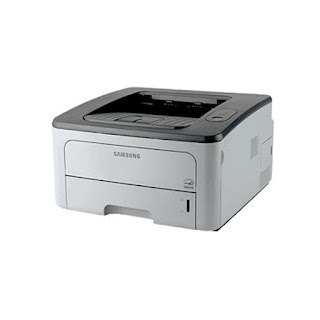
The Samsung ML-2450 served small offices in the mid-2000s: a compact single-function mono laser with enough pace for a handful of users sharing everyday documents. It prints with the standard ML-D2850A cartridge or the higher-yield ML-D2850B, and both compatible and genuine OEM cartridges for the ML-2450 are available here.
Two cartridges for one printer confuses people until they see the logic: the machine is identical either way, and the choice is simply how often someone walks over to change the toner. A small office that prints steadily feels every swap — the job pauses, the cartridge hunt begins. That is why so many of these machines ended up standardized on the high-yield unit, and why this page's shelf leans the same way.
Toner Cartridges for ML-2450
| Cartridge | Color | Page Yield |
|---|---|---|
| ML-D2850B High Yield Toner Cartridge | Black | See product page |
| Samsung ML-2450 High Yield Toner Cartridge | Black | See product page |
| ML-D2850B High Yield Toner Cartridge 3 Pack | Black | See product page |
| Samsung ML-2450 High Yield Toner Cartridge 5 Pack | Black | See product page |
| ML-D2850B Premium Quality High Yield Toner Cartridge 5 Pack | Black | See product page |
Which cartridge should you buy?
Start with the question of volume. If the ML-2450 prints lightly — a home office, a few documents a day — the standard ML-D2850A keeps the upfront cost down. For shared office duty, the ML-D2850B high-yield is the better habit: it lasts longer between changes, so the cost per page falls and the low-toner interruptions come less often. The multipacks on this page are all the high-yield unit in quantity; a 3 Pack or 5 Pack makes sense when the printer cannot afford downtime and nobody wants toner duty on their chore list. Switching between the two codes needs no configuration — the printer accepts both and tracks them the same way.
Chip, toner and everyday use
Each cartridge's chip handles level reporting, so the printer warns ahead of an empty rather than failing mid-document. Install with the seal fully removed and the cartridge seated until it settles into place. Yield figures assume light text coverage, the standard estimating basis, so a department printing dense reports will see fewer pages than one printing memos. Keep one spare on the shelf: these are mature machines, and the cheapest insurance against a stalled workday is a cartridge already in the building, stored sealed and upright in a cool, dry cabinet.
Frequently Asked Questions
Why do two different cartridges both fit the ML-2450?
They are two capacities of the same design. The ML-D2850A is the standard-fill unit; the ML-D2850B carries more toner for heavier use. The only difference you will notice is how long each lasts before the low-toner warning appears — fitting, handling and print quality are the same.
Do I need to change any setting when I move from the A cartridge to the B?
None at all. The printer accepts both codes without configuration and tracks the level the same way. Many offices made the switch permanent once they compared how often each one needed replacing.
Does this printer take a separate drum as well?
This page's shelf is toner only, and toner is the consumable you replace in the normal run of things. You change the single cartridge and keep printing — there is no set of colors to rotate on a mono machine like this.
Which models share these cartridges?
The 2850 family below — including the ML-2851ND — runs on the same A and B cartridges, so a spare bought for this machine covers its siblings too.
More printers that use the same cartridges
The ML-D2850A and ML-D2850B pair serves the whole 2850 line:
ML-2850, ML-2850D, ML-2850DR, ML-2850ND, ML-2851, ML-2851ND, ML-2851NDL, ML-2851NDR, Samsung-MLD2850B